EasyManua.ls Logo

Digisol DG-BG4300NU - User Manual

Digisol DG-BG4300NU
139 pages
Print Icon
To Next Page IconTo Next Page
Loading...
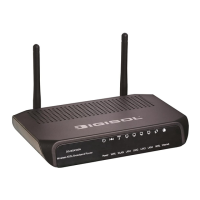
DG-BG4300NU
300Mbps Wireless ADSL2/2+
Broadband Router with USB port
User Manual
V2.0
2014-01-15
As our products undergo continuous development the specifications are subject to change without prior notice

Other manuals for Digisol DG-BG4300NU

Questions and Answers

  • E
    Edward HawkinsSep 10, 2025
    What to do if I can't access the internet on my Digisol Network Router even when the ADSL indicator is on?
    • J
      Jessica CarterSep 10, 2025
      If the ADSL indicator is lit but you still can't access the internet, double-check that you've correctly entered your VPI, VCI, username, and password in the router's settings.
  • J
    Jason GutierrezSep 12, 2025
    Why is there no proper LAN connection indication on my Digisol Network Router?
    • V
      valerie02Sep 12, 2025
      A missing LAN connection indication may be due to several factors. First, check the connection between your device and the PC, hub, or switch. Verify the operational status of the computer, hub, or switch. Inspect the cables linking the device to other devices. Try using a cross-over cable to connect directly to a computer or a straight-through cable for connections to a hub or switch.
  • S
    stephanie70Sep 14, 2025
    How to fix Digisol Network Router when I cannot access the web page?
    • K
      kaitlynsmithSep 14, 2025
      If you're unable to access the web page, first, go to Start > Run on your desktop. Then, in the DOS window, enter 'Ping 192.168.1.1' to test the connection (192.168.1.1 is the default IP address). Also, check the type of network cable you are using, verify the connection between the device and your computer, and ensure that the TCP/IP properties of your computer's network card are correctly configured.
  • A
    Ashley CastilloSep 15, 2025
    What to do if the ADSL indicator is not on Digisol Network Router?
    • B
      Brian LarsonSep 15, 2025
      If the ADSL indicator isn't lit, check the connection between the ADSL interface on your device and the corresponding socket.
  • C
    Christopher PhillipsSep 18, 2025
    What to do if all the indicators are off on my Digisol Network Router?
    • C
      Charles CurrySep 18, 2025
      If all indicators are off, start by checking the connection between the power adapter and the power socket. Also, ensure that the power switch is turned on.
  • K
    Kimberly RichardsonNov 23, 2025
    What to do if I can't access my Digisol Wireless Router through the web page?
    • R
      Robert GarciaNov 23, 2025
      If you're unable to access your Digisol Wireless Router's web page, consider the following: 1. Check the power cord and network cable connections to ensure they are correctly and firmly inserted. 2. If all the LEDs on the router are off, check the A/C power adapter to ensure it's correctly powered. 3. Ensure your computer uses the same IP address subnet as the router. 4. If you are using MAC or IP address filtering, try connecting with another computer. If that doesn't work, restore the router to factory default settings by pressing the reset button for over 10 seconds. 5. Set your computer to obtain an IP address automatically (DHCP) to see if it gets an IP address. 6. If this issue occurred after a firmware upgrade, contact your dealer for assistance. 7. Clear your Internet brows...

Summary

Product Information

Safety Precautions

General safety instructions for using the router and its accessories.

System Requirements

Recommended hardware and software for using the router.

Package Contents

List of items included in the router package.

LEDs and Interfaces

Description of the router's indicator lights (LEDs) and physical ports.

Hardware Installation

Software Installation

Web Configuration

Access the Router

Steps to log in to the router's web-based configuration interface.

Wizard Setup

Step-by-step guide for fast and accurate internet connection setup.

Status Overview

Displays current status, device info, LAN, WLAN, WAN, and statistics.

Network Settings

Configuration for LAN, WAN, and WLAN interfaces.

Service Configuration

Settings for DNS, Firewall, UPnP, IGMP Proxy, TR-069, and ACL.

Advanced Settings

Configuration for Routing, NAT, Port Mapping, IP QoS, SNMP, USB Storage, Others.

Administration

Device management including Commit/Reboot, Update, Log, Password, and Time.

Diagnostic Tools

Tools for network diagnostics like Ping, Traceroute, and ADSL tests.

Appendix

Technical Specifications

Detailed technical specifications of the router hardware and features.

Troubleshooting Guide

Guides users through common problems and their solutions.

Glossary

Definitions of technical terms used in the manual.

Digisol DG-BG4300NU Specifications

General IconGeneral
Wireless StandardsIEEE 802.11b/g/n
Frequency Band2.4 GHz
Wireless SpeedUp to 300 Mbps
FirewallSPI Firewall
Ports4 x 10/100 Mbps LAN ports, 1 x 10/100 Mbps WAN port
SecurityWEP, WPA, WPA2
Operating ModesRouter, WISP
Antenna2 x 5 dBi external antennas

Related product manuals