C
HAPTER
21
| General Security Settings
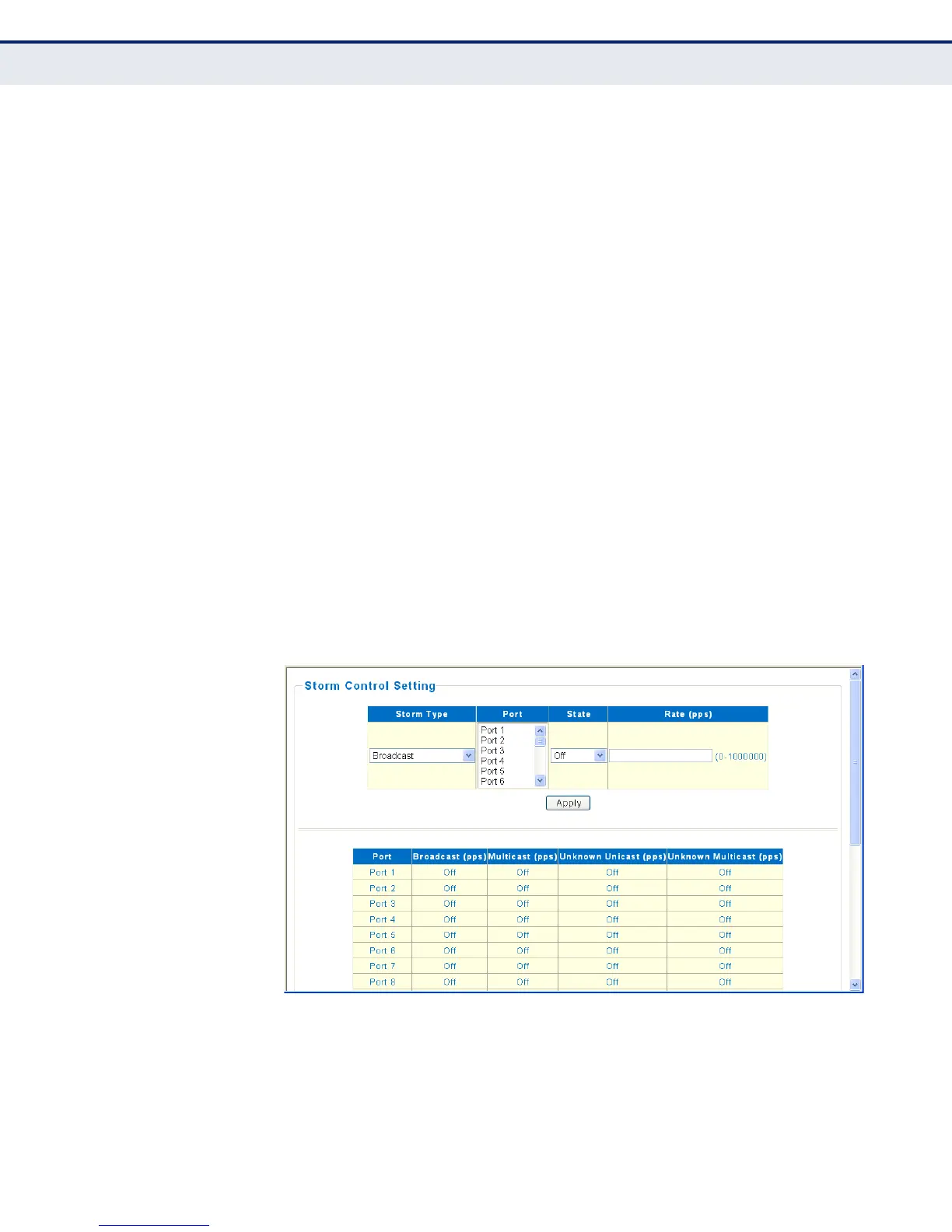
Storm Control Setting
– 115 –
PARAMETERS
The following parameters are displayed on the Storm Control page:
◆ Storm Type — Selects the storm control type. (Broadcast, Multicast,
Unknown Unicast, Unknown Multicast)
◆ Port — Selects port and trunk interfaces. (Port Range: 1-26)
◆ State — Enables or disables storm control. (Default: Off)
◆ Rate — Threshold as packets per second (pps). (Range: 0-1000000)
WEB INTERFACE
To configure Storm Control settings:
1. Click Security, Storm Control.
2. Select the Storm Control type.
3. Select one or more ports to configure.
4. Set the State to “On” and set the threshold rate.
5. Click Apply.
Figure 43: Storm Control Settings




 To Next Page