DG-PS1010U User Manual
20
4 (Optional) In the Subnet Mask option, type the Subnet Mask your LAN or network
segment is currently configured to use.
5 (Optional) In the Gateway field, type the IP address of gateway.
6 When done, click OK button. The program will save the above settings into the print server.
7 The network settings are now complete.
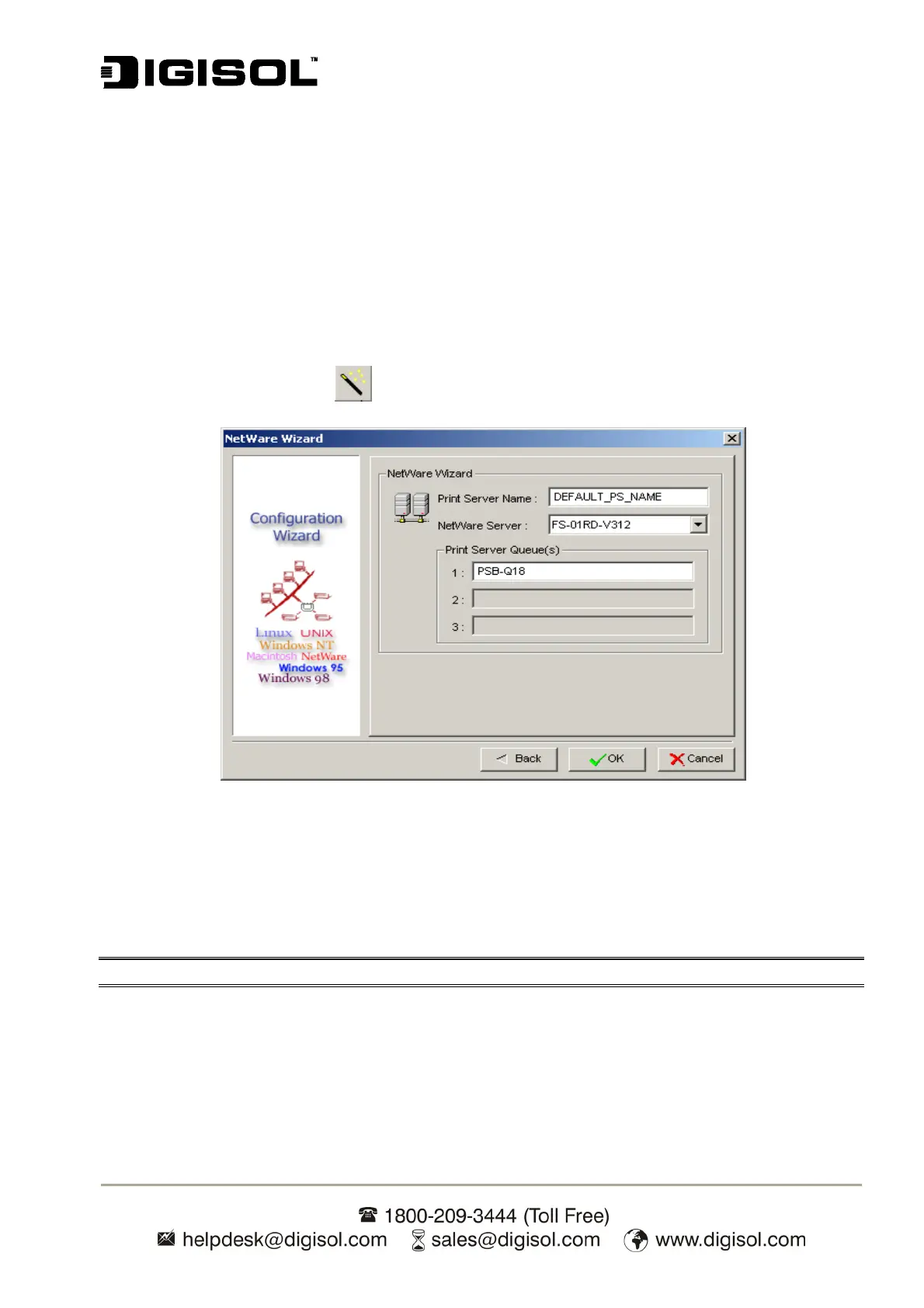
NetWare Wizard
1. Log into your NetWare file server as a Supervisor (Admin) or equivalent.
2. Click Wizard button <
> and select NetWare Wizard.
Fig 16
3. Select the NetWare File Server to which the print server device will be attached.
4. Type in a Print server Name.
5. Type in a Print Server Queue(s) Name.
Note: Each print queue corresponds to each print port of the print server.
6. Click OK.
7. The settings are now complete.
8. From your NetWare client computer, such as Windows 95/98/Me, create a printer that is
connected (redirected) to one of the NetWare print queues serviced by the print server.


 To Next Page