D4204-EN Scale Link 2 Technical Manual 23
General ISOBUS/ CAN settings
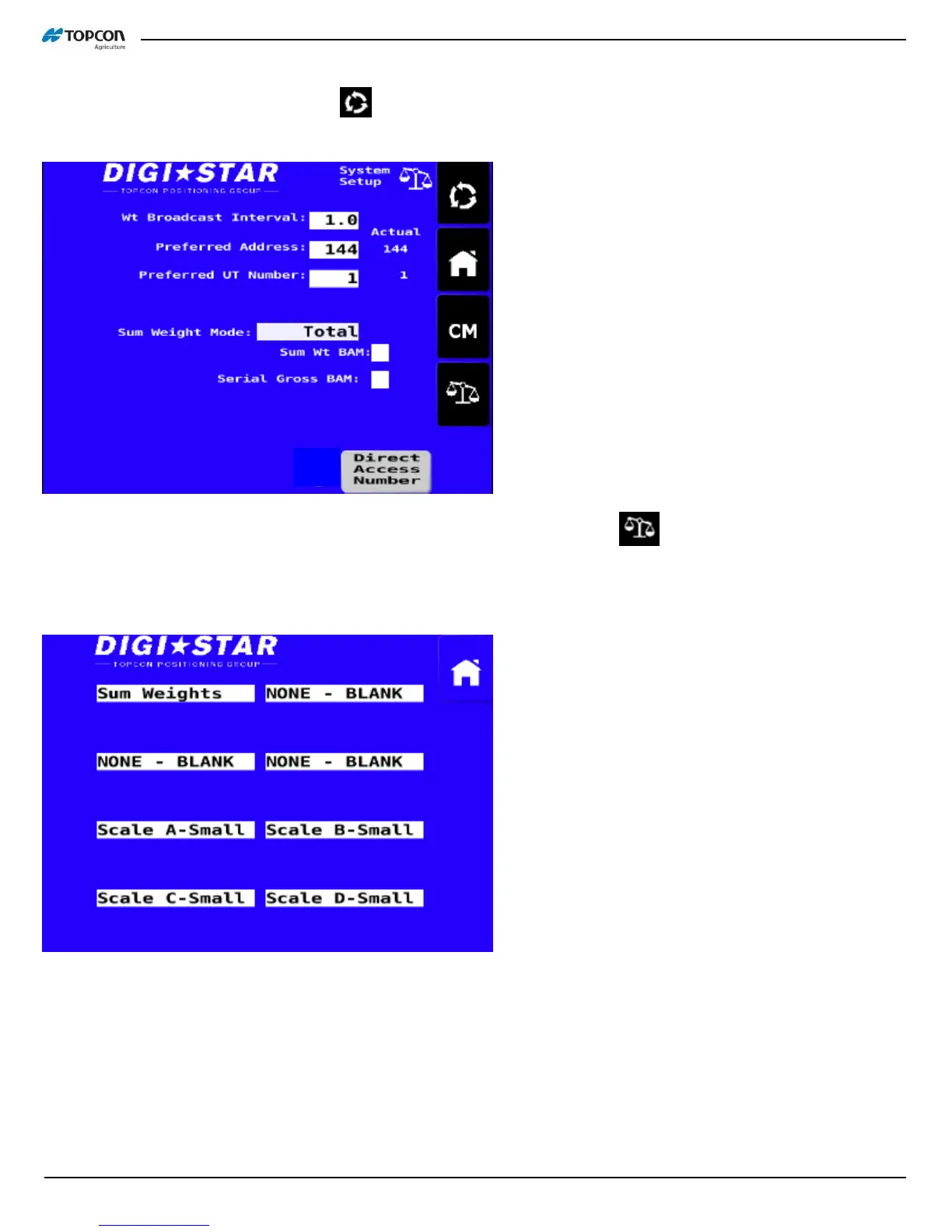
On UT, touch spinning arrow button 2x . This brings up the ‘System Setup’ screen. Broadcast Interval, address,
and UT number to display on are set here. Refer to D4196 for more details.
The main screen layout can be accessed here too. Touch the scale symbol , which will bring up a screen of 8
configuration boxes for the 4 possible scales. If you are using only 3 scales, this is where you would change your
unused scale to ‘NONE-BLANK’ in the matching configuration window. Many screen configuration options are
available here to fit most user needs and most UT screens.
*Legacy mode versus standard mode. Some existing equipment requires use of the original Scale Link DDIs. SL2
is default at standard but can be changed to legacy values. DAN 2704 ON = Standard, OFF = Legacy.
*For non-ISO, CAN only applications, the mask can be deactivated. Once you turn this off, the SL2 will no longer
work with a UT. A SLC2810 will then be required to change any functions. DAN 8745.
*For non-ISO, CAN only applications, the CAN message type and CAN interval time can be adjusted for proprietary
applications. DAN 2711 & 2712.
*DAN 5111 selects the active CAN port on the SL2.



 To Next Page