DSF22 UNIQUE MONITORING TERMINAL
8
INSTALLATION AND SETUP GUIDE
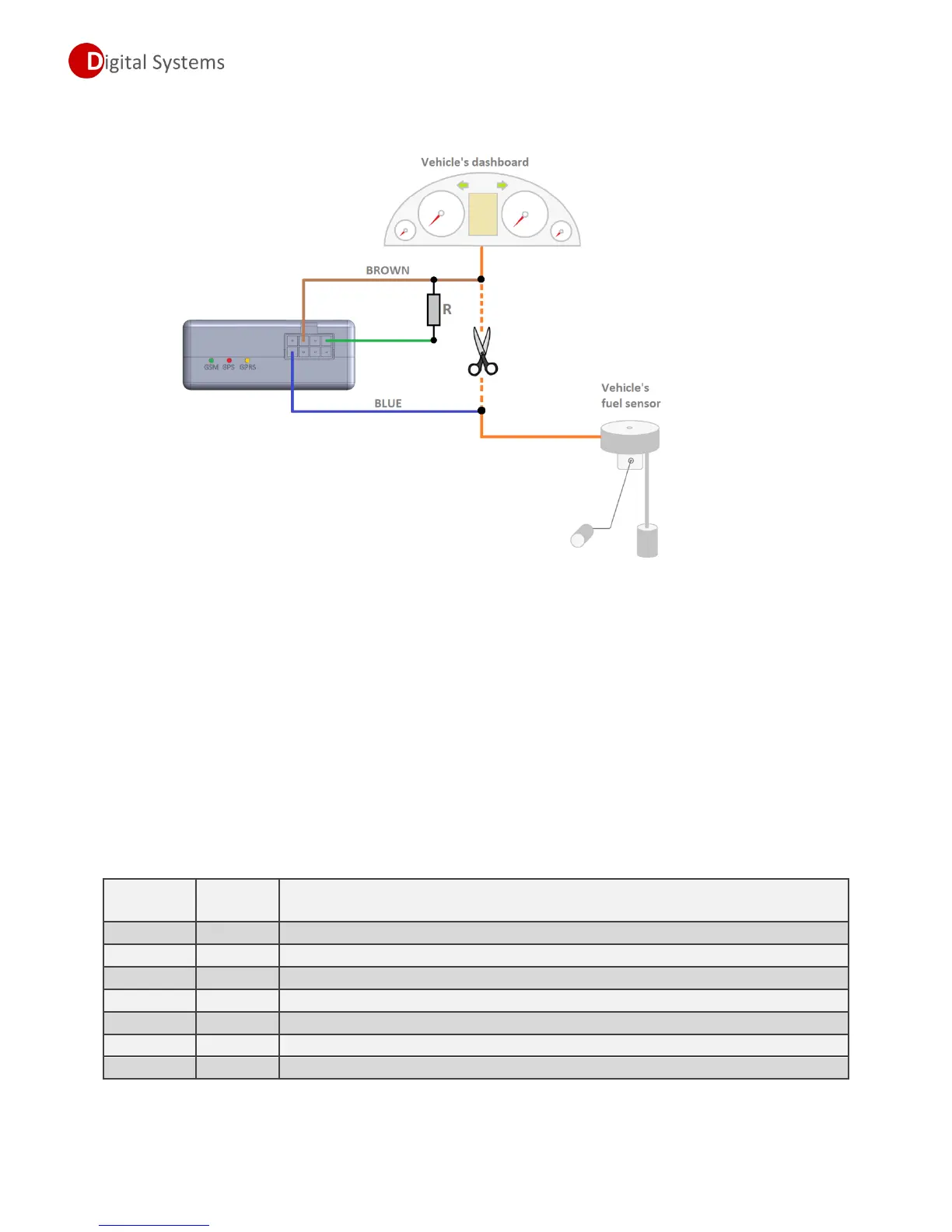
Correct connection diagram for fuel sensor imitation shown in the picture below.
After connecting additional resistor, installer must activate fuel sensor imitation mode in terminal,
following these steps:
1. Configure universal Digital pin to work as Digital output mode by setting P35 to 1
2. Enable “Fuel sensor imitation mode” by setting P33 to1
Note!!!
In case if universal digital pin is configured as digital output (P35 = 1), then this pin cannot be used
as digital input at the same time.
Settings related to standard fuel sensor usage.
Enable specialized input for reading a vehicle’s standard fuel sensor
Fuel measurement frequency (we recommend to leave default value)
Enable/Disable Fuel sensor imitation mode
Universal digital pin work mode (output or input)
Enable/Disable fuel data processing (filtering)
Fuel data processing depth (used only if P50=1)
Fuel measurement conditions (see description later in this document)


 To Next Page