104
Customize the Guide and Channel Lists
Chapter 11
Changing the Guide Display
The receiver comes set to display the Program Guide with video in the upper right corner.
However, you can change the way the Program Guide displays on your TV screen.
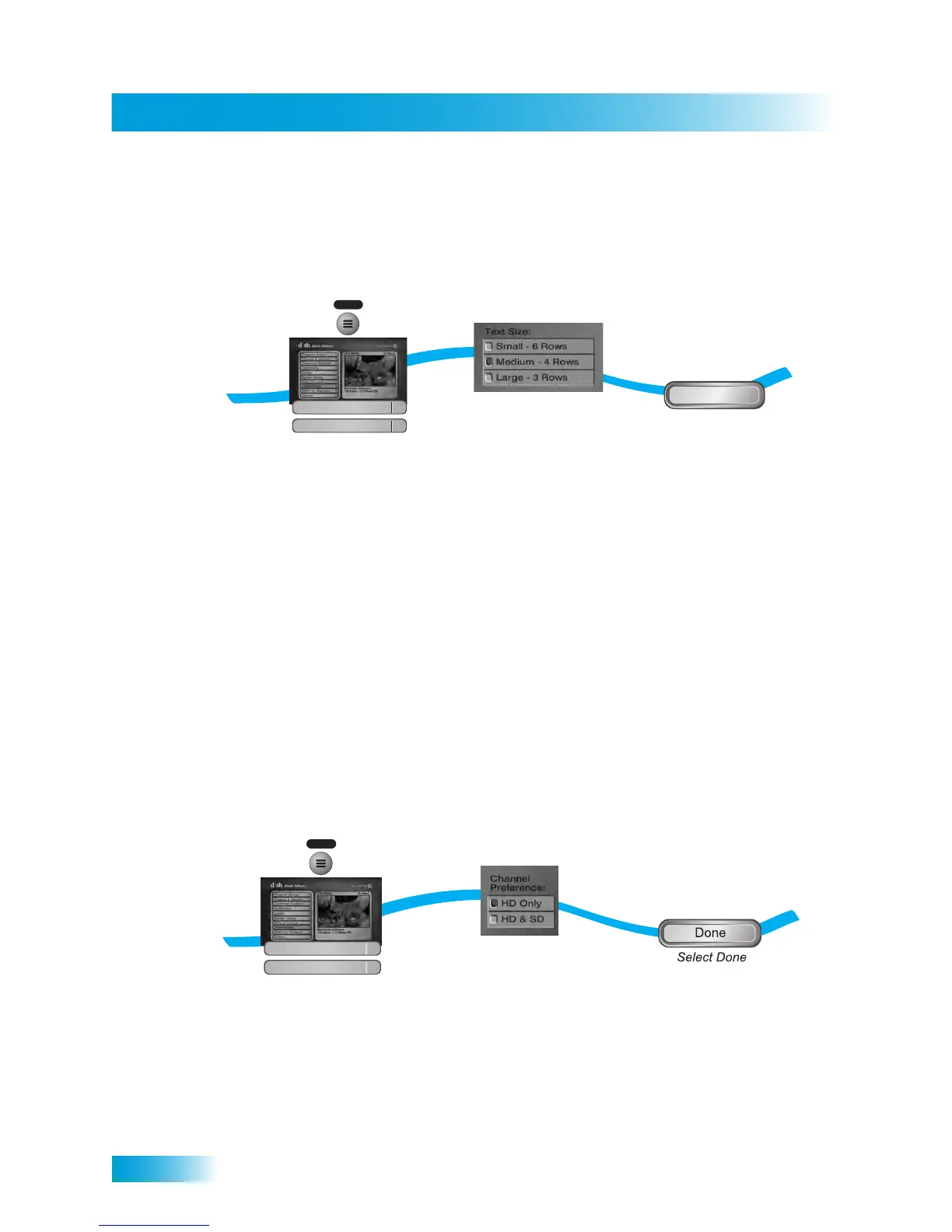
1 Press MENU and select Preferences, and then select Guide Format.
2 Select one of the following Guide Format options:
• Small—This option is the default option. The Program Guide displays video in the
upper right corner and six rows of channels per page.
• Medium—Choose this option if you would like larger text on your Program Guide. The
Guide displays video in the upper right corner and four rows of channels per page.
• Large—Choose this option i if you would like to see video in the upper right corner
and three rows of channels per page.
3 Select Done.
Channel Display Preferences
The Channel Preference option on the Guide Format menu allows you to customize how
your HD and SD channels display in the Program Guide.
1 Press the MENU button, select Preferences, and then Guide Format.
2 Choose a preference for channel display in the Program Guide and the other channel lists
under Guide Format:
2
3
Select from the
guide display options
Select Done
Done
1
Press MENU and select
Preferences, then Guide Format
MENU
Preferences
Guide Format
1
8
3
1
MENU
Preferences
Guide Format
1
8
Press MENU and select
Preferences, then Guide Format
Select from the
Channel Preferences in the
guide display options
2


 To Next Page