6
Watching TV Now
Chapter 1
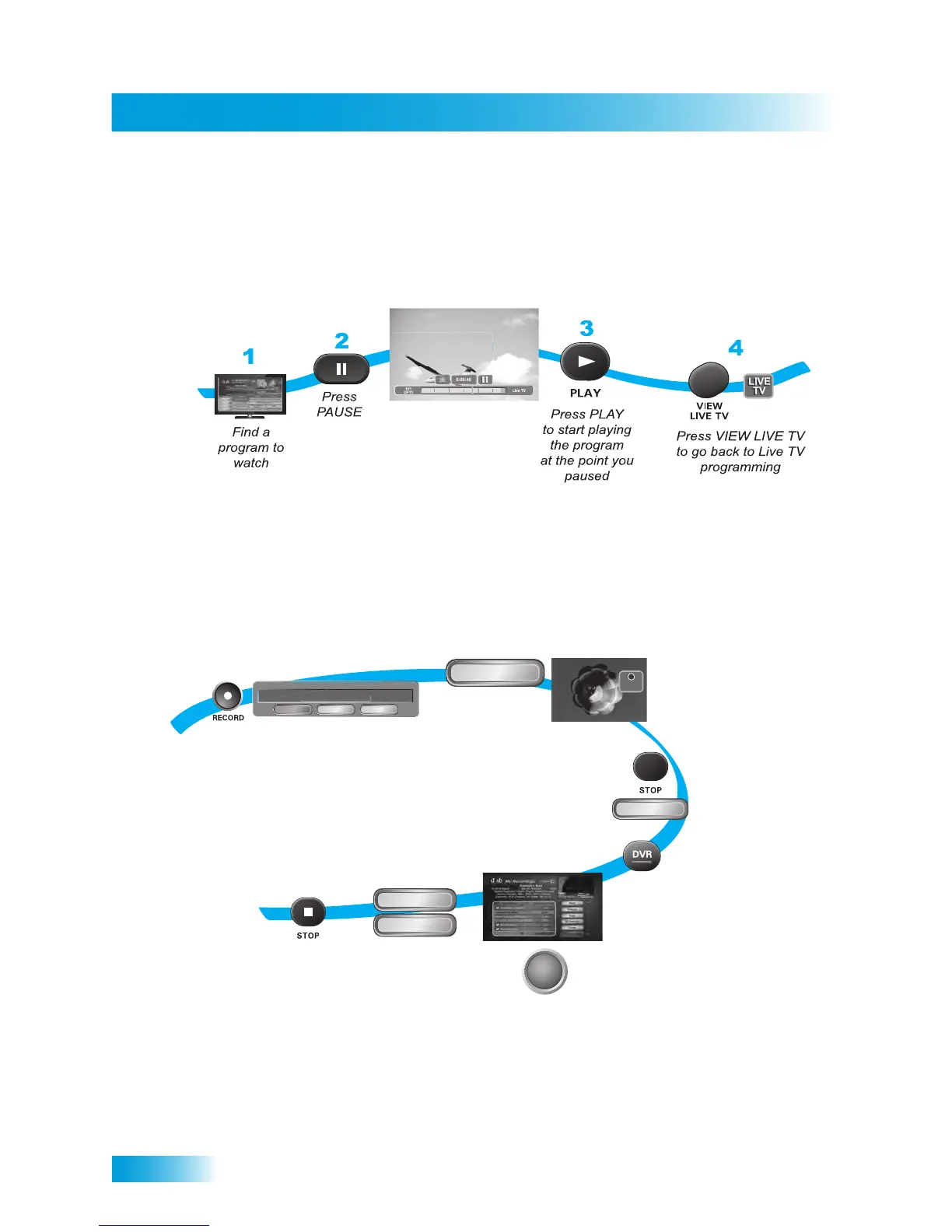
Pausing Live TV
Here’s something you can’t do with regular old TV: pause live TV because someone’s at
the door or calling you on the phone, or there’s something else you have to do right now.
For more about the pause feature of your receiver, see Pausing a Program on page 56.
Recording and Playing Back a Program
Take this tour to learn how to make basic recordings of your favorite shows. For more
about the DVR features of your receiver, see Chapter 8: Digital Video Recording starting
on page 55.
1
2
5
6
7-8
4
3
Start
Start Over
Select Start or
Start Over
(the recorded
program will
begin playback)
Press STOP
to stop playback
of the recorded
program
After a few minutes,
press STOP and selec
Yes to stop recording
While watching
a program,
press RECORD
Select OK
to record
the remainder
of the program
Select the
program you
recorded
To begin watching
your recorded
program,
press DVR twice
OK
Yes
SELECT
REC
REC
tion
Cancel
300 HBO-E, End Time: 8:00
"
li
hanger
Record Remainder of This Event:



 To Next Page