Connections and Setup
117
Connecting to the Remote TVs (TV1 or TV2)
14 For some TVs, you must run an internal channel scan so that the TVs will find and display
the selected channel from the receiver. Run the channel scan on all applicable remote
TVs, if available. See your TV user’s guide for instructions.
15 Confirm that you see a picture from the receiver on your remote TVs.
• If your picture looks good, then you can go to step 23.
• If your TVs do not have a picture or if it is not as clear as you would like it to be, go on
to the next step.
16 You may need to change the cable connection on the splitter that sends the TV signal
throughout your house. The change that needs to be made is to reconnect the cable
coming from the receiver HOME DISTRIBUTION from the output of the splitter to the input of
the splitter using the following instructions.
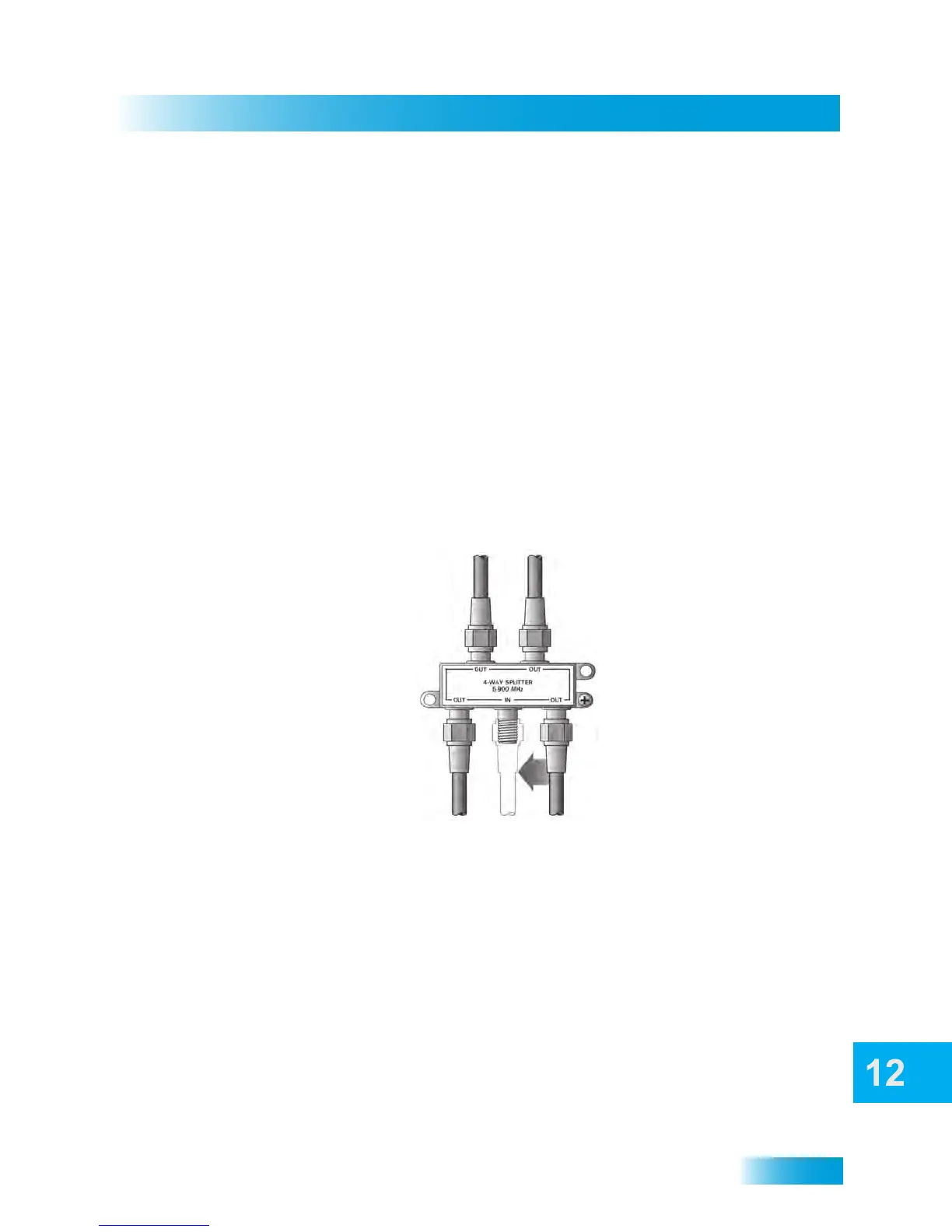
The figure below shows an example of what your splitter may look like. Your splitter may
also look different than this. The places where the splitter indicates OUT refers to all TVs
connected to your cabling system. The places where the splitter indicates IN refers to
where the satellite TV signal is fed into the splitter.
17 Find where the TV signal is distributed throughout your house. It should be near where the
cable TV service enters the house.
18 Disconnect the cable TV service cable or the antenna cable from the splitter input, if
necessary. Make sure the disconnected cable is capped or otherwise protected from the
weather.
19 Disconnect the cable coming from the receiver HOME DISTRIBUTION port from the splitter. If
you are not sure which cable this is, then go to the next step. Otherwise, go on to step 21.
20 If you have multiple TVs on the cabling system, do the following to determine which cable
on the splitter is coming from your receiver:
1 Input, 4 Output (4-Way) Splitter


 To Next Page