Connections and Setup
121
Connecting the Phone Line
Phone Connection Recommendations for VoIP
If you have a VoIP (Voice over Internet Protocol) phone service, the following tips may
help improve the chances of the satellite receiver successfully connecting to DISH using
the VoIP phone service.
Note: Not all VoIP services will function with the receiver.
• Manually set the VoIP equipment for the proper bandwidth, to the highest bandwidth
possible, using the VoIP equipment’s instructions.
• Use other settings or connections suitable for modems or fax machines.
• For Vonage VoIP customers only, using the phone prefix *99 in the phone systems
setup can allow the VoIP connection to switch to its highest possible bandwidth.
Follow the steps in Phone System Setup, below, to enter a phone prefix.
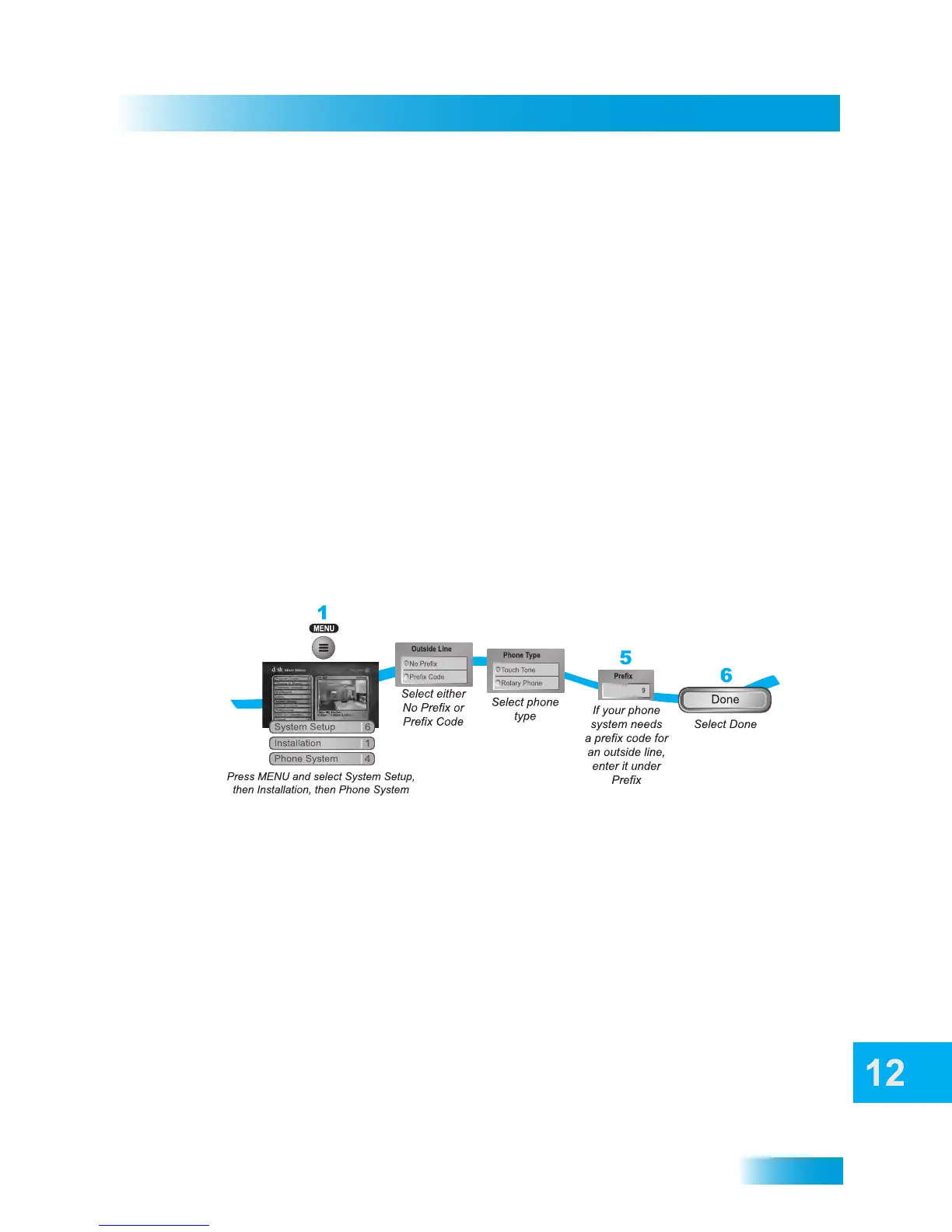
Phone System Setup
You must set up the receiver for your telephone system (touch-tone or rotary-phone
dialing), and set a telephone prefix, if you need a prefix to dial an outside call.
Note: A prefix is different than an area code, which is required for all 10-digit dialing.
1 Press MENU button, select System Setup, Installation, and then Phone System.
2 Select either the No Prefix or the Prefix Code option in the Outside Line Prefix list.
Note: Usually, you need a telephone number prefix only for business phone installations.
For most residential installations, all you need to do is set the telephone system type. The
default setting of No Prefix will allow correct dialing. If this is the case, select the Save
option to save the above setting, and stop here. If you know that you need to set a prefix,
then instead of selecting the Done option, go on to step 5.
3 If you selected No Prefix, then select Done.
4 Select the Touch Tone or the Rotary Phone option in the Phone Type list.
5 If you selected Prefix Code, the receiver highlights the box where you must enter the
exact sequence used when dialing via an outside line.
6 Select Done.
2-3
4



 To Next Page