EasyManua.ls Logo

Dish Network Dish ViP722K - Page 29

Dish Network Dish ViP722K
171 pages
Print Icon
To Next Page IconTo Next Page
To Previous Page IconTo Previous Page
Loading...
Satellite Receiver
19
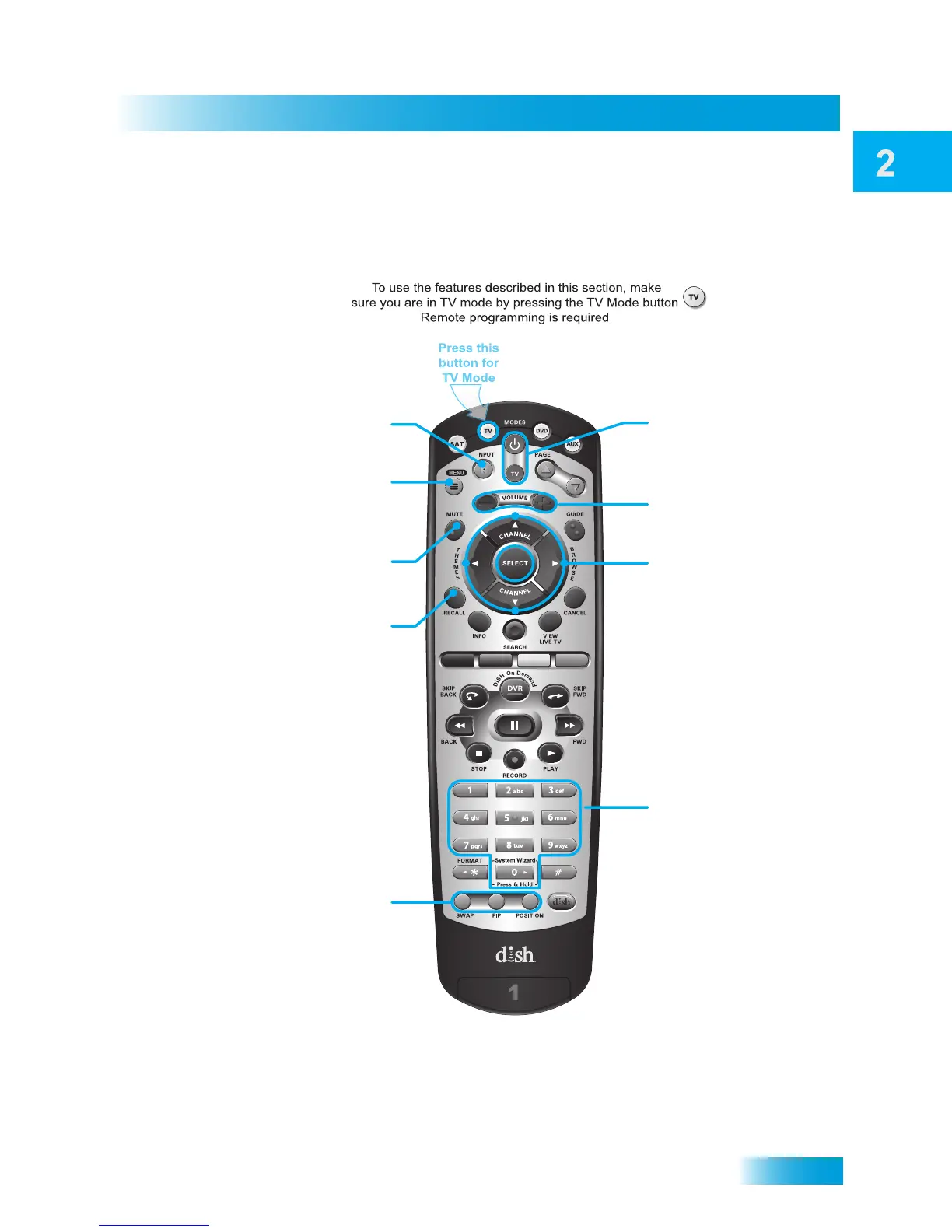
Remote Control
Volume
Control TV volume
TV Power
top and bottom button
Turn TV on/off
Arrows/Select Buttons
Channel up/down on TV,
navigate TV menus/modes
and select desired TV option
Number Buttons
Enter a desired channel
number on TV
TV Menu
Access menu features
available on some TVs
Recall
Go back to last channel viewed
(or input, depending on your TV)
TV/Video
Switch between TV inputs
Picture-In-Picture
(PIP) Buttons
Watch two separate
programs at once
on TVs that support this
Mute
Turn TV volume on or off
Note: Remote operation is different on DISH TVs.
See your DISH TV User’s Guide for proper operation.
TV Mode

Table of Contents

Related product manuals