18
IP2395EN
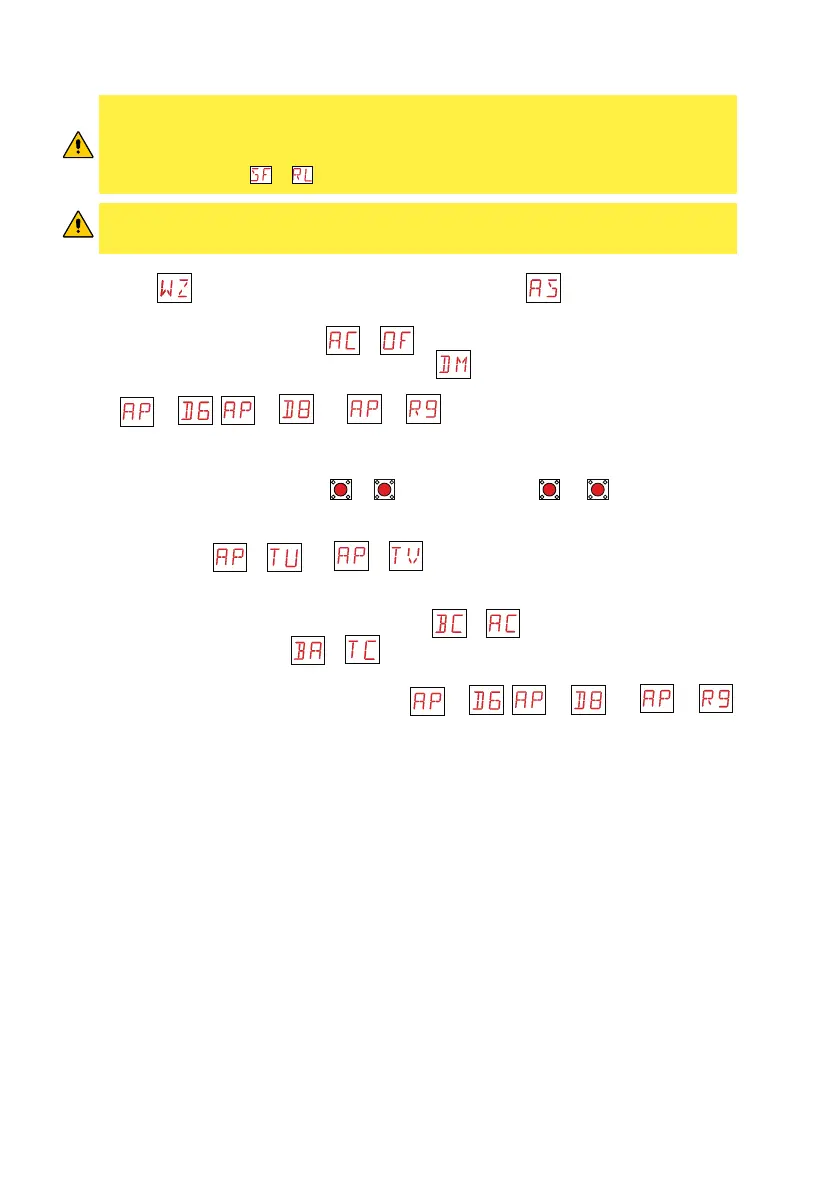
1. Turn on the power
2. Activate the configuration wizard menu.
Select the parameter value of 01 for operating
without slow-down, or 04 to activate deceleration during opening and closing. Deactivate auto-
matic closing by setting parameter
to
. Select the specific installation. Make sure the
opening direction parameter is correct (parameter )
.
3. Make a jumper for the safety contacts 1-6, 1-8 and 1-9. If not deactivated via the menu param-
eters → , → and → .
4. The limit switches must be set so that they intervene near the mechanical opening and closing
stop. To set the limit switches, see paragraph 7.3.
5. Perform a complete opening (keys
ENTER
+
UP
) and closing (keys
ENTER
+
DOWN
) cycle and check
that the automation performs the corresponding operation and stops when each limit switch
is activated (self-learning).
6. Adjust parameters
→ and → to regulate the extra operating time after ac-
tivation of the limit switches during opening and closing in order to precisely define the desired
final position. Several attempts may be required.
7. Activate automatic closing if necessary (parameter → ) and adjust the desired delayed
automatic closing (parameter → ).
8. Connect the safety devices after removing the jumpers 1-6, 1-8 and 1-9, or reactivating the cor-
responding inputs using the menu parameters
→ , → and → .
Make sure the various safety devices are operating correctly.
ATTENTION: if the control panel is used to replace an identical control panel which is
faulty, the last automation configuration can be reset by inserting the old control panel
storage module into the new control panel and loading the last set configuration using
the menu sequence → .
ATTENTION
: before using the automation, make sure that the operating forces of the gate
wings comply with the EN 12453:2017 standard and subsequent revisions.
9.2 Product start-up




 To Next Page