revision: 1
FlexxPump 125 B
User Manual
34
EN-
SCHMIERSYSTEME
DIRECT LUBRICATION SYSTEMS
D L S
6.3.7 RUN-Menu
The RUN-Menu is used for manual activation of the FlexxPump 125 B. A special
donation from FlexxPump 125 B can be triggered in this way. This function can, for
example, be used for the advantageous "Quick Check" to manually check the condition
of the lubrication point.
FlexxPump 125 B carries out a special donation after triggering the RUN function.
During the stroke, the back pressure detected by the integrated microelectronics is
displayed in the LCD as an approximate value in bar.
There is no fault or error at FlexxPump 125 B.
Remove the activation and programming key from the bottom of FlexxPump 125 B
and place it on the action area.
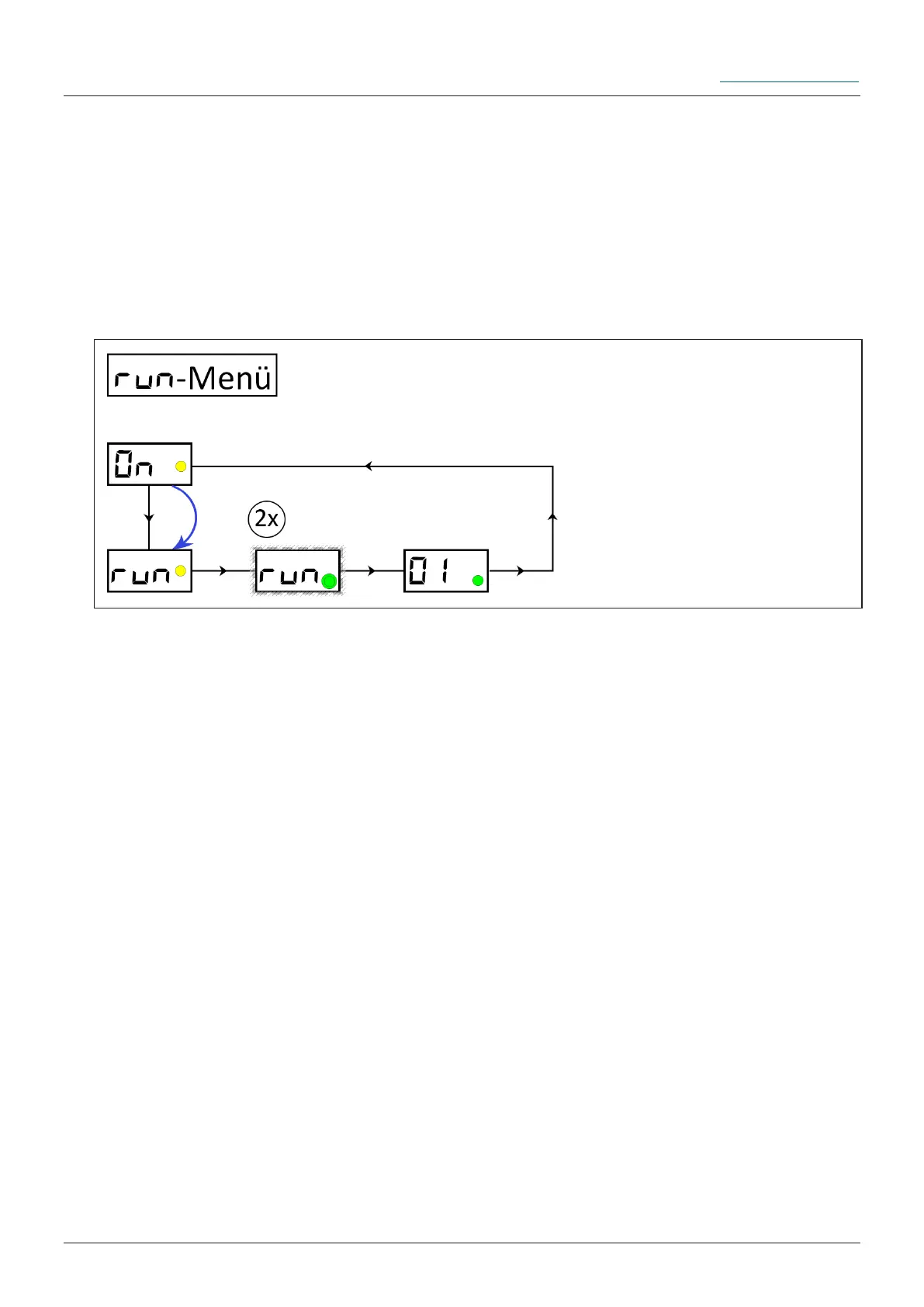
Hold the activation and programming key on the action surface. The yellow LED
lights up. Leave the activation and programming key on the action area until RUN is
displayed in the LCD. Remove the activation and programming key from the action
area as long as RUN is displayed in the LCD. The yellow LED disappears.
Ü The LCD ashes together with the green LED twice. The FlexxPump 125 B starts to
pump the lubricant to the outlet (special donation or "Quick-Check").
Insert the activation and programming key into the hole provided on the underside of
the FlexxPump 125 B or repeat the special dispenser ("Quick-Check") if necessary.
Observe the back pressure values displayed on the LCD if they are of interest to
you.
During the dispensing process, the green LED lights up; in addition, the
counterpressure for the stroke is displayed in the LCD.
The RUN-Menu can only be reached from the ON mode (FlexxPump 125 B switched
on). When you have entered the RUN-Menu, you will return to the ON mode.


 To Next Page