MC402 System settings
53
12 System settings
12.1 Setting the equalizer (EQ)
You are able to adjust the EQ mode and parameters such as, for example, base
(bas)/mid (mid)/treble (tre).
➤ Press on the display or the SEL button on the remote control to set the
equalizer or fader/balance.
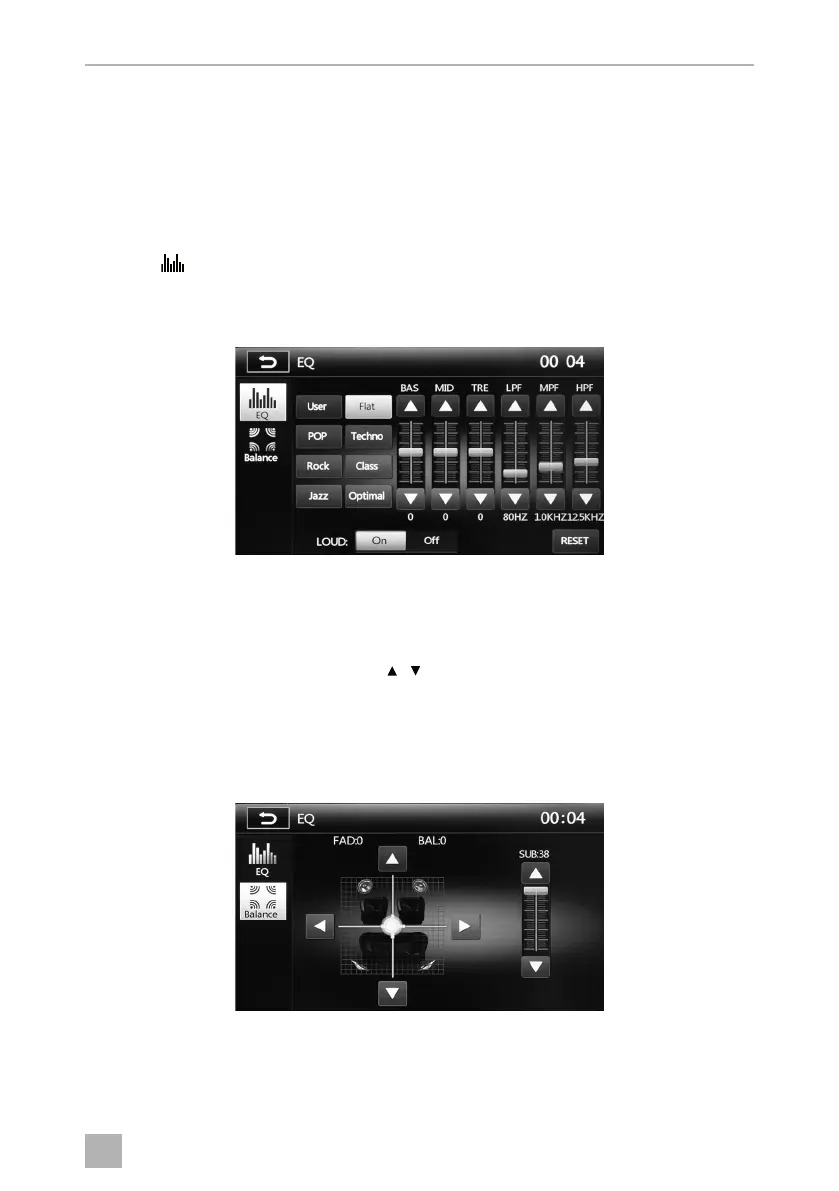
➤ Press EQ to set the equaliser.
➤ Select the EQ mode from (User, Flat, Pop, Techno, Rock, Class, Jazz, Optimal).
The EQ settings can be user defined in the EQ mode “User”. RESET allows you to
reset the user defined settings.
➤ Set the controls using the buttons .
You can set the parameters for BAS, MID and TRE at levels of –7 to 7. Further settings
are possible for the parameter LPF Low Pass Filter (60 Hz, 80 Hz, 100 Hz, 200 Hz),
MPF Middle Pass Filter (0.5 kHz, 1 kHz, 1.5 kHz, 2.5 kHz) and HPF High Pass Filter
(10 kHz, 12.5 kHz, 15 kHz, 17.5 kHz).
➤ Press BALANCE on the display to set the fader/balance.
You can set the parameters for the subwoofer on a scale of 0–38, and individually set
the loudspeaker at levels of 0 – 7.
MC402-IO-EN.book Seite 53 Montag, 21. November 2016 6:14 18



 To Next Page