4302-067-G-2-21
2
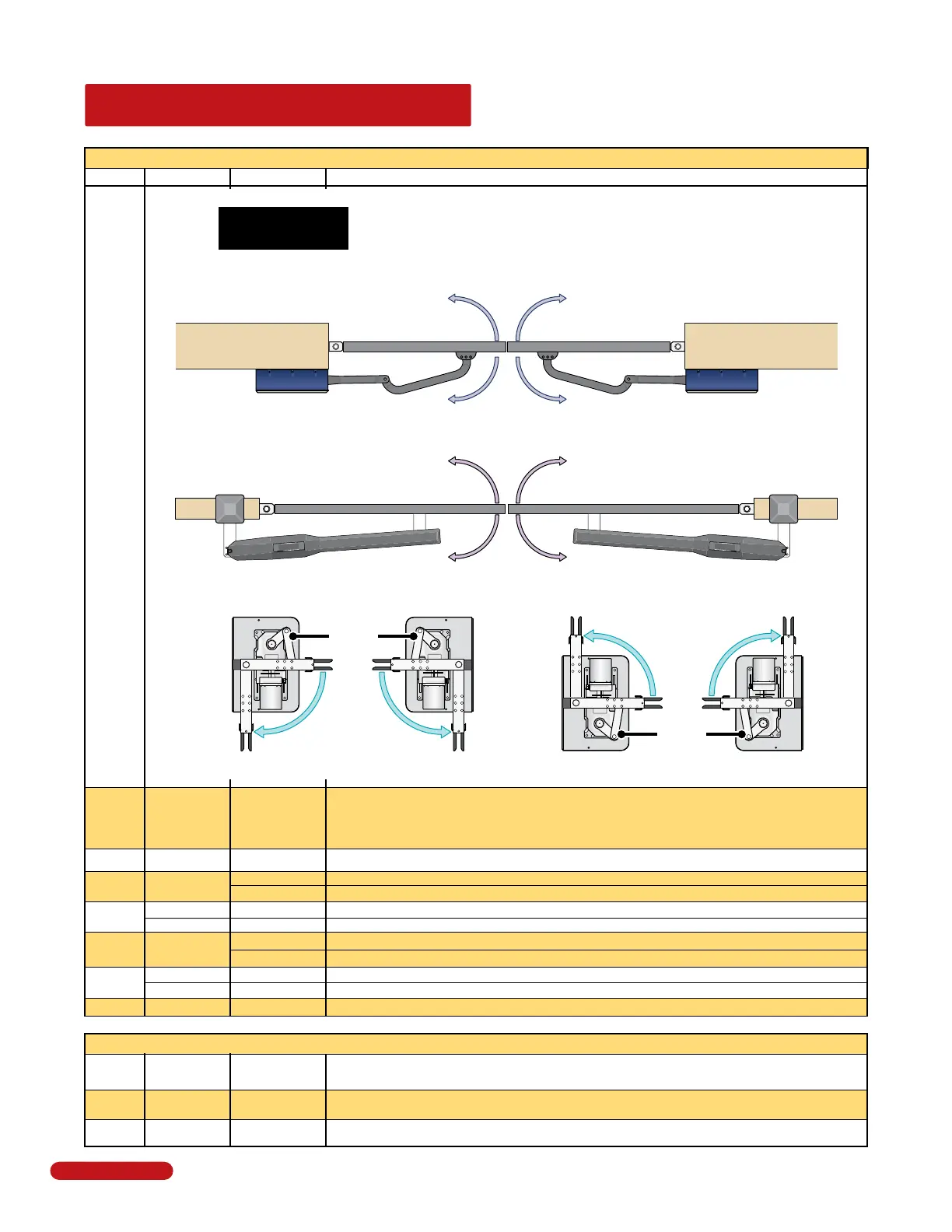
QUICK GUIDE: DIP-Switches
See page 22 for more info about DIP-switches.
Switch Function Setting Description
1
Opening
Direction of
SECONDARY
Operator
2
SW 1 - Top 8 Switches
Same opening directions as illustrated above for the primary operator type.
• Switch 2 will be the SAME setting as switch 1 for the 6006.
• Switch 2 will be the OPPOSITE setting as switch 1 for the 6004 and 6400.
Note: SW1, switch 7 MUST also be ON when using a secondary operator.
Opening Direction of
PRIMARY Operator
The operator MUST OPEN GATE upon initial power up and OPEN command.
If the operator closes gate after giving open command, shut off power and
reverse this switch setting otherwise operator will NOT function correctly.
Whenever any programming or switch setting on the control board is changed, press the reset button for new settings to take effect.
SW 2 - Bottom 4 Switches
1-OFF 2-ON
Circuit board relay activates when gate is NOT closed.
Spare
Leave in the OFF position.
OFF
Leave in the OFF position.OFF
Relay
Operation
1 and 2
3
4
Not Used
OFF (normal)
ON
OFF
ON
Reverse
Not Used
Overlapping
Gates
5
6
Terminal #8 is a standard Reverse input.
On setting is NOT used.
Both operators start at the same time.
Secondary operator opens 1-2 seconds before primary operator. Vice-versa when closing.
OFF
ON
Single
Dual
Switch must be OFF for single operator.
Switch must be ON when (dual) operators are used.
Input Power Switch MUST be in the OFF position.OFF
8
7
OFF
ON
Auto-Close
Timer
4
Auto-close timer is OFF. Manual input required to close gate.
Auto-close timer is ON. Adjustable from 1-23 seconds.
OFF
3
Leave in the OFF position.
Not Used
Left-Side Right-Side
6004 ONLY
Opens Inside
Opens Outside
ON setting OFF setting
OFF setting ON setting
6400
ONLY
Same Drive Motor
Orientation
Open
Open Open
Open
Closed
Closed
Same Drive Motor
Orientation
Opens as Shown
Opens as Shown
ON setting
OFF setting ON setting
OFF setting
6006 ONLY
Pull to Open
Push to Open
OFF setting
ON setting
OFF setting
ON setting
Quick Guide - 1



 To Next Page