4302-067-G-2-21
30
1 2 3 4 5 6 7 8 9 101112131415 16171819 20
ON
OFF
PUSH TO OPERATE
technician use only
Solar NEG
Solar POS
24 V POS
24 V NEG
Relay COM
Relay N.O.
Full Open
Not Used
Not Used
B
FULL
OPEN
OB
CB
Close
Beam
Open
Beam
GND
GND
SW1
1
ON
2
1476-010
US
e
3.6 Shutdown Conditions Continued
Hard Shutdown (Alarm Activated)
Shutting OFF Alarm
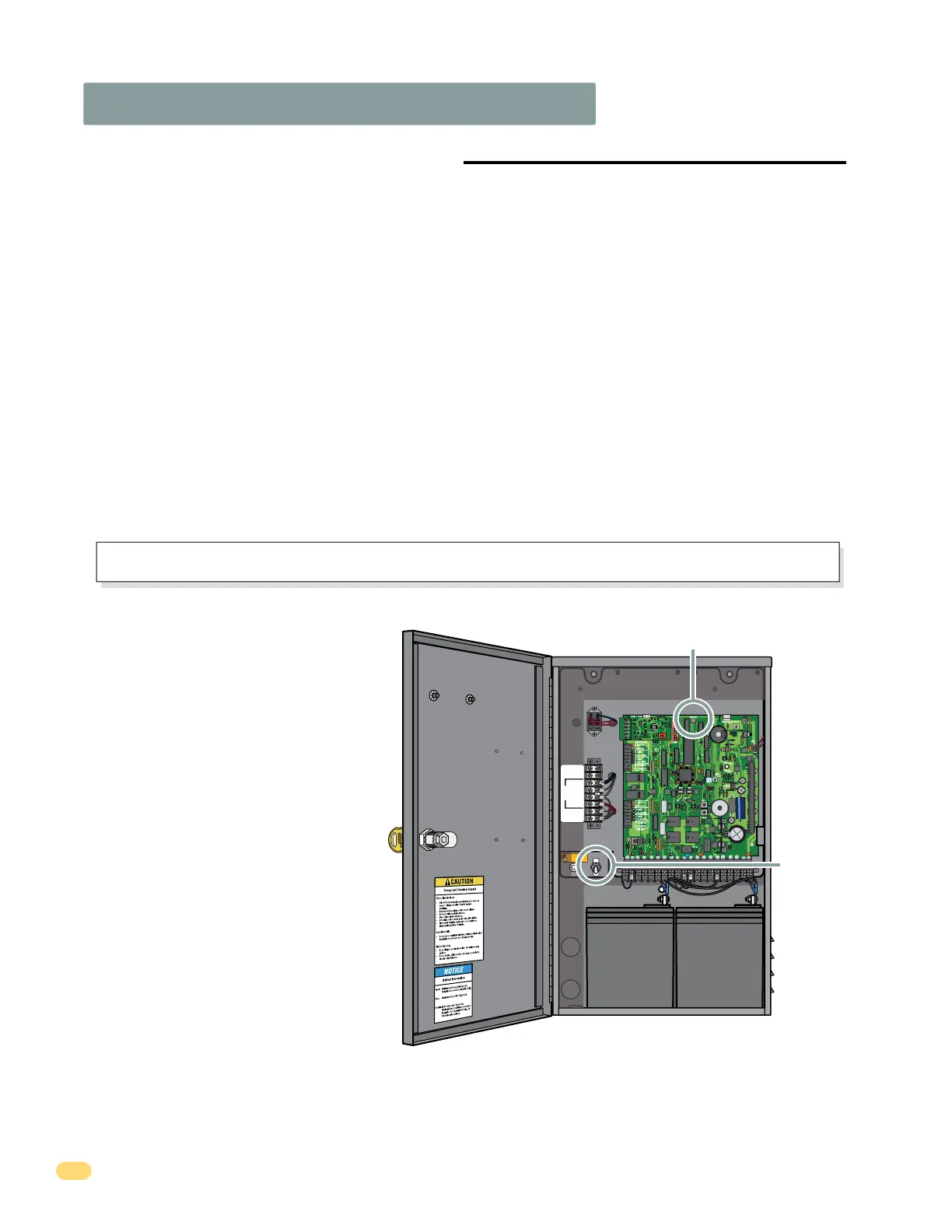
DoorKing operators have a built-in alarm
reset push button on the circuit board.
Activating this button will return the gate
operator to normal operation, but will not
activate the gate operator. Also, power can
be shut-off to the gate operator to reset it.
When the operator is in a hard shutdown,
the system WILL NOT shut down power to
the circuit board (idle time) until the reset
button has been activated regardless of
the length of time it takes to accomplish
this.
Once the gate has been reset, an open or close command is needed to start the gate operator. Most activating commands
will cause the gate operator to cycle to the open position. This includes activation of a key switch or open command and
activation of the automatic exit loop (If used). Activation of a close command will run the gate to the closed position.
Resetting a Hard Shutdown
Reset Button
Power Switch
A hard shutdown condition occurs when: (1.) The inherent entrapment protection system (Type A) gets activated TWO
consecutive times before the gate completes the open or close cycle. (2.) The reversing edge (Type B2) gets activated and
reverses but before the gate completes the reverse cycle the inherent entrapment protection system (Type A) gets activated.
• Example of a Hard Shutdown - The gate is closing and the inherent entrapment protection system senses
an obstruction and causes the gate to reverse direction. As the gate begins to run in the open direction, a
second obstruction is sensed prior to the gate reaching the full open position. Once the second obstruction
has been sensed, the operator will stop, the audio alarm will sound and all standard inputs are shut
down (including open commands, safety commands, loop inputs, etc.).
– To silence the alarm, press the reset button or after 5 minutes, the audio alarm will shut off but will
“chirp” every 5 seconds. This indicates that the operator is in a hard shutdown condition (The reset
button must be pressed OR turn power off to reset the operator and stop the alarm “chirping”).
The operator is in a hard shutdown condition when the audio alarm is sounding OR “chirping” every 5 seconds.
• Before resetting a hard shutdown, determine why the shutdown occurred. Inspect the gate for any
obstructions along its path that could have activated the inherent entrapment sensing system. Inspect
the gate and gate hardware. If the gate is malfunctioning, DO NOT put it back into service until the
problem can be corrected.
The audio alarm will sound for five minutes if the operator is not reset. After (5) five minutes the alarm will “chirp every 5 sec.”
and the hard shutdown condition will remain in affect until the reset button is pushed OR power is shut-off to operator.
FULL
OPEN
4302-018



 To Next Page