VigorIPPBX 3510 Series User’s Guide
152
Maximum Sessions Defines the available session number for each host in the
specific range of IP addresses. If you do not set the session
number in this field, the system will use the default session
limit for the specific limitation you set for each index.
Add Adds the specific session limitation onto the list above.
Edit Allows you to edit the settings for the selected limitation.
Delete Remove the selected settings existing on the limitation list.
Index (1-15) in Schedule
Setup
You can type in four sets of time schedule for your request.
All the schedules can be set previously in Application –
Schedule web page and you can use the number that you
have set in that web page.
5
5
.
.
7
7
.
.
2
2
B
B
a
a
n
n
d
d
w
w
i
i
d
d
t
t
h
h
L
L
i
i
m
m
i
i
t
t
The downstream or upstream from FTP, HTTP or some P2P applications will occupy large
of bandwidth and affect the applications for other programs. Please use Limit Bandwidth to
make the bandwidth usage more efficient.
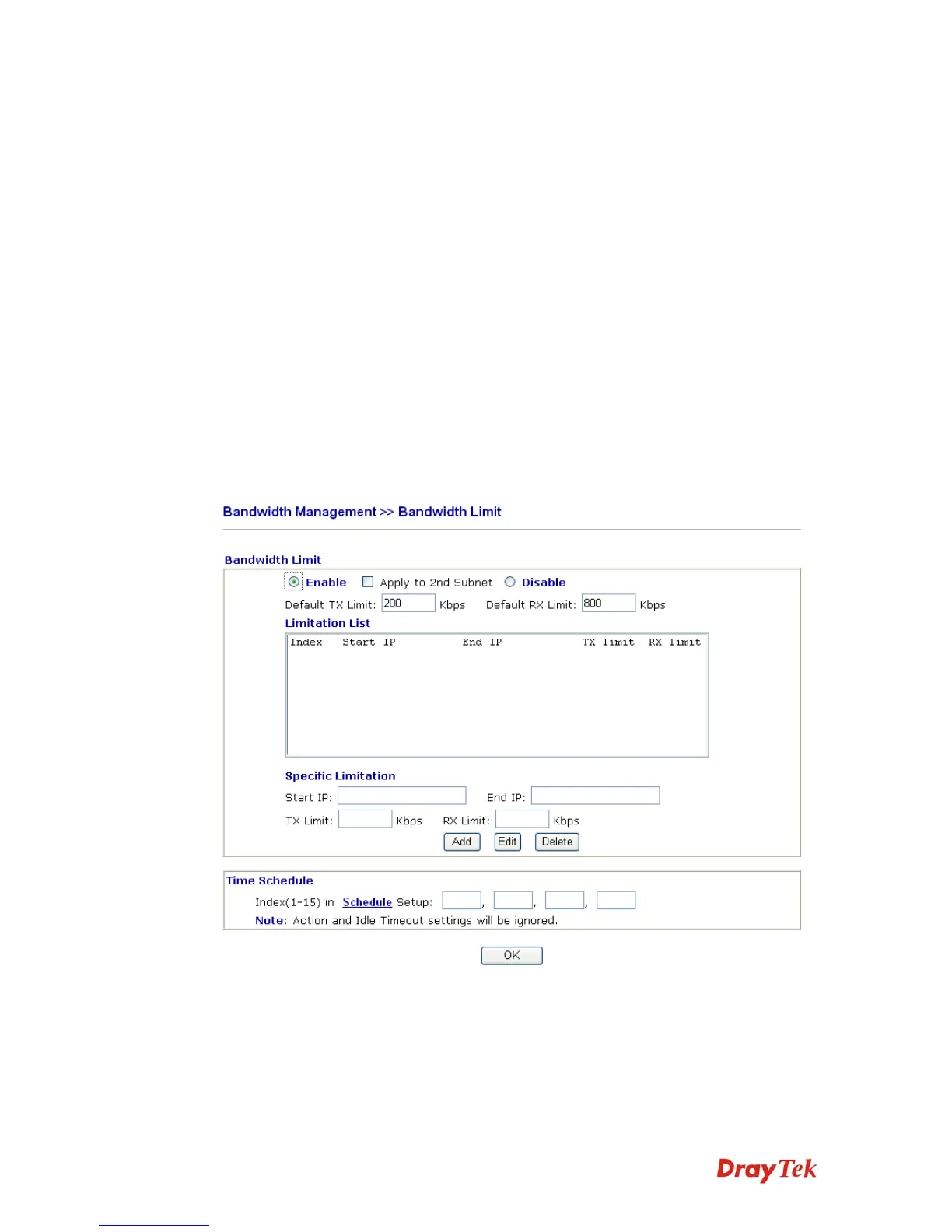
In the Bandwidth Management menu, click Bandwidth Limit to open the web page.
To activate the function of limit bandwidth, simply click Enable and set the default upstream
and downstream limit.
Enable Click this button to activate the function of limit bandwidth.
Apply to 2
nd
Subnet – if bandwidth limit function is enabled,
please check this box to apply to second subnet.
Disable Click this button to close the function of limit bandwidth.



 To Next Page