VigorIPPBX 3510 Series User’s Guide
38
3
3
.
.
4
4
I
I
S
S
D
D
N
N
A
A
p
p
p
p
l
l
i
i
c
c
a
a
t
t
i
i
o
o
n
n
w
w
i
i
t
t
h
h
A
A
l
l
l
l
I
I
S
S
D
D
N
N
T
T
E
E
P
P
o
o
r
r
t
t
s
s
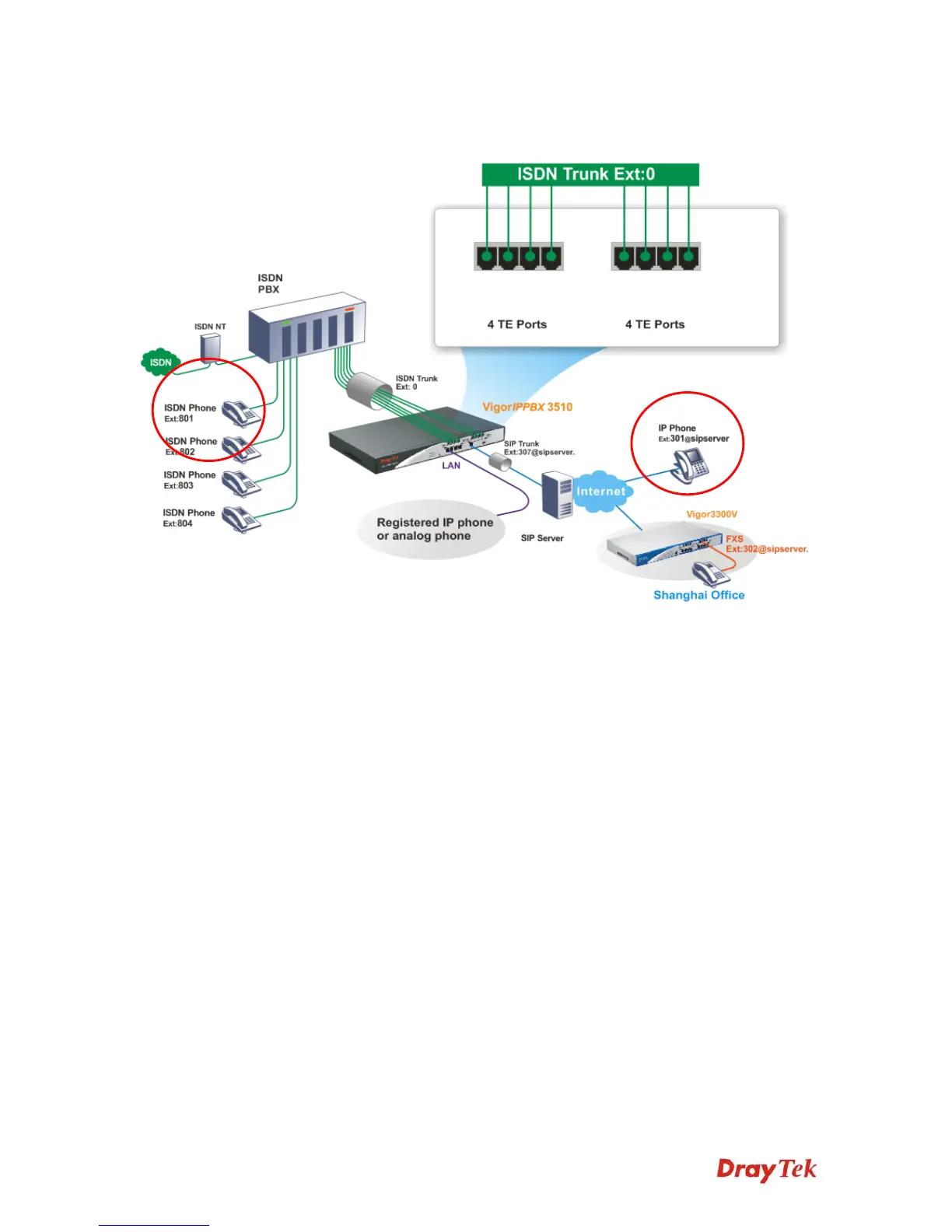
z The establishment of IP registration is made through WAN port.
z Ext. 307 and 302 are registered at a SIP server.
z The remote IP-based phone with ext. 301 is registered at a SIP server.
z The ISDN Phone with ext. No.801, 802, 803, and 804 are connected to ISDN PBX.
ISDN Phone: with extension No. 801
ISDN Phone: with extension No. 802
ISDN Phone: with extension No. 803
ISDN Phone: with extension No. 804
z The IP phone with ext. 301 on Internet made a call to the remote ISDN Phone (Ex:
801): Dial to SIP trunk number 307; then dial ISDN trunk number 0 to connect to
ISDN PBX. After getting through you can hear the dial tone, press ext. No. 801.



 To Next Page