VigorIPPBX 3510 Series User’s Guide
167
5
5
.
.
8
8
.
.
5
5
I
I
G
G
M
M
P
P
IGMP is the abbreviation of Internet Group Management Protocol. It is a communication
protocol which is mainly used for managing the membership of Internet Protocol multicast
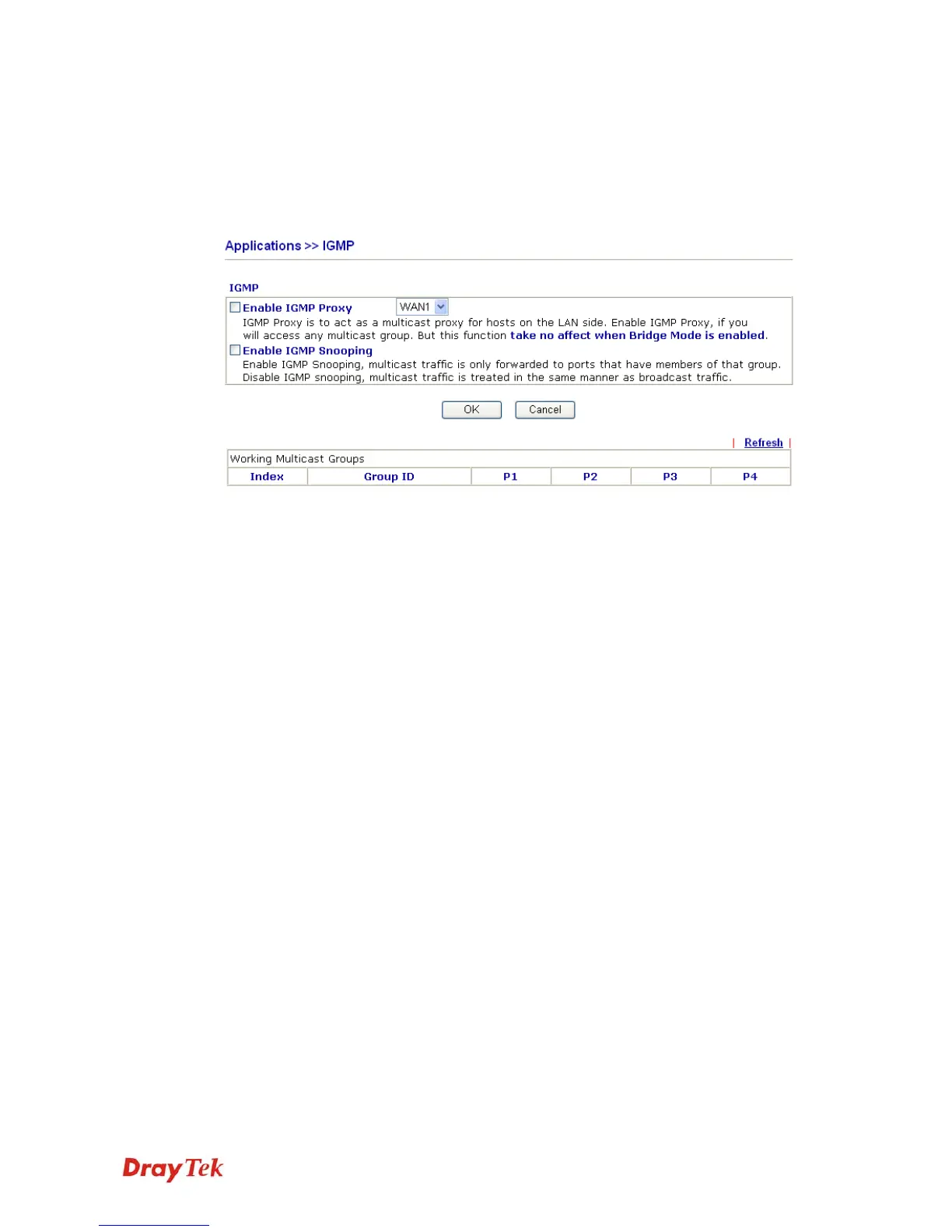
groups. For invoking IGMP Snooping function, you have to check the Enable IGMP Proxy
box first for activating the IGMP proxy function.
Enable IGMP Proxy Check this box to enable this function. The application of
multicast will be executed through the selected WAN port. In
addition, such function is available in NAT mode.
Enable IGMP Snooping Check this box to enable this function. The application of
multicast will be executed for the clients in LAN.
Group ID This field displays the ID port for the multicast group. The
available range for IGMP starts from 224.0.0.0 to
239.255.255.254.
P1 to P4 It indicates the LAN port used for the multicast group.
Refresh Click this link to renew the working multicast group status.
If you check Enable IGMP Proxy, you will get the following page. All the multicast groups
will be listed and all the LAN ports (P1 to P4) are available for use.



 To Next Page