VigorIPPBX 3510 Series User’s Guide
74
4
4
.
.
9
9
C
C
r
r
e
e
a
a
t
t
i
i
n
n
g
g
a
a
n
n
A
A
c
c
c
c
o
o
u
u
n
n
t
t
f
f
o
o
r
r
M
M
y
y
V
V
i
i
g
g
o
o
r
r
The website of MyVigor (a server located on http://myvigor.draytek.com) provides useful
service (e.g., Web Content Filter) to filter the web pages for protecting your system.
To access into MyVigor for getting more information, please create an account for MyVigor
first.
4
4
.
.
9
9
.
.
1
1
C
C
r
r
e
e
a
a
t
t
i
i
n
n
g
g
a
a
n
n
A
A
c
c
c
c
o
o
u
u
n
n
t
t
v
v
i
i
a
a
V
V
i
i
g
g
o
o
r
r
R
R
o
o
u
u
t
t
e
e
r
r
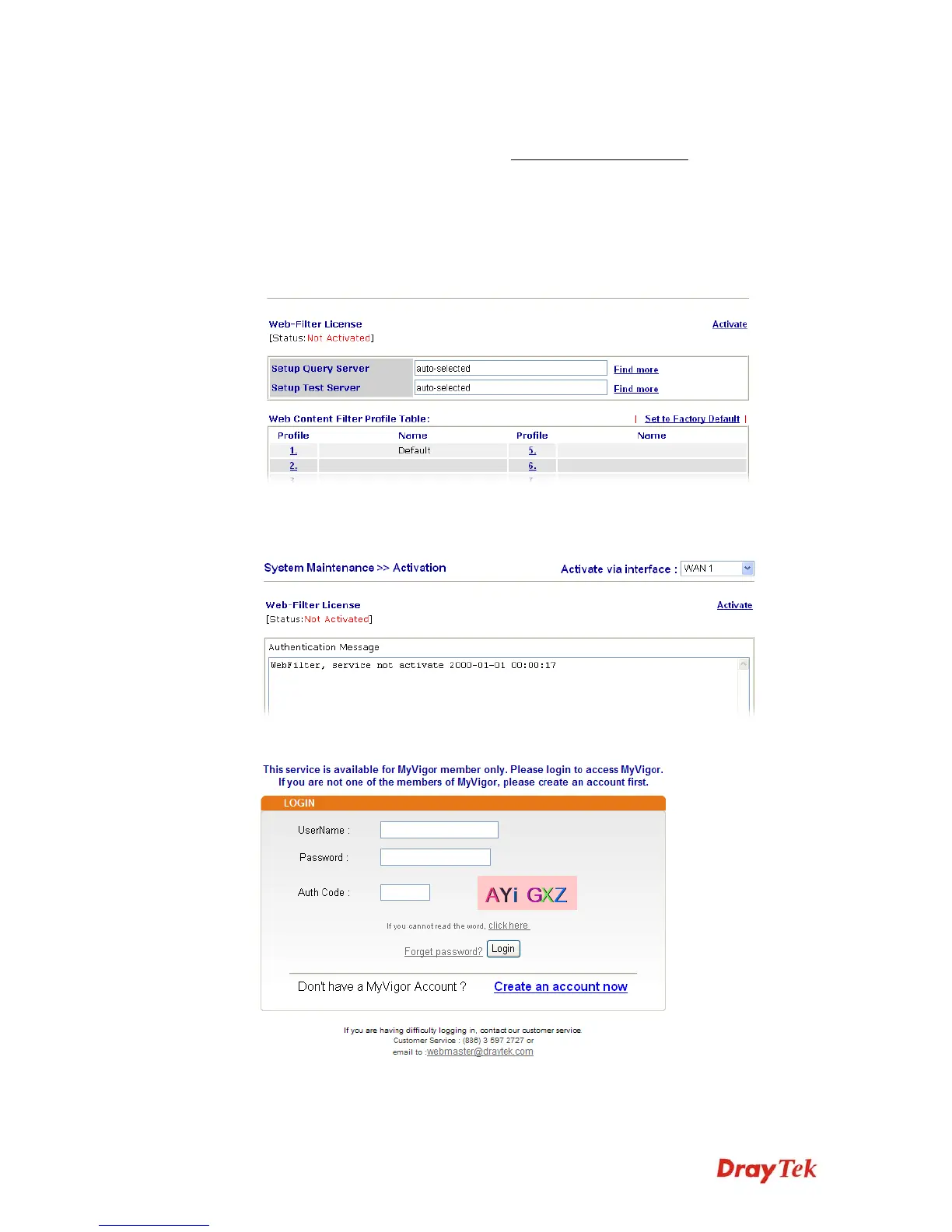
1. Click CSM>> Web Content Filter Profile. The following page will appear.
Or
Click System Maintenance>>Activation to open the following page.
2. Click the Activate link. A login page for MyVigor web site will pop up automatically.
3. Click the link of Create an account now.
4. Check to confirm that you accept the Agreement and click Accept.



 To Next Page