VigorIPPBX 3510 Series User’s Guide
85
5
5
.
.
1
1
.
.
4
4
I
I
n
n
t
t
e
e
r
r
n
n
e
e
t
t
A
A
c
c
c
c
e
e
s
s
s
s
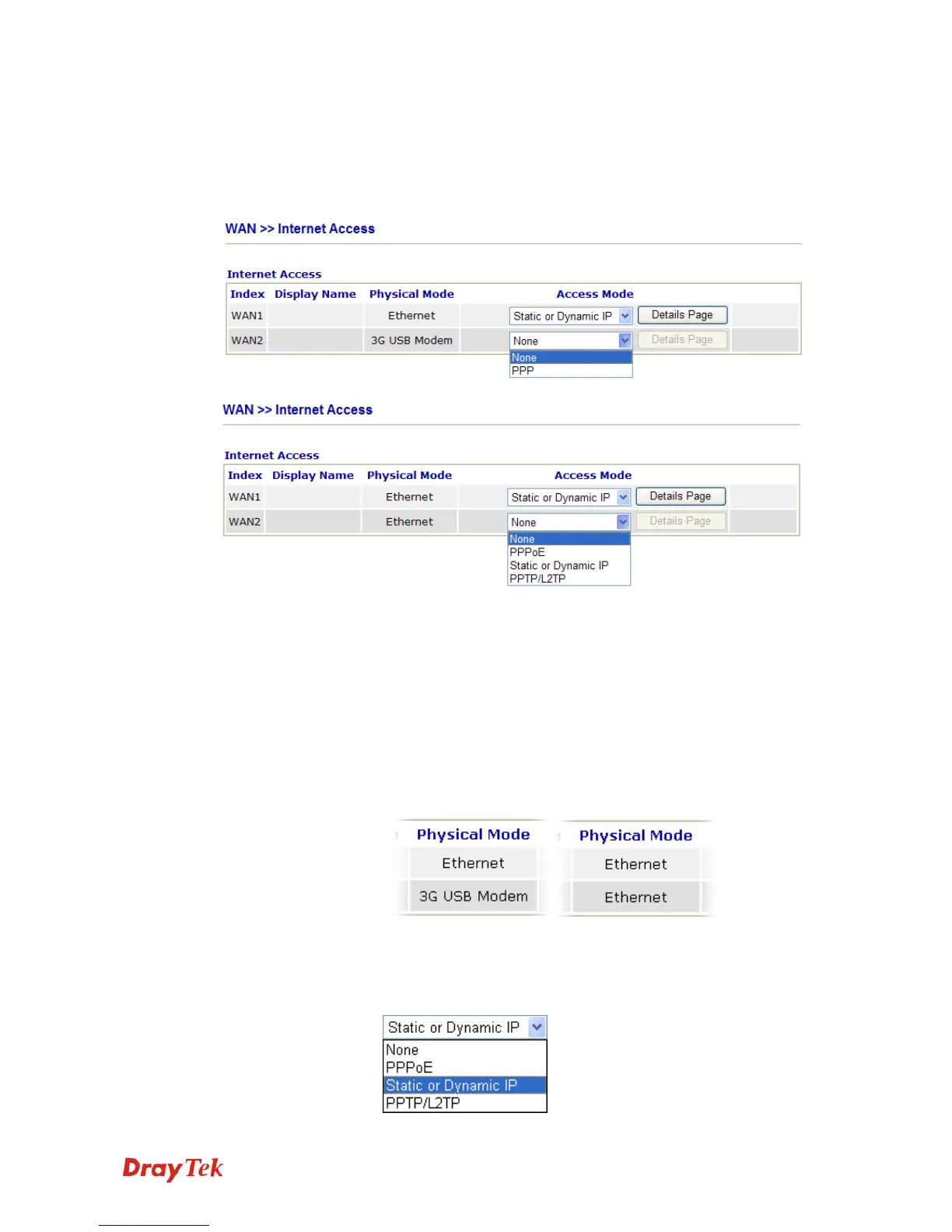
For the router supports dual WAN function, the users can set different WAN settings (for
WAN1/WAN2) for Internet Access. Due to different Physical Mode for WAN1 and WAN2,
the Access Mode for these two connections also varies slightly.
Index It shows the WAN modes that this router supports. WAN1 is the
default WAN interface for accessing into the Internet. WAN2 is
the optional WAN interface for accessing into the Internet when
WAN 1 is inactive for some reason.
Display Name It shows the name of the WAN1/WAN2 that entered in general
setup.
Physical Mode It shows the physical connection for WAN1 (Ethernet) /WAN2
(Ethernet or 3G USB Modem) according to the real network
connection.
Access Mode Use the drop down list to choose a proper access mode. The details
page of that mode will be popped up. If not, click Details Page for
accessing the page to configure the settings.



 To Next Page