SLICE User’s Manual support@dtsweb.com
Version 1.0 - May 2010 32 ©DTS, Inc. - All Rights Reserved
Sensor ID
! Refresh: The sensor IDs are read when the software is started or when a
SLICE is rebooted. If sensor connections are switched, choosing refresh
will read the connected IDs on the current channels.
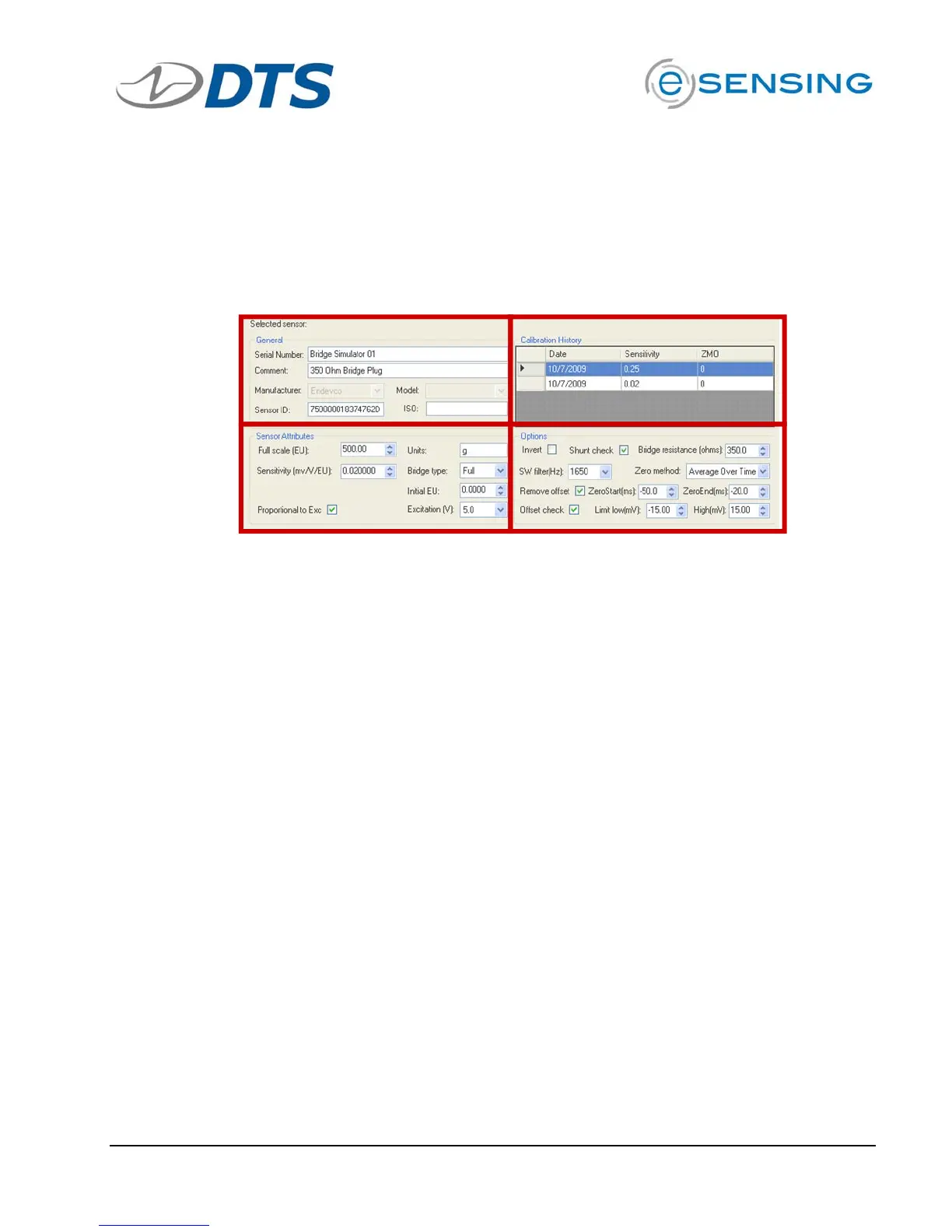
Sensor Details
General Calibration History
Attributes Options
General
! Serial Number: Used to identify the sensor. Can be any unique identifier.
The sensor list is sorted by default with the serial number.
! Comment: User field can be any text entry.
! Manufacturer: Not enabled as of 200910.
! Model: Not enabled as of 200910.
! Sensor ID: Enter or “READ ID” to populate.
Attributes
! Full Scale: The maximum expected value the sensor will be subjected to.
! Units: The Engineering Units of the sensor.
! Sensitivity:
o When Proportional to Excitation is checked: This value is the
calibrated sensitivity in mV/V/EU.
o When Proportional to Excitation is un-checked: This value is the
calibrated sensitivity in mV/EU.
! Initial EU: Typically left at 0.00. This entry may be used to insert an
engineering value to the starting point of the recorded sensor.
! Excitation: Leave at 5.0. Adjustment is not enabled as of 200910.


 To Next Page