trip 1 information
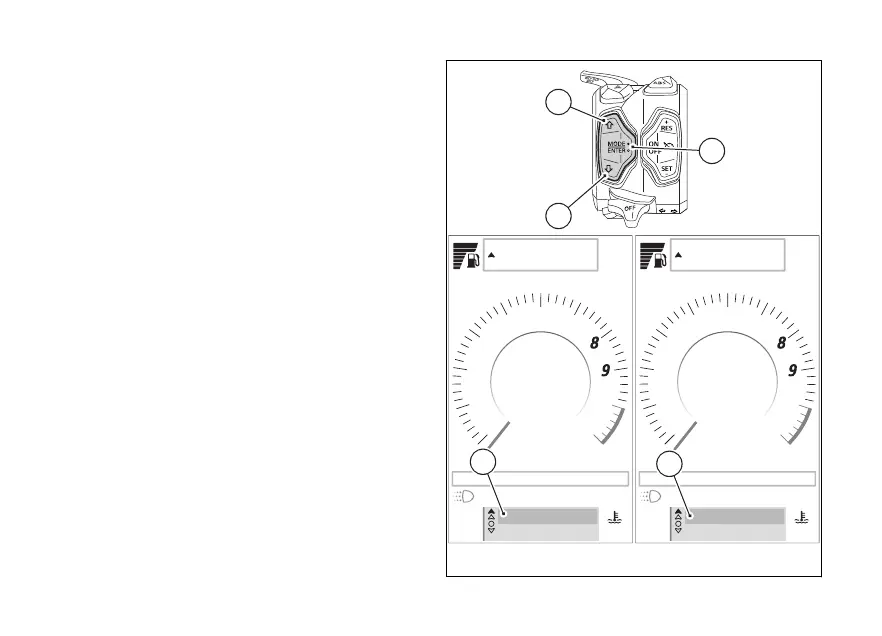
The “Trip 1”, "Ø cons.1", "Ø speed 1" and "Trip 1 time"
information can be reset by pressing the ENTER
(3) when selected: "Reset trip 1 info?" and the
items "Yes" and "No" (C) are displayed.
Use (1) and (2) to select "Yes" or "No" and
press ENTER (3) to confirm your choice.
To exit without making any changes, keep (1)
pressed for a long time.
When the trip 1 information is reset, all the meters
that refer to it are reset as well.
trip 2 information
The “Trip 2” information can be reset by pressing the
ENTER (3) when selected: "Reset Trip 2 info?"
and the items "Yes" and "No" (D) will be displayed.
Use (1) and (2) to select "Yes" or "No" and
press ENTER (3) to confirm your choice.
To exit without making any changes, keep (1)
pressed for a long time.
Air
22
°C
90
°C
rpm X1000
1
2
3
4
5
6
7
10
11
km/h
Gear
N
SPORT
DWC 3 DTC 5 ABS 3 EBC 2
10:34
am
A
Chrono
Setting menu
Air
22
°C
90
°C
rpm X1000
1
2
3
4
5
6
7
10
11
km/h
Gear
N
SPORT
DWC 3 DTC 5 ABS 3 EBC 2
10:34
am
A
Chrono
Setting menu
Yes No
Reset trip 1 info?
Yes No
Reset trip 2 info?
0 0
1
3
2
C
D
Fig 69
122













 To Next Page