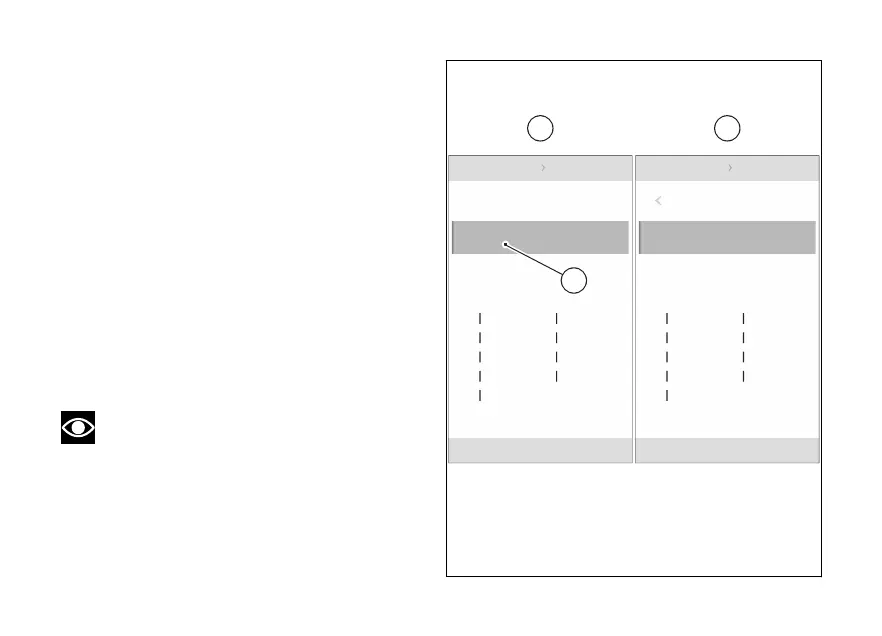
In the following example, the position of the
“Trip 1 time” item is changed from 6 to 9:
●
Use (1) and (2) to select item "Trip 1 time”
and press the ENTER (3).
●
The screen (A) is displayed. The upper of the
screen shows the selected item and the current
position, and the lower shows the list of
items in the current order.
●
The values displayed above and below the digit
(B) indicate that the position number can be
changed using (1) and (2).
●
Once the value of the new position has been set
(in the example "9"), press ENTER (3) to confirm.
The order of the Info display is then updated
with the new position (C).
●
select “Back” and press ENTER (3) to go back to
the previous screen.
Note
If the fuel level display is set to “Range”, the
is displayed grey in the list.
Info display Trip 1 time
09 Trip 1 time
08
Back
01
02
03
04
05
Total
Range
Trip 1
Ø cons. 1
Ø speed 1
Trip 2
Cons.
Daylight
Trip 1 time
06
07
08
09
N
Gear
Info display Trip 1 time
05
Trip 1 time06
07
01
02
03
04
05
Total
Range
Trip 1
Ø cons. 1
Ø speed 1
Trip 1 time
Trip 2
Cons.
Daylight
06
07
08
09
N
Gear
A C
B
Fig 120
207













 To Next Page