28
Chapter 1 Before Operation
Copyright © 2019 Duplo Corporation All Rights Reserved
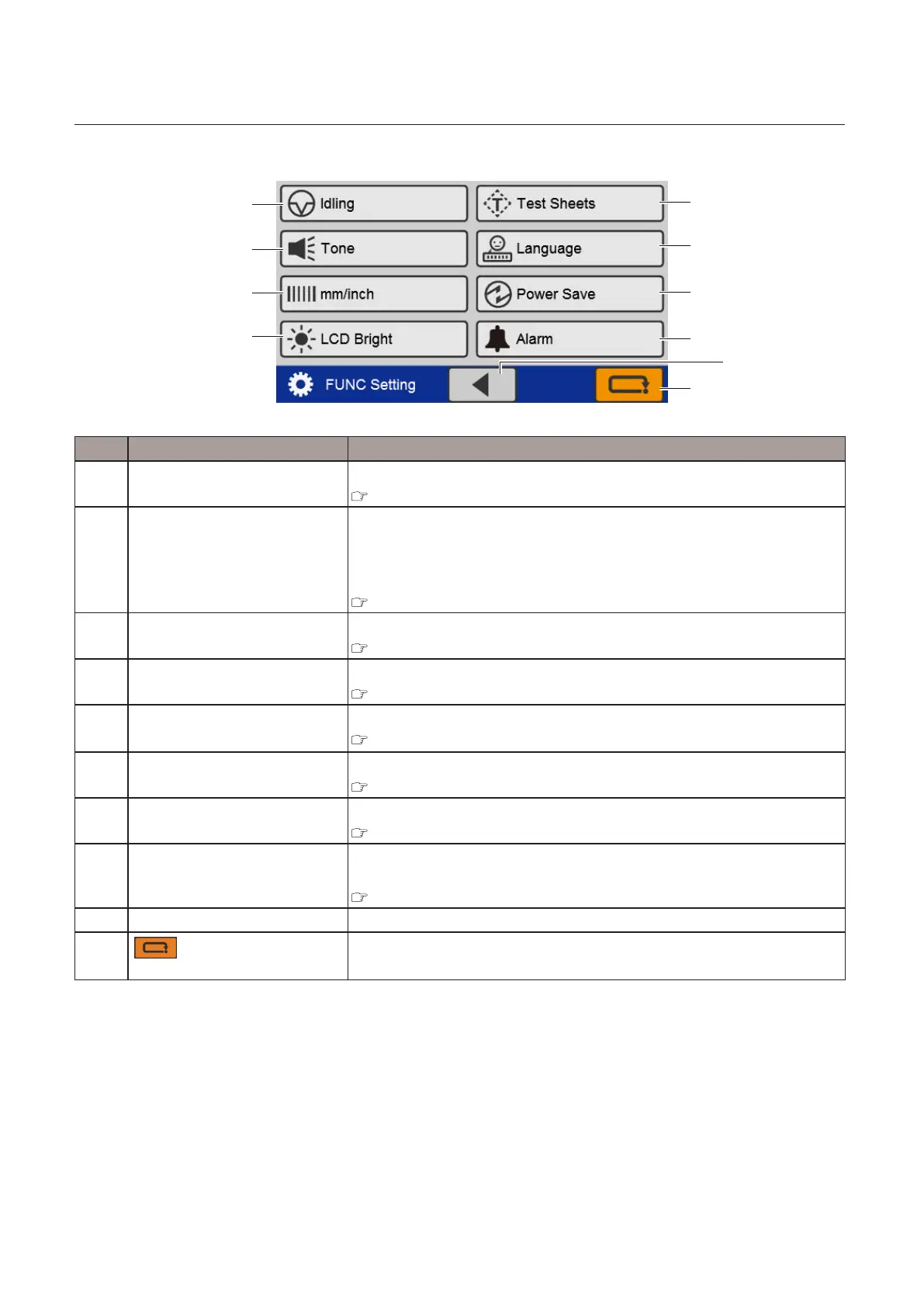
Selection screen 2
[7]
[8]
[10]
[9]
[1]
[2]
[3]
[4]
[6]
[5]
No. Name Function
[1] Idling Sets whether or not to perform idling operation.
Chapter 3 “8-9. Idling” (p.69)
[2] Tone Setswhethertoenableordisablethebuzzer(keyoperationsoundonthe
controlpanel).
However,thebuzzerthatsoundswhenanabnormalityoccurswillsound
even if the setting is disabled.
Chapter 3 “8-10. Tone” (p.70)
[3] mm/inch Switches the unit used for paper length.
Chapter 3 “8-11. mm/inch” (p.70)
[4] LCD Bright Sets the brightness of the LCD touch panel screen.
Chapter 3 “8-12. LCD bright” (p.71)
[5] Test Sheets
(TheNumberofTestSheets)
Sets the number of test feed sheets.
Chapter 3 “8-13. Number of test sheets” (p.72)
[6] Language Switches the language displayed on the touch panel.
Chapter 3 “8-14. Language” (p.72)
[7] Power Save SetswhetherornottoturnotheLCDtouchpanelscreenautomatically.
Chapter 3 “8-15. Power saving” (p.73)
[8] Alarm(*) Setswhetherornottouseanalarmtopreventforgettingtoswitchothe
power.
Chapter 3 “8-16. Alarm (DF-999/DF-999A)” (p.74)
[9] Display switching key Touching this key switches the screen to the 1st page.
[10]
(Cancel)key
Whentouched,thedisplayreturnstothe[BasicSettings]screen.
Pressandholdtoreturntothe[Ready]screen.
(*) DF-999/DF-999A



 To Next Page