88
Chapter 6 Trouble Guide
Copyright © 2019 Duplo Corporation All Rights Reserved
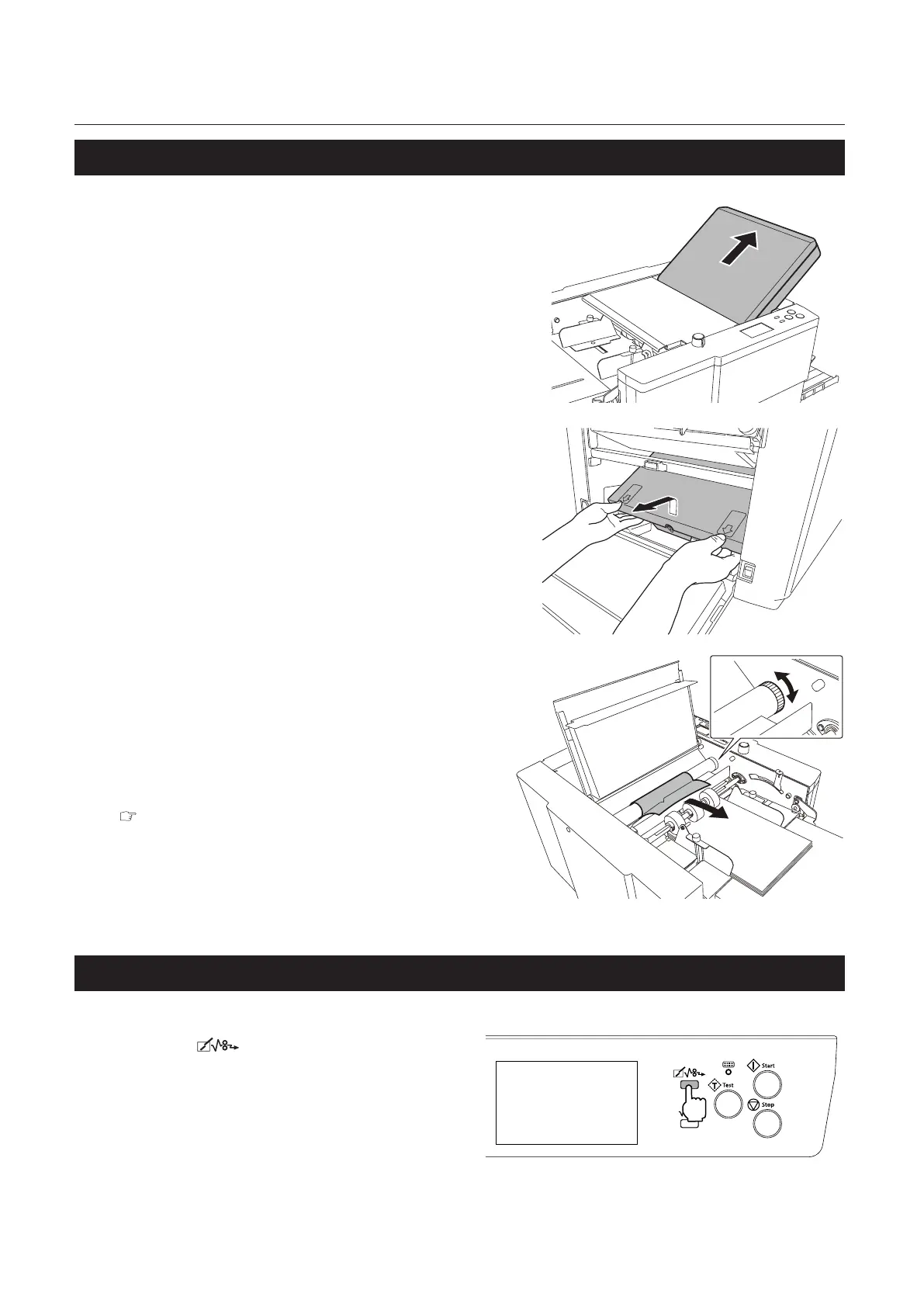
2-2. Folding roller
1
Take out the folding plate 1.
2
Open the side cover.
3
Take out the folding plate 2.
4
Open the top cover.
5
Pull out the paper rotating the jam
correction knob.
6
Close the top cover.
7
Insert the folding plate 1 and folding
plate 2.
Chapter 1 “2-3. Installation procedures” (p.5)
8
Close the side cover.
The side cover will not be closed if the folding
plate 2 is not attached correctly.
2-3. Folding plate
Press the key.
Ejectforciblythepaperinsidethefolding
plate.
Forcibleejectioninthefoldingplatewillnot
stop until the folding stopper returns to the
home position, as the folding stopper moves,
even if the key is not held.
Evenifthepaperisnotremovedafterforcibleejection,checkthepositionofpaperjamtoremovethepaper
with the following method.



 To Next Page