63
Chapter3AdvancedOperation
Copyright © 2019 Duplo Corporation All Rights Reserved
No. Name Function Default
value
[11] Input range display. Displayed when trying to input a value outside the input range. –
[12]
(Clear)key
Sets the input value to "0". –
Aftersetting,anicon( )isdisplayedonthetouchpaneldisplaysection.
8-4. Double-feed detection
Double-feeddetectionreferstoafunctionthatreadsthethicknessofpaperontestfoldinganddetects
when more than one sheet of paper is fed into the machine at a time.
Whentheultrasonicsensorisset,thereisnoneedtoperformtestfolding.
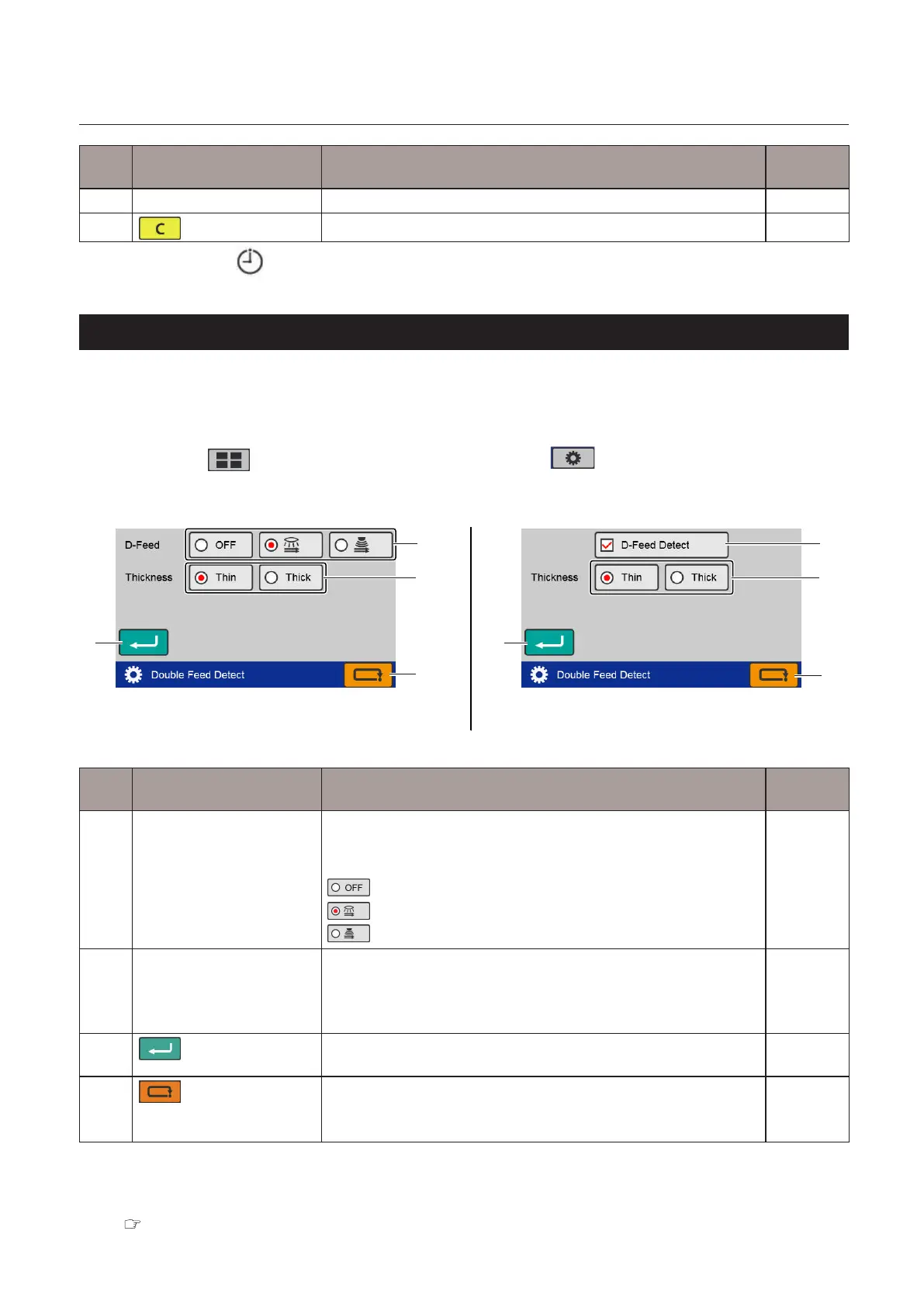
Touch the key on the top screen —> Touch the key —> Touch the [D-Feed
Detect].
The[DoubleFeedDetect]screenisdisplayed.
[1]
[1]
[4]
[4]
[2]
[2]
[3]
[3]
When the DF ULTRASONIC SENSOR KIT is registered When the DF ULTRASONIC SENSOR KIT is not registered
No. Name Function Default
value
[1] D-FeedDetect Sets whether to enable double feed detection.
WhentheDFULTRASONICSENSORKITisnotregistered,on/ocan
be changed with the checkbox.
Disables double feed detection.
Enables the optical sensor.
Enablestheultrasonicsensor.(*)
–
[2] Thickness Whentheopticalsensorissetfordoublefeeddetection,setthe
thickness of the paper.
Whentheultrasonicsensorisselected,thekeyisgrayedoutand
cannot be operated.
Thin
[3]
(Return)key
Saves the double feed detection setting and returns to the
[FunctionSettings]screen.
–
[4]
(Cancel)key
Returnstothe[FunctionSettings]screenwithoutsavingtheinput
content.
Pressandholdtoreturntothe[Ready]screen.
–
(*) DisplayedonlywhentheDFULTRASONICSENSORKITisregisteredasanoptionalitem.
(DF-999/DF-999A)
After setting, an icon is displayed on the touch panel display section.
Chapter 1 “6-1-2. Touch panel operation section” (p.16)



 To Next Page