1515
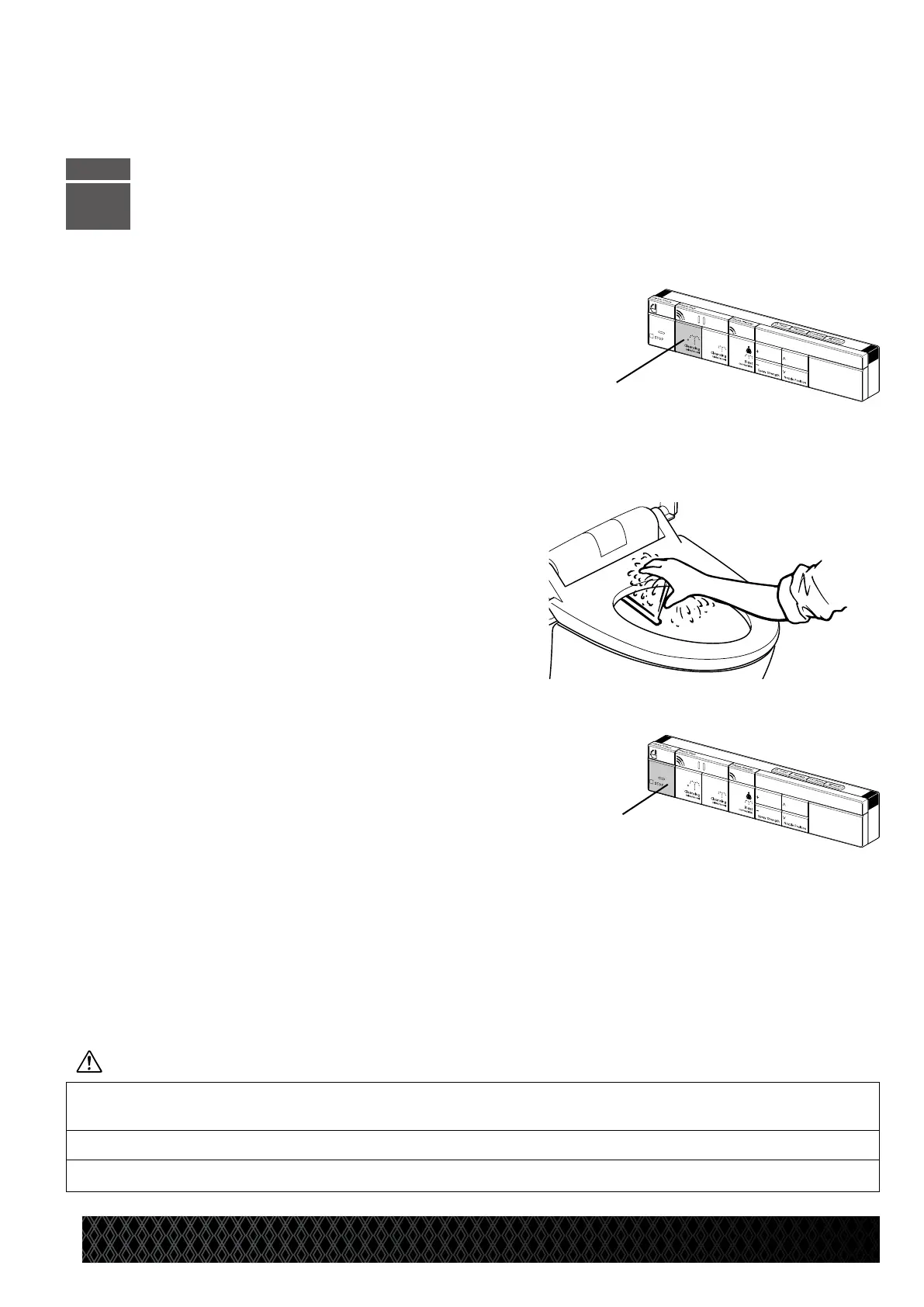
CheckingtheRearCleansingFeature[3]
•Covertheseatsensorwithapieceofpaperorcloth.
*
If the paper or cloth is black, the occupied seat sensor may not function.
•PresstheCleansingbutton[A].
•Placeahandabovethenozzletiptoblockthesprayedwater.
* At this time, water comes out from a point near the nozzle tips
in preparation for operation.
•
PresstheSTOPbutton[B]tostoptheshower.
•Removethepaperorcloth
covering the seat sensor.
* Check the other functions by referring to “General Operation” (from page 17 of this Manual).
* The toilet is equipped with a seat sensor, which detects when someone is sitting on the seat.
The functions for front and rear cleansing, as well as for drying, cannot be activated when there
is no one sitting on the seat.
Ensuretheelectricaloutlettowhichthepowercordisconnectedisproperlygrounded,asfailuretodosomay
cause electric shock or damage.
Thisproductshouldonlybeconnectedtoa120VAC,60HzGFCI-protectedoutlet.
Donotconnectadditionalpowercordstothetoilet’selectricaloutlet,asthismayresultinfire.
[A]
STEP
3
PreparationandChecksBeforeUse
[B]


 To Next Page