2323
UsingtheDryer
DryerFunction
Warm air is blown to dry the area washed by the shower.
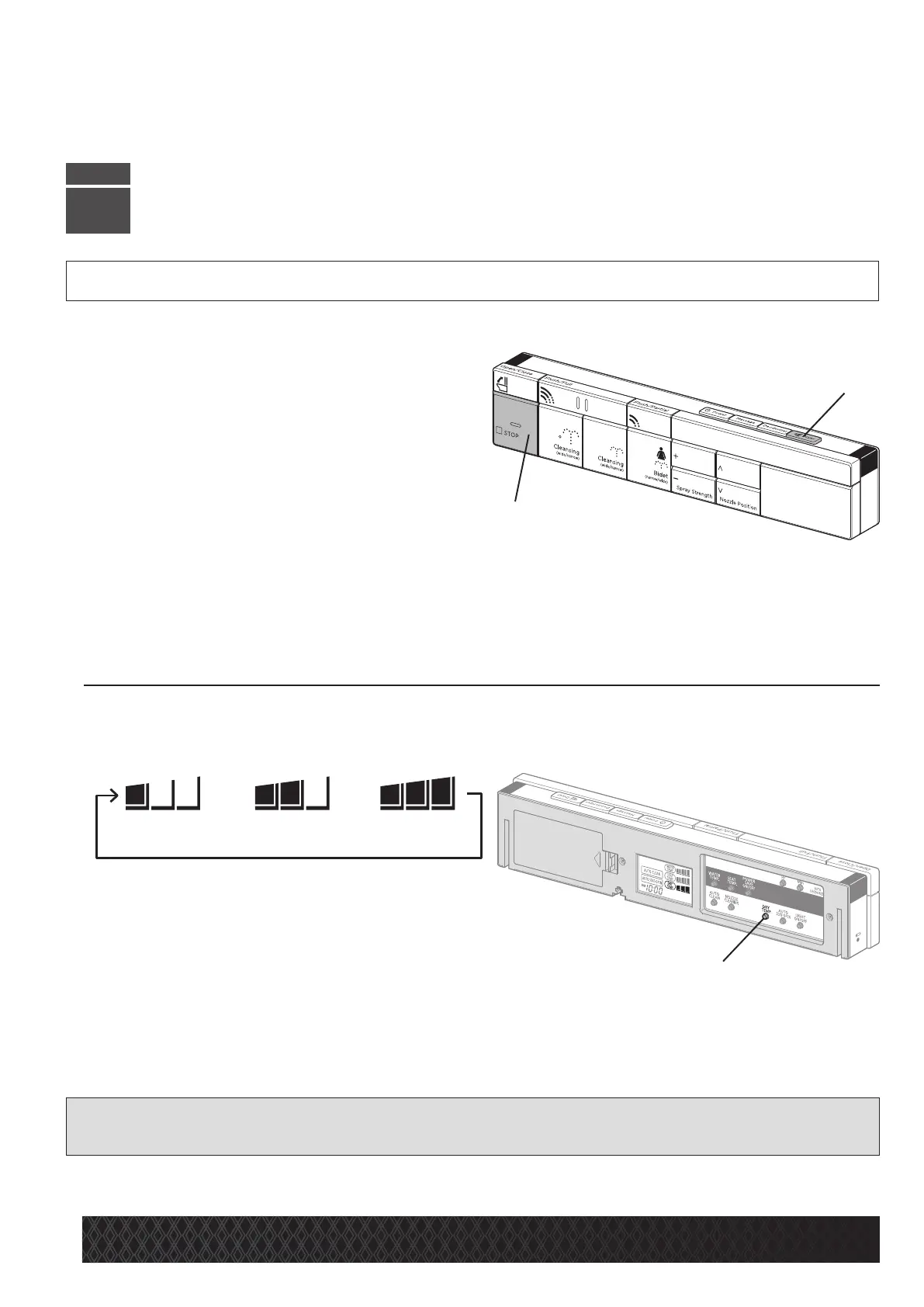
•PresstheDryerbutton[B].
*
The air temperature can be adjusted to any of three levels.
*
The deodorizer temporarily stops when drying is performed.
*
Set the remote control in the holder, and press the [Dryer] button.
•PresstheSTOPbutton[A]to
stopdrying.
* Wipe away any excess water with toilet paper. The dryer
function has an auto-stop feature that will terminate
drying after 4 minutes of continuous use.
Tochangetheairtemperature
PresstheDryerTemp.button[C]againwhiledrying.
* By pressing this button, the warm air temperature is changed. The temperature can be adjusted in a cycle from
“Low” to “Mid” and “High” as displayed on the LCD, and shown in the diagram below.
[Reference]
• Use a small amount of toilet paper to wipe away excess water before using.
STEP
4
—
>
—
>
MidLow
High
[B]
[A]
GeneralOperation
[C]


 To Next Page