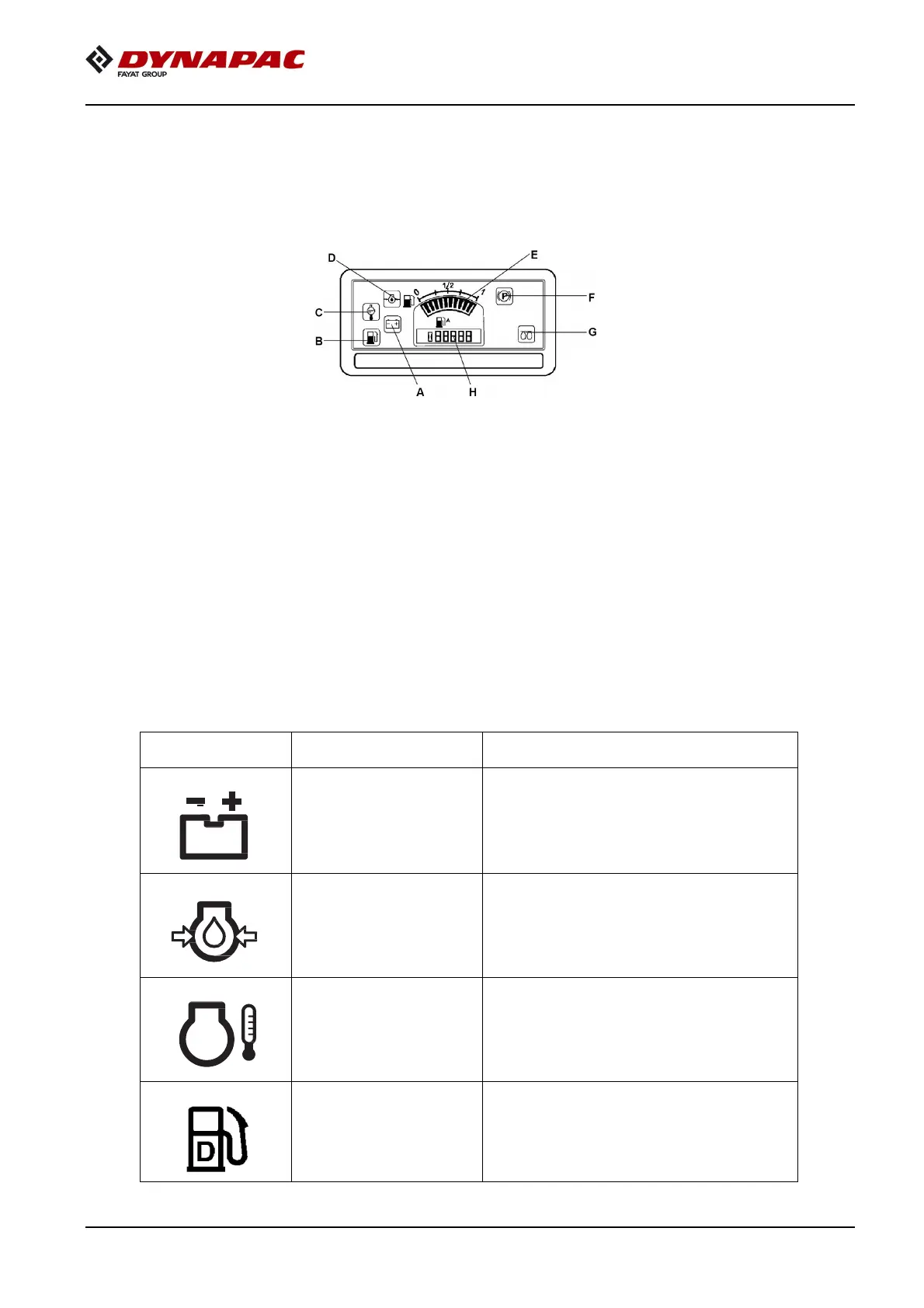
Figure 5-18: Control Panel
B
Low fuel level
F
Parking brake lamp
C
Engine water temperature
G
Glow plug
Control Panel Warnings Symbols
Warning lights comes on when the starter switch is turned to the on position and should goes off once
the engine has started. If the lights comes on when the engine is running indicates a faulty condition.
Table 5-1:Warning Lights
Designation Function Description
indicator lamp.
If light does not illuminate when ignition is
switched on, illuminates after engine is
started, the battery is not charging. Contact
maintenance personnel if the lamp comes
on during tramming.
Diesel engine lubricating
oil pressure indicator
lamp.
If the pressure is too low, the lamp comes
on and the parking brake is applied. In this
event, switch the engine off immediately
and rectify the cause. Contact maintenance
personnel.
signal lamp.
The lamp comes on when the temperature
is too high. The engine must be switched
off immediately and contact the
maintenance personnel if the lamp comes
on during tramming.
Low fuel level indicator.
This lamp comes on if the oil level is low in
the fuel tank.



 To Next Page