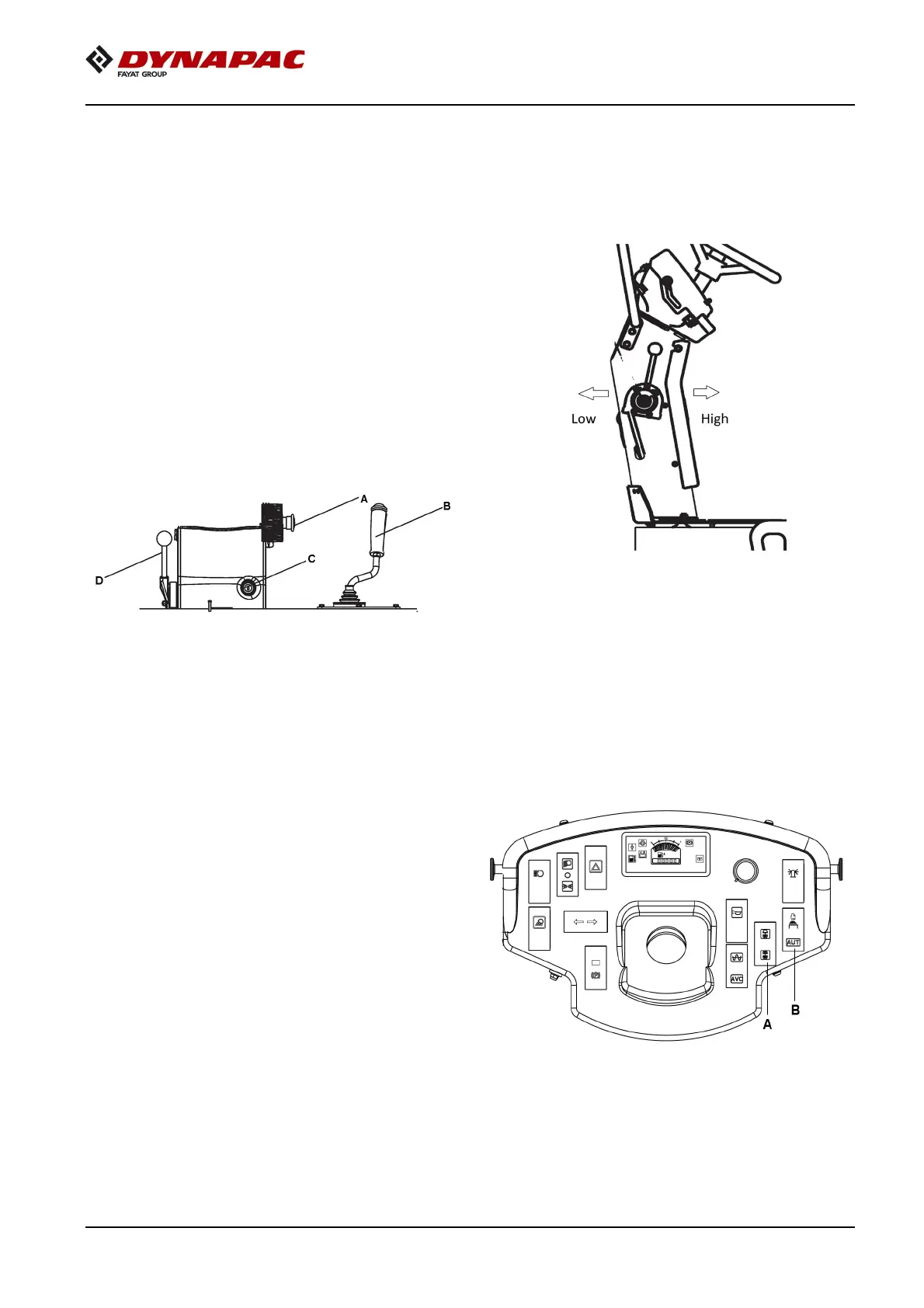
6. Make sure the throttle control is turned to low
Inspections and Operations
Operation
1.
Before the roller startup, a pre-operational
general inspection of the roller must be
performed in accordance with those
instructions previously mentioned and in the
instructions found in
section 7 - Maintenance.
2.
Make sure all operator console controls are
either off or in the neutral position and all
control console gauges read zero.
Figure 6-5:Operator Consoles
A
Emergency stop C Ignition switch
B
FNR lever D Throtlle lever
3.
Make sure the emergency stop button is not
activated.
4.
The FNR must be in neutral position.
5.
Parking brake switch must be in engaged
condition.
position.
Figure 6-6:Throttle control
7.
Set the vibration switch for manual/automatic
vibration position. In the manual position, the
operator must activate the vibration using the
switch on the forward/reverse lever grip. In the
automatic position, vibration is activated when
the pre-set speed is reached. Vibration is
automatically deactivated when the FNR lever
is moved from neutral condition.
Figure 6-7:Vibration Man/Auto Switches
A Vibration Man/
Auto switch
B Vibration selector
switch



 To Next Page