DH200F User Manual
©Dyness reserves the copyright of this document.
7 Human-Machine interface of HMI screen (optional)
Introduction to Operating System
The product is equipped with a 10-inch HMI screen. Users can choose an HMI screen, on
which they can view the operating information of the system and set the operating
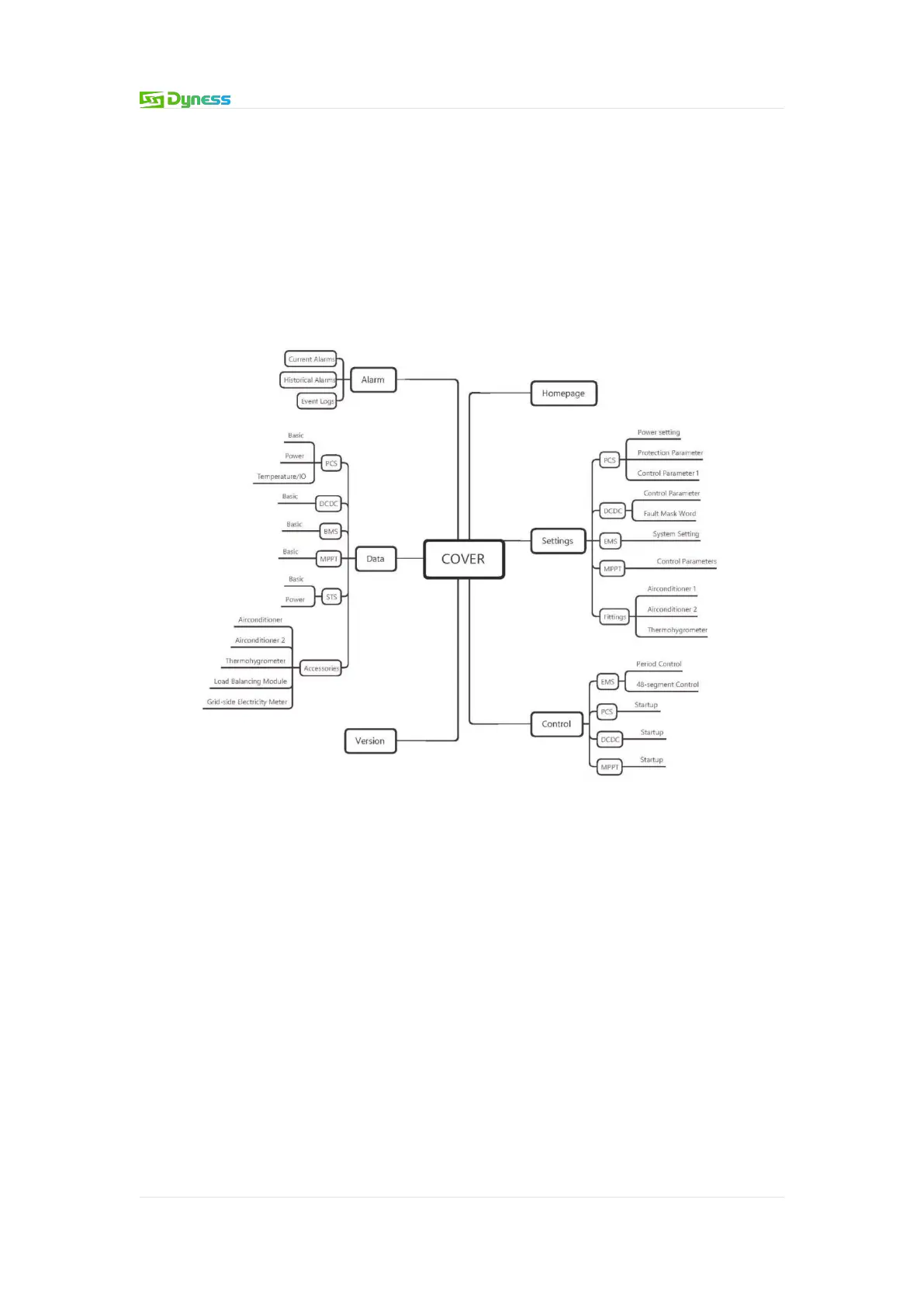
parameters of the system. For the convenience of operation, the logical structure
distribution diagram of the HMI screen menu is provided in the manual.
Note: If the user does not choose the HMI screen, the system can also run without
affecting the system work.
Figure 7-1 HIMI Screen menu logical structure distribution diagram
There are six common function buttons on the left side of each interface: [Home]
[Settings] [Control] [Data] [Warning] [Version]. Through these six common buttons, users
can operate conveniently and quickly. On the left side of the interface, the sub-menu
buttons corresponding to the above six commonly used buttons are displayed, and the
selected buttons are marked in yellow.


 To Next Page