2388-MANUL-V10.00.00-UTP2 Operating Manual
Page 62 of 74
4.4.6 Spectrum Screen
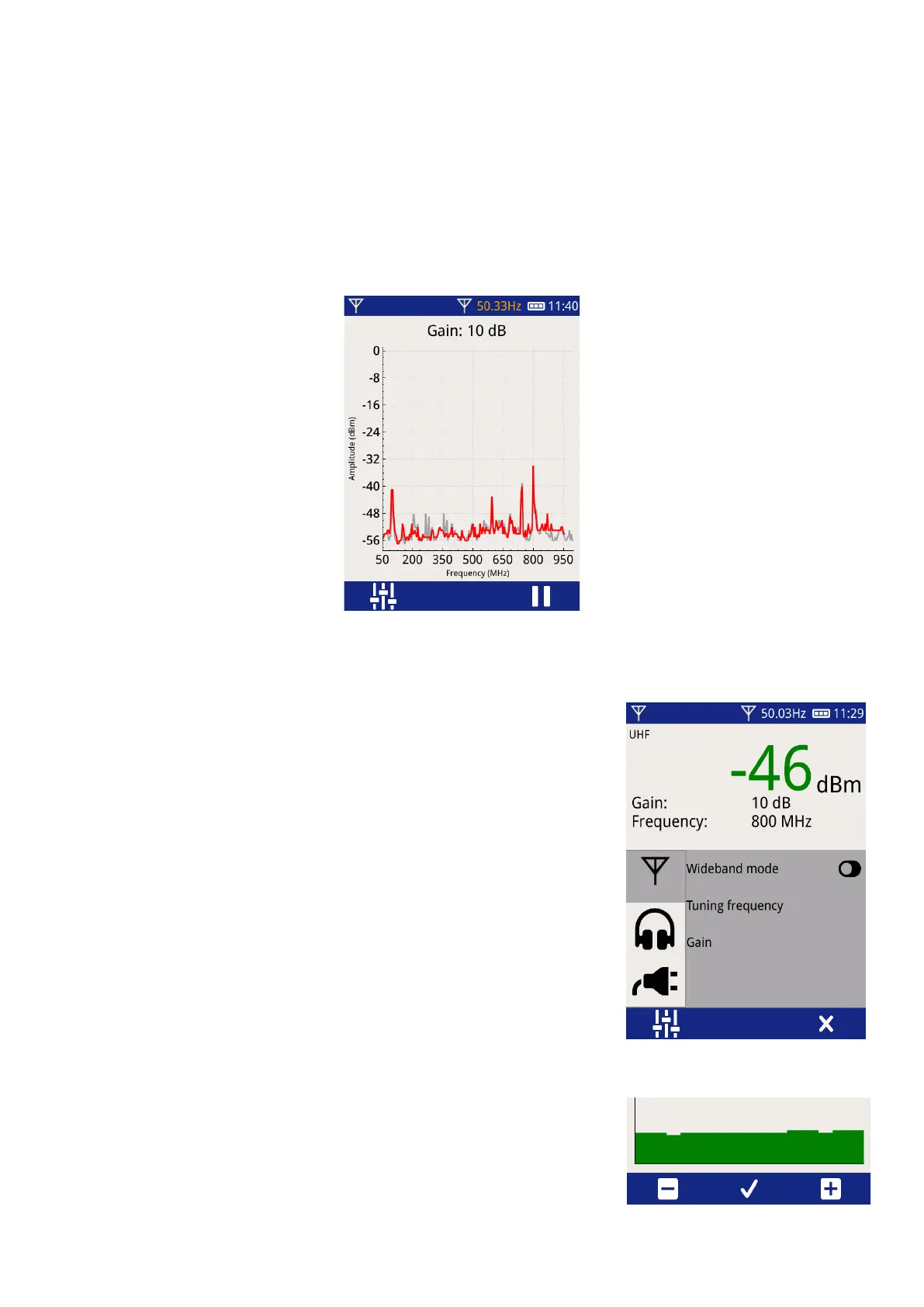
The Spectrum Screen shows the peak power received by the UHFR1 over its full tuning range.
• The tuning frequency is quickly swept from 50 MHz to 1000 MHz.
• The peak power received is plotted.
• Each time a new sweep is started, the previous sweep is shown in grey and the new sweep in red. This
highlights any changes.
4.4.7 Adjusting the Mode, Gain and Tuning Frequency
To adjust the UHF Mode, Gain or Tuning Frequency, press the Context Settings
button. This will display the Context Settings menu showing the most
appropriate settings for the current operating mode.
• To switch between Narrowband and Wideband modes, press the
“Wideband mode” toggle button.
• To adjust the Gain or Tuning Frequency, press the relevant button.
The Context Settings menu will close, showing ‘+’ and ‘–‘ buttons.
• The on-screen or physical buttons can be pressed to adjust the Gain
or Tuning Frequency, or the physical buttons can be held down to
make the adjustment quicker.
• Once the correct gain/frequency is selected, press the tick or the
central button to confirm.



 To Next Page