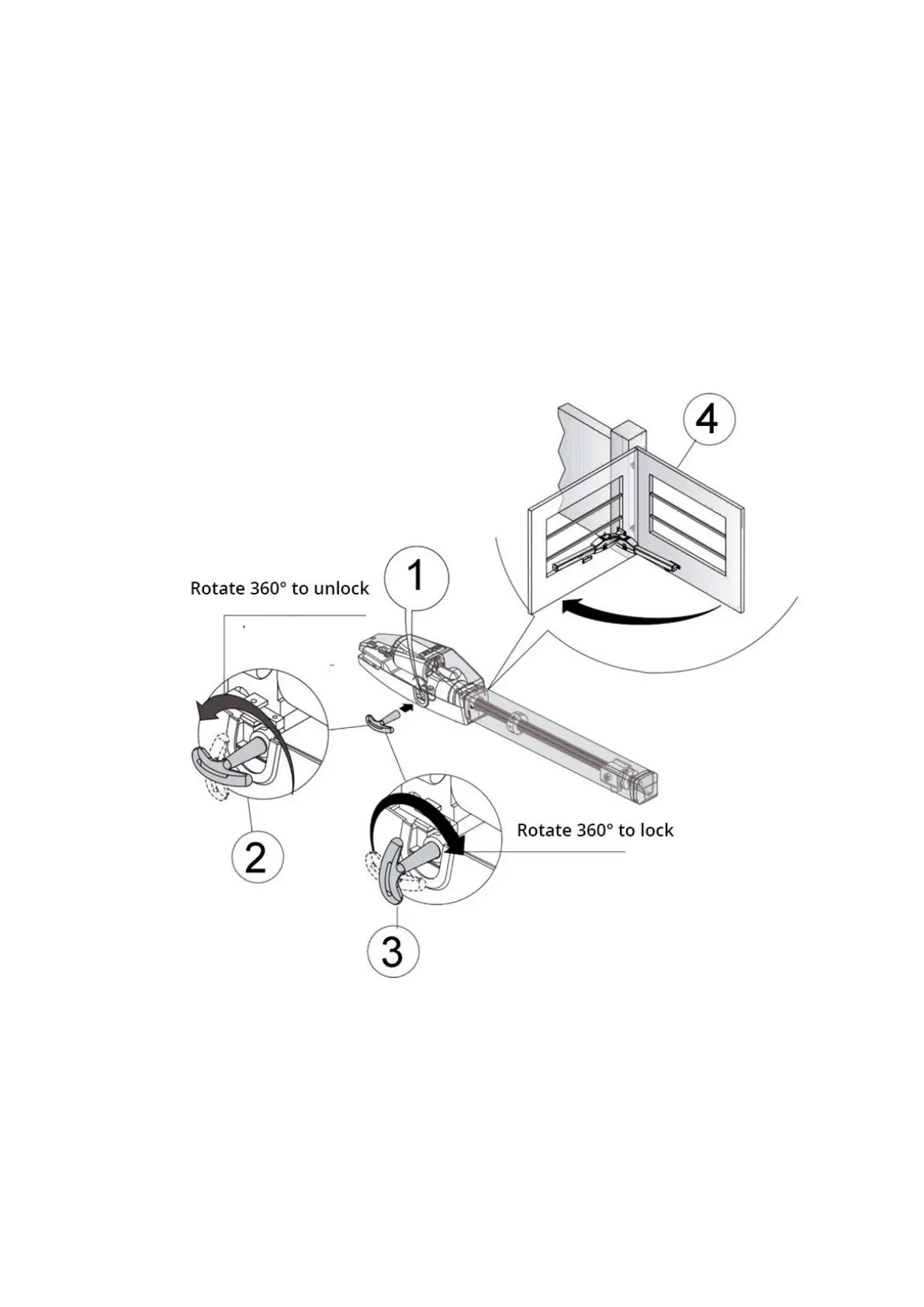
2.9 Manual unlocking
ATTENTION:
• Turn off the mains power supply before continuing.
• Manual unlocking may cause uncontrolled movement of the gate due to mechanical damage or unstable
mechanical conditions.
• Do not put excessive pressure on the key, so it doesn’t break.
This command allows the release of the motor arm gearbox and the manual movement of the leaf. It can be used
in the event of a power failure or system anomaly.
Manual unlocking is performed with a key that should be kept in a safe place.
a) Lift the lock guard (1) upwards with a finger.
b) Insert the triangular key (2) into the lock and turn it 360° counterclockwise. The gate (4) will be unlocked.
c) The gate will be unlocked and can be moved manually.
d) Insert the triangular key (3) and turn it 360° clockwise to lock the leaf again . The motor arm will lock
again.


 To Next Page