4. CONTROL UNIT CONFIGURATION
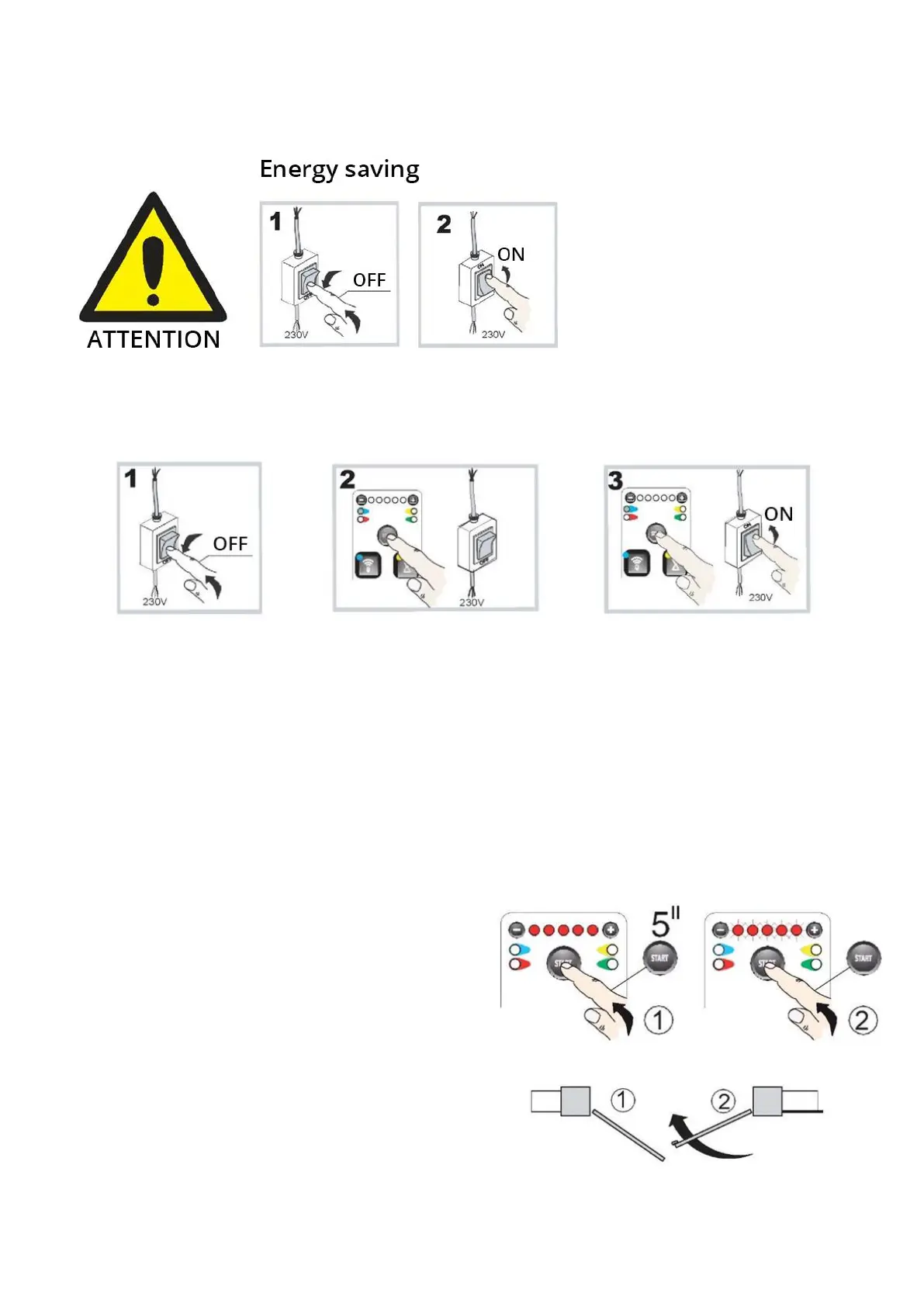
To optimise energy consumption, we
have introduced an energy-saving
function. After 10 minutes from the
configuration of the control unit, the
LEDs on the front panel will turn off,
and the use of the keyboard will be
disabled. The control unit must be
turned off and on to reactivate the
keyboard.
4.1 Full reset
IMPORTANT
Turn off system power, hold the Start button, turn the power back on, and release the Start button when the red lights
turn on.
4.2 Activating the initial configuration
IMPORTANT If only one motor is used, connect it to terminals 35 - 36.
Ensure that the device’s mechanical opening and closing limit switches are installed.
a) Position both halves of the gate at an angle of 45°.
b) Press and hold the START button for 5 seconds until
all 5 red LEDs light up.
c) Press START, the device will perform the following
sequence:
- leaf 2 closing;
- leaf 1 closing;
- leaf 1 opening; with slowdown;
- leaf 2 opening;
- leaf 2 closing; with slowdown;
- leaf 1 closing.


 To Next Page