6. OPTIONS
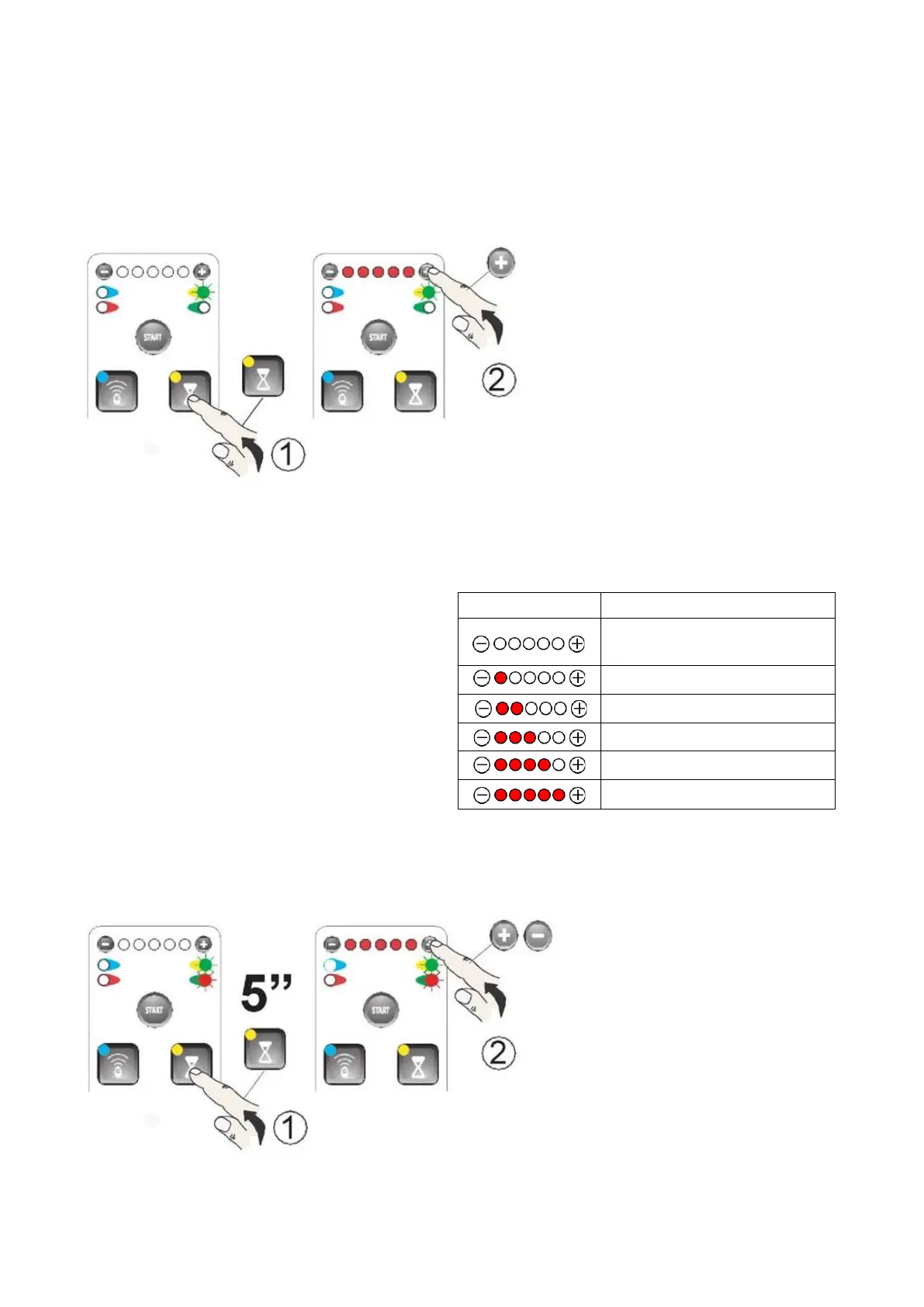
6.1 Automatic closing
Automatic closing is activated after a pre-set PAUSE.
a) Press the CLOCK BUTTON. The
green LED on the right will light up.
- If neither of the “-” or “+” LEDs is on,
automatic closing is not active - to
activate it, press the “+” button.
- If at least one “1” LED is on,
automatic closing is active - to deactivate
it, press and hold the “-” button until all
LEDs turn off.
By pressing “-” and “+”, you can adjust the PAUSE.
Wait 20 seconds or press the CLOCK BUTTON again
to exit programming mode.
Operating sequence: OPEN - PAUSE - CLOSE - PAUSE
6.2 Slowdown time adjustment
a) Press the CLOCK BUTTON for 5
seconds - the green and red LEDs on
the right will light up. By pressing “-”
and “+”, you can adjust the
SLOWDOWN TIME.
AUTOMATIC CLOSING IS NOT
ACTIVE


 To Next Page