EATON PVM Piston Pump Service Manual E-PUIO-II001-E4 December 201736
Disassembly
Before attempting to disassemble, clean the pump exterior.
Dispose of leakage oil and oily cloths in an environmentally
responsible manner. All parts within the unit must be kept
clean during the overhaul process. Handle each part with
great care, marking as necessary to ensure proper reassem-
bly. The close tolerance of the parts makes this requirement
very important. Clean all parts that are removed from the unit
with a commercial solvent that is compatible with the system
uid. Compressed air may be used in the cleaning process.
However, it must be ltered to remove water and other con-
tamination.
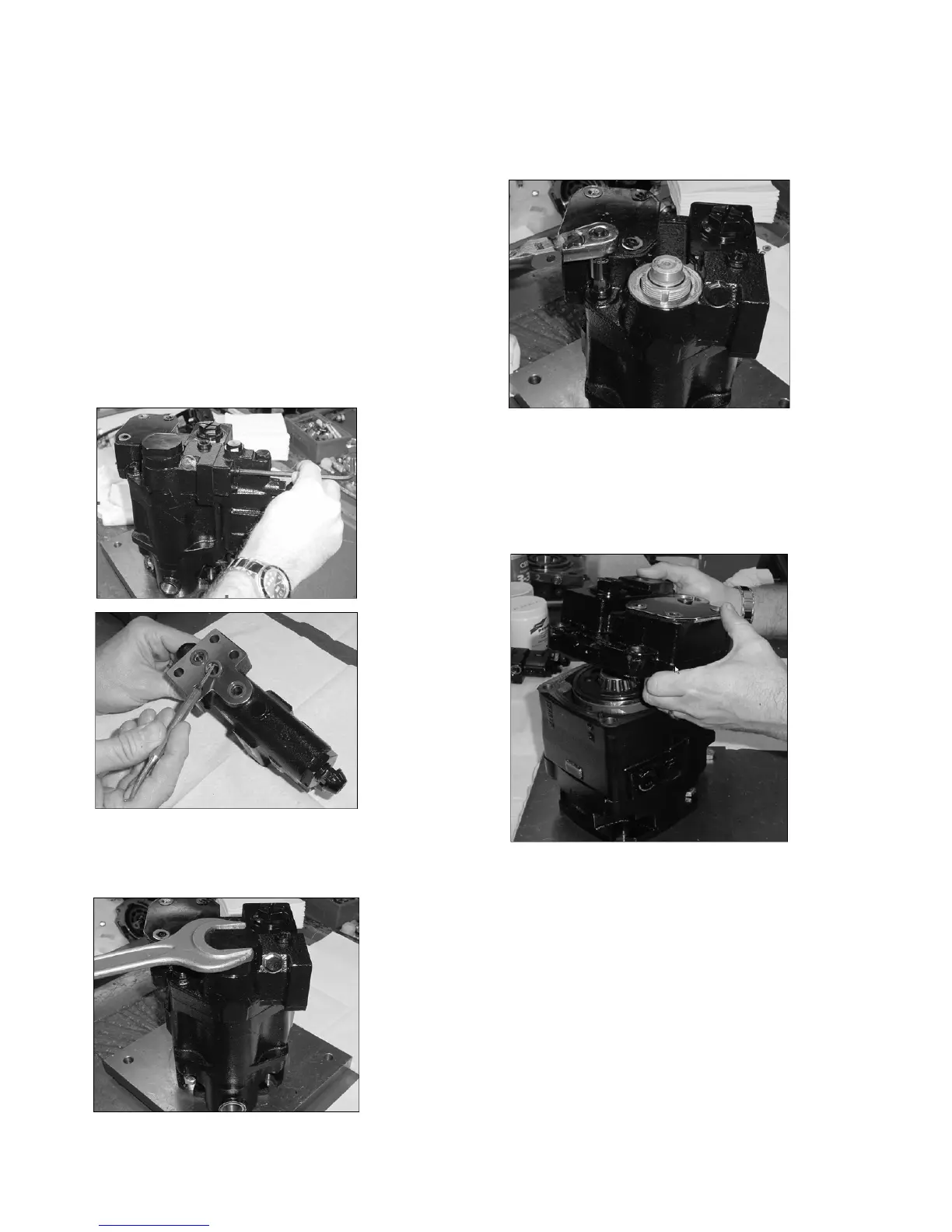
1. Remove Control
Note: Remove and discard three O-rings.
2. Remove Maximum Displacement Stop Screw
Note: Remove lock nut and turn the adjusting screw so it does not bottom
out in either direction. After loosening the control cap, tap on the cap with
rubber mallet to loosen the control sleeve in the end cover.
3. Loosen End Cover screws
Note: While loosening the end cover socket heat cap screws (SHCS), rst
remove two end cover SHCS opposite of each other and replace with 8”
studs referenced in the special tools section. Then remove remaining four
SHCS.
4. Remove End Cover
Note: To dislodge end cover from the pump housing, tap on side of end
cover with a rubber mallet. Be careful not to damage the valve plate or end
cover during this operation.




 To Next Page