59
How to operate the CD player
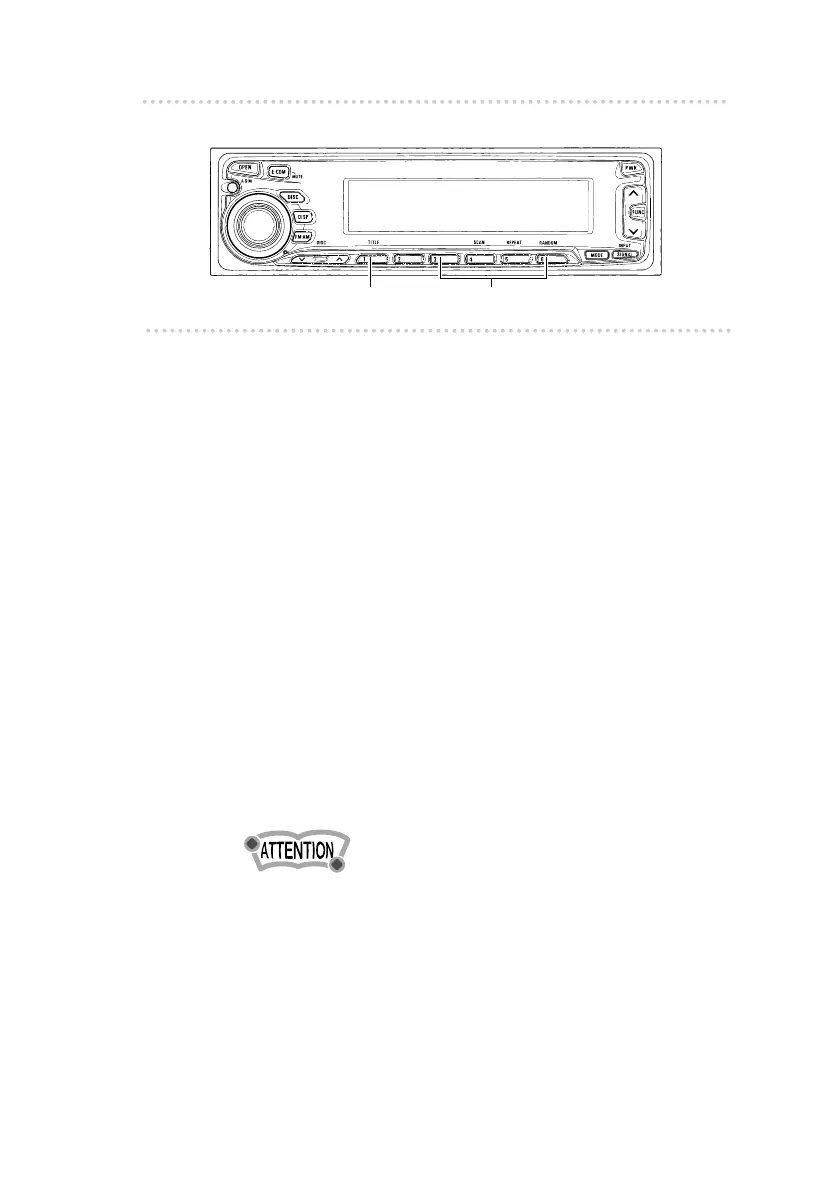
n Changing a previously set title
If external CD changers are connected, a previously set title
for a CD will be changed in the same way. It is assumed
here that the CD mode is selected.
1 .
Press button [1 (TITLE)].
The CD title setting mode starts, and all titles are
displayed.
2 .
Press either of button [3] or [4] to move the
cursor to the position in the title for inserting or
changing characters.
Button [3]: Moves the cursor to the left.
Button [4]: Advances the cursor to the right.
3 .
Press either button [5] or [6] to make changes
in the character that is flashing.
Button [5] : Moves the character backward in its type.
Button [6] : Advances the character in its type.
To leave a space blank, follow these steps.
1. Select and flash the space to be blank.
2. Press button [6] to make a blank space flashing.
3. Press button [4] to move.
4 .
Press button [1].
The CD title entry process is now completed.
Button [1] Buttons [3] to [6]



 To Next Page