Page 26 of 51
EFW5L_IFU REV NEW
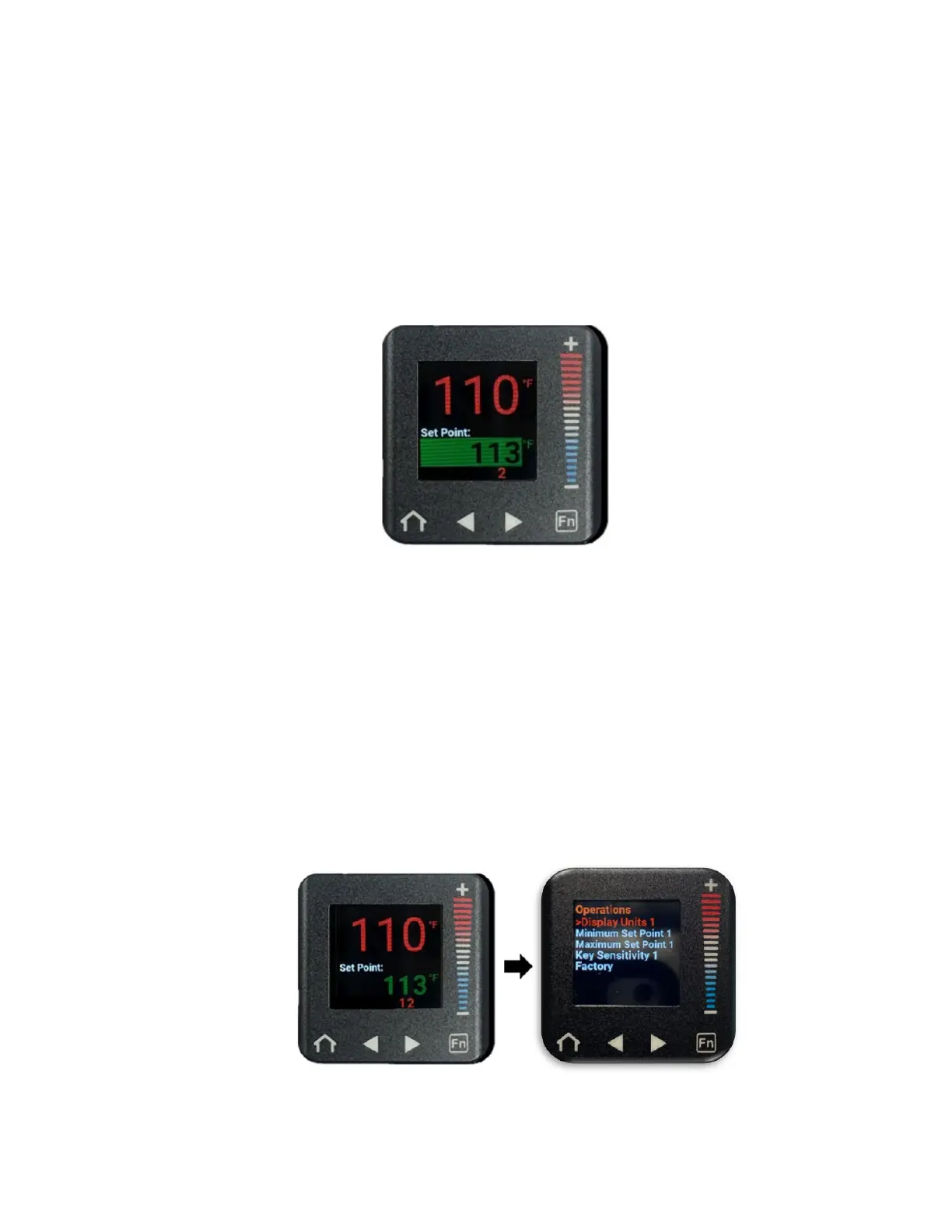
a. From the home screen,
Press the “+” button to increase the Set Point temperature by increments of
1 degree.
Press the “–” button to decrease the Set Point temperature by increments
of 1 degree.
Press and hold the “+” or “–” buttons to adjust the Set Point Temperature
by more than 1 degree at a time.
b. When the user has stopped adjusting the Set Point temperature, the Set Point
temperature display will flash green to confirm that the desired Set Point has
been accepted.
6.6.3 Locking and Unlocking the Set Point Temperature Controls
The Set Point Temperature can be locked to a specific temperature or unlocked to allow
the user to adjust the temperature as desired.
Note: When the set point temperature is locked, the temperature scale, password
enable, and set point temperature range features are also locked and cannot be
adjusted.
6.6.4 Locking the Set Point Temperature:
a. From the home screen, follow the directions in Section 6.6.2 to adjust the Set Point
temperature to the desired Set Point.
b. From the home screen, press the right arrow button to navigate to the Operations
menu (“Display Units 1” will be selected in a red font).


 To Next Page