Page 42 of 51
EFW5L_IFU REV NEW
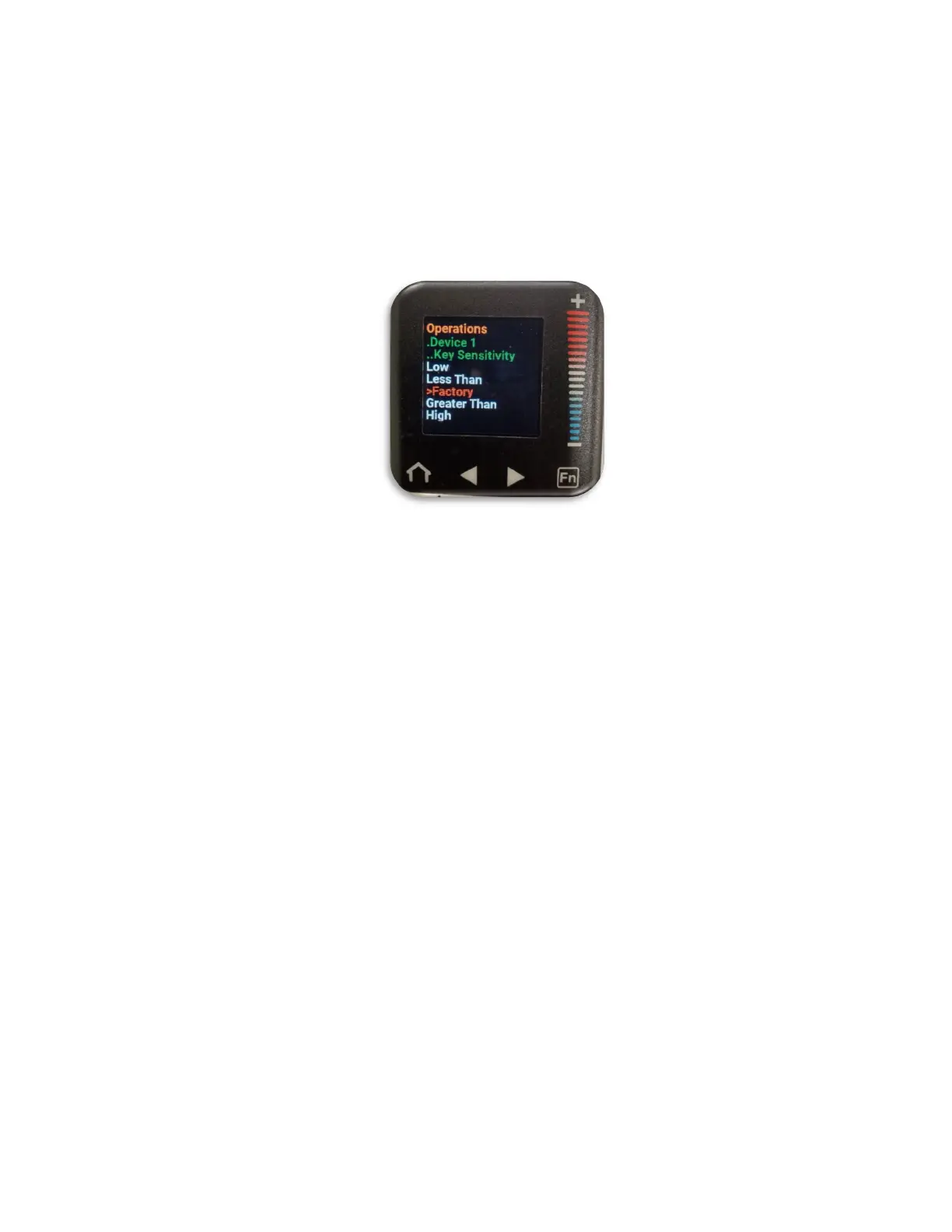
c. Press the “–” button to scroll down to the desired sensitivity setting (selected
option will be in red font.)
i. Low: 15% less sensitivity than factory settings
ii. Less Than: 5% less sensitivity than factory settings
iii. Factory: factory default and typical sensitivity value
iv. Greater Than: 5% more sensitivity than factory settings
v. High: 10% more sensitivity than factory settings
d. Press the home button to return to the home screen with the sensitivity
setting now changed.
7 Operating Instructions
7.1 Powering On
Refer to Figure 7. Ensure the power cord is installed correctly on EFW5L (Section 6.4).
1. Plug male end into a wall outlet.
2. The Power Switch on top of the unit is used to turn on the system. Press the on side
of the Power Switch (1) to power on the unit. The blue Power Indicator LED (2) will
remain lit as long as the on side of the Power Switch was pressed and EFW5L is
plugged in.
7.2 Powering Off
Refer to Figure 7.
1. Press the off side of the Power Switch (1) on top of the unit to power off the warming
system. The blue Power Indicator LED (2) will turn off.
2. Unplug the male end of the power cord from the wall outlet and store on power cord
hook.


 To Next Page