Page 34 of 51
EFW5L_IFU REV NEW
g. Press the home button to return to the home screen with the Set Point Temperature
range now updated.
6.6.7 Enabling and Disabling Password Protection
Enabling the password provides a second layer of security on the unit. If the password is
enabled, the user will be prompted for the password before any setting changes can be
made. After enabling the password, the unit must be restarted for the password enable
feature to be activated.
(Note: If the set point temperature is locked (write security is set to 0), the password
enable/disable feature is also locked and cannot be adjusted. Refer to section 6.6.5 to
unlock the set point temperature and adjust write security to 5 prior to enabling/disabling
the password.)
6.6.8 Enabling Password Protection
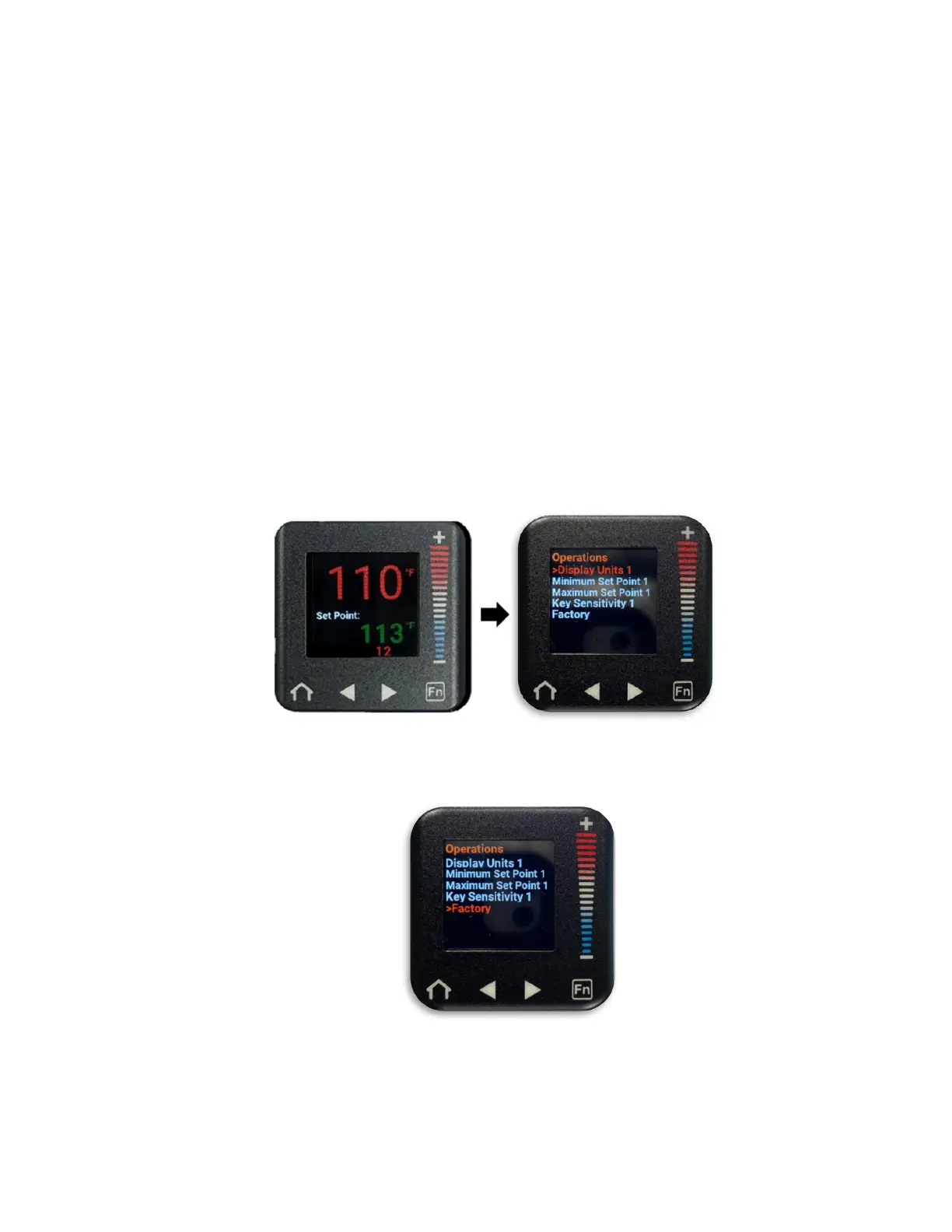
a. From the home screen, press the right arrow button to navigate to the Operations
menu. (“Display Units 1” will be selected in a red font).
b. Press the “–” button to scroll down to “Factory” (“Factory” will be in a red font when
selected).
c. Press the right arrow button to enter the Factory submenu. (“Lock” will be selected
in a red font).


 To Next Page