Page 31 of 51
EFW5L_IFU REV NEW
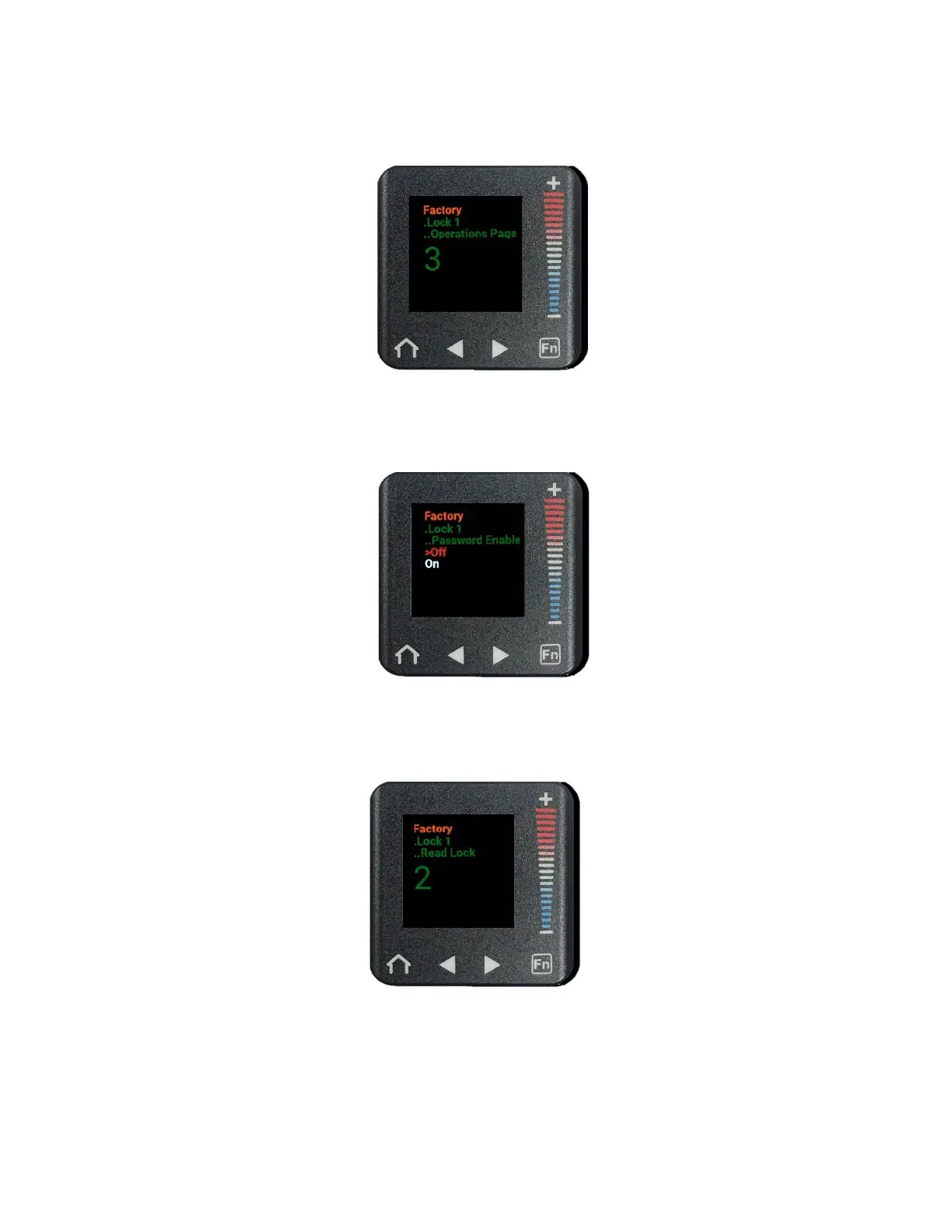
f. Ensure that the number displayed is set to “3.” If it is not, press the “+” or “–”
buttons to increase or decrease the number displayed until it is set to “3.”
g. Press the right arrow button to enter the Password Enable submenu. (“Off” will be
selected in a red font.)
h. Press the right arrow button to enter the Read Lock submenu.
i. Ensure that the number displayed is set to “2.” If it is not, press the “+” or “–”
buttons to increase or decrease the number displayed until it is set to “2.”
j. Slowly press the right arrow button to enter the Write Security submenu.
k. Ensure that the number displayed is set to “5.” If it is not, press the “+” or “–”
buttons to increase or decrease the number displayed until it is set to “5.”
(Note: If the screen flashes, you may have scrolled too far and the number will not
save. If so, press the home button to return to the home screen and repeat steps a-l.)


 To Next Page