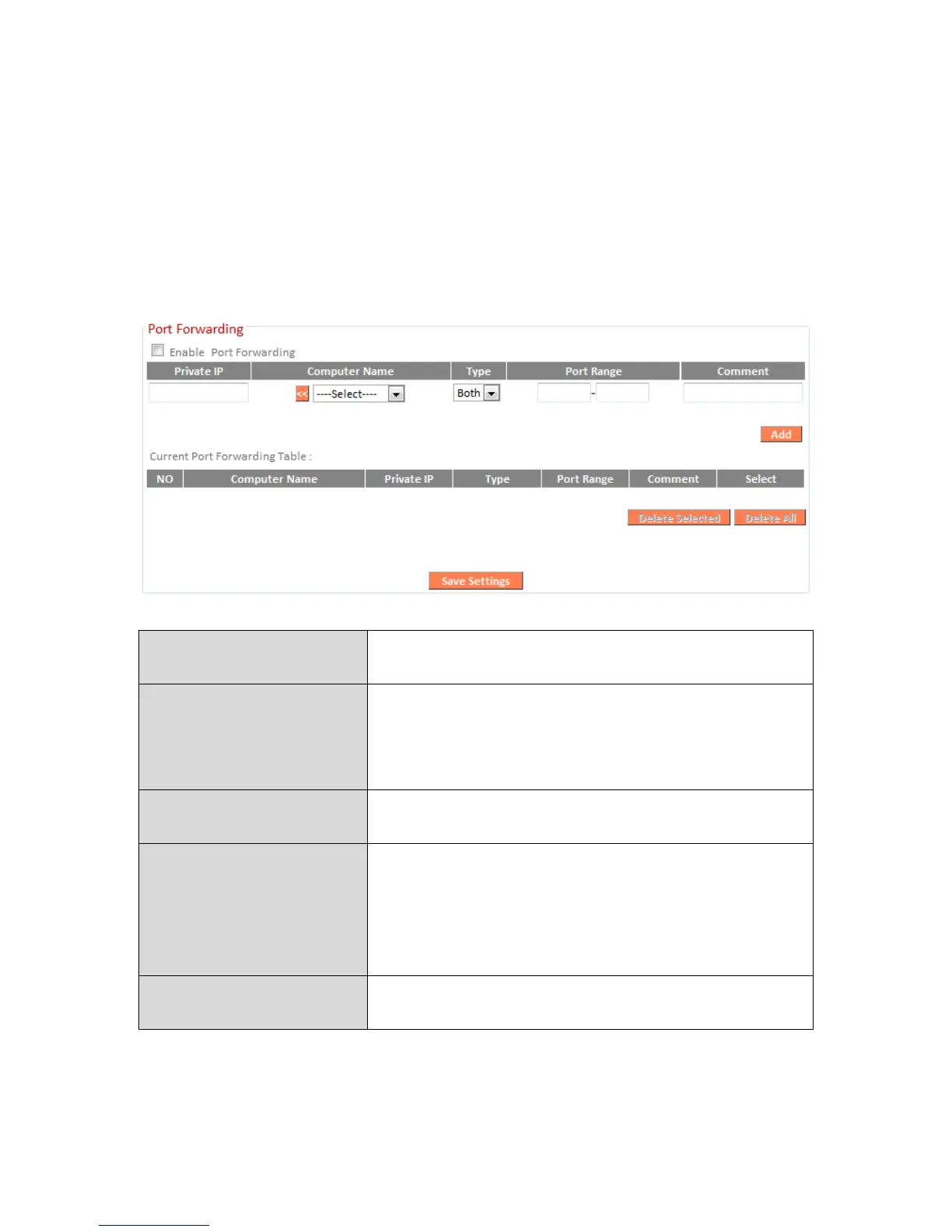
III-4-8-2. Port Forwarding
This function allows you to redirect a single port or consecutive ports of an
Internet IP address to the same port of a local IP address. The port number(s)
of the Internet IP address and local IP address must be the same.
If the port number of the Internet IP address and local IP address is different,
please use the “Virtual Server” function instead.
Enter the IP address of the computer on the
local network.
Windows computers on the local network
will be listed here – select a computer from
the list and click << to automatically add the
IP address to the “Private IP” field.
Select the type of connection, “TCP”, “UDP”
or “Both”.
Input the starting port number in the left
field, and input the ending port number in
the right field. If you only want to redirect a
single port number, only enter a port
number in the left field.
Enter a comment for reference or
identification.
Port Forwarding Table entries will be displayed in the table shown below:






 To Next Page