14
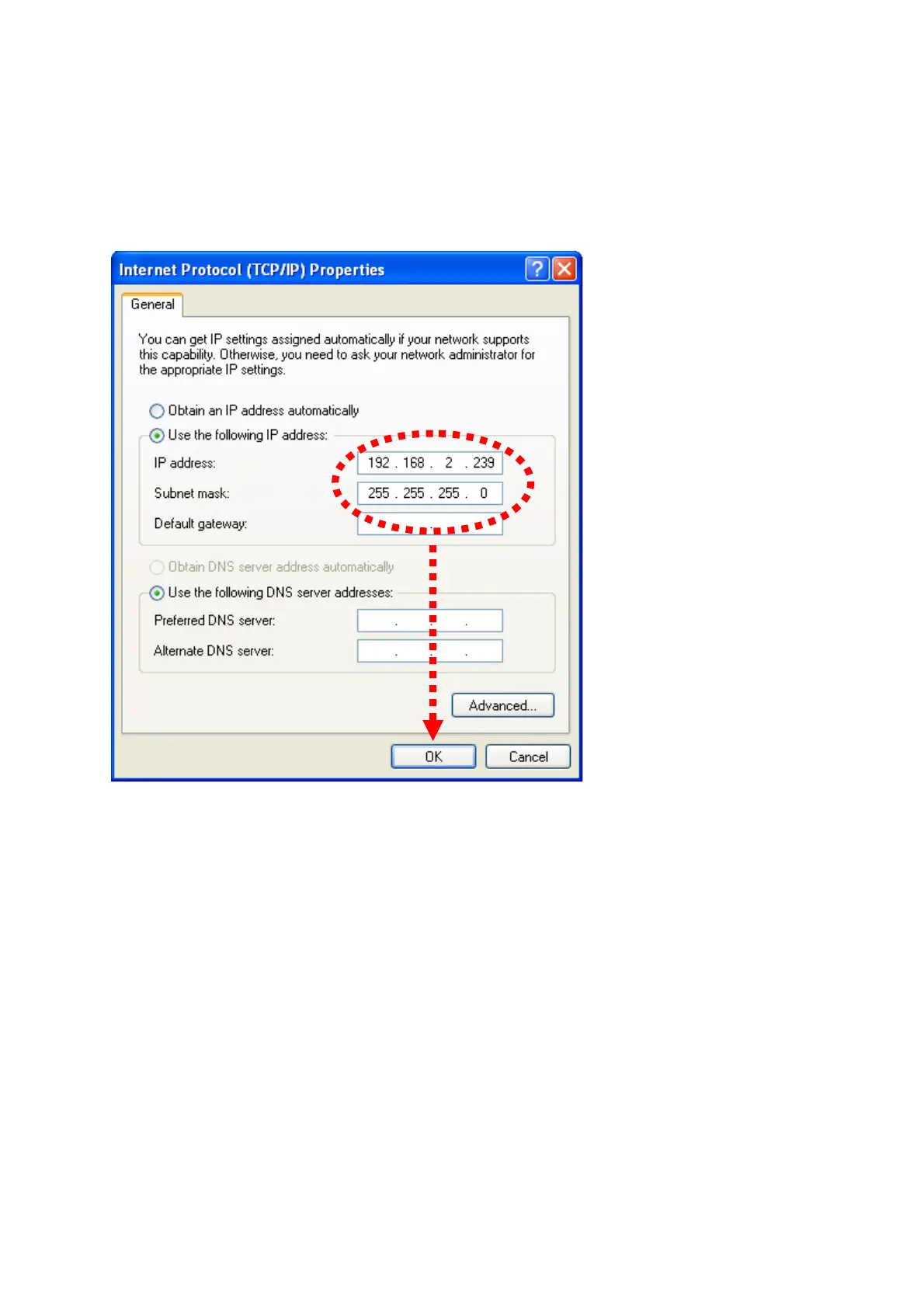
5. In ‘IP address’ field, please fill in any IP address begins with ‘192.168.2’, and ends
with a value greater than 2 and less than 254 (You can use the example in the
picture ‘192.168.2.239’). In Subnet mask field, please fill ‘255.255.255.0’. Please
keep all other fields empty, and click ‘OK’.
If you changed the IP address of this IP camera and you forget it, there’re 2 methods
to recover it:
a. Press and hold the ‘Reset’ button located at the bottom of this IP camera, to
clear all settings of the IP camera and reset the IP address back to
192.168.2.3. You’ll lose all settings in the IP camera.
b. Ask network administrator to check the DHCP release table, if the camera
was set to obtain the IP address by DHCP, a new record will be added to
DHCP release table on DHCP server when the IP camera is connected to the
local area network.



 To Next Page