DCP 350 User Manual
2.5.2 Network configuration
DHCP (Dynamic Host Configuration Protocol) which automatically assigns IP address to the EDIsecure
®
DCP 350 network printer on the same network is default for IP configuration. If you don’t have DHCP
server, you need to set static IP.
Please run NetAdmin.exe in the EDIsecure
®
DCP 350 installation CD to set or change network
configuration.
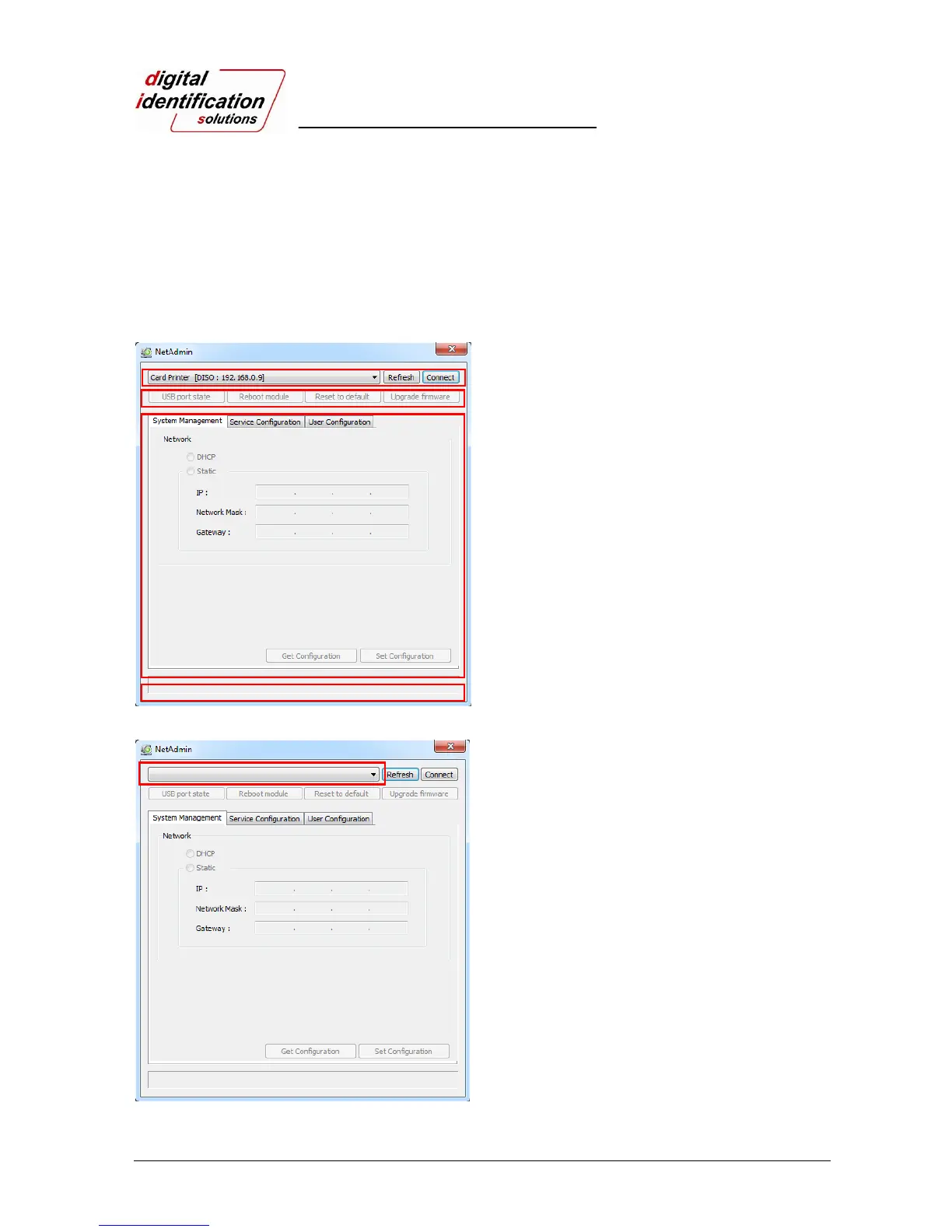
Pic.49 Running the NetAdmin
NetAdmin is run as shown in Pic. 49 after turning on
EDIsecure
®
DCP 350 network printer.
① Printer Connection Status Searches local
network, finds and shows available network
printer.
② Network Module Management Searches
connected encoder on network module.
Reboots, Resets network module. Firmware
upgrade available
③ Printer Configuration Sets detailed system
configuration.
④ Network Information Shows firmware version
of network module
Pic.50 Network printer is not found
When no printer is connected to network, there is no
printer shown on the box.
Please click “Refresh”. If no printer shown, please
check as below,
1. Please check the printer is turned on.
2. Please check network cable is connected to
network hub and works properly (LED lamp
blinking).
3. Please check if there is DHCP server in the
local network. When DHCP server is not in
your local network, you need to set Static IP.
4. If Static IP is used, please check the IP
configuration. If another device uses same IP
address, it doesn't work.
③
④
②
①



 To Next Page