DCP 350
4.1.2 Basic setup
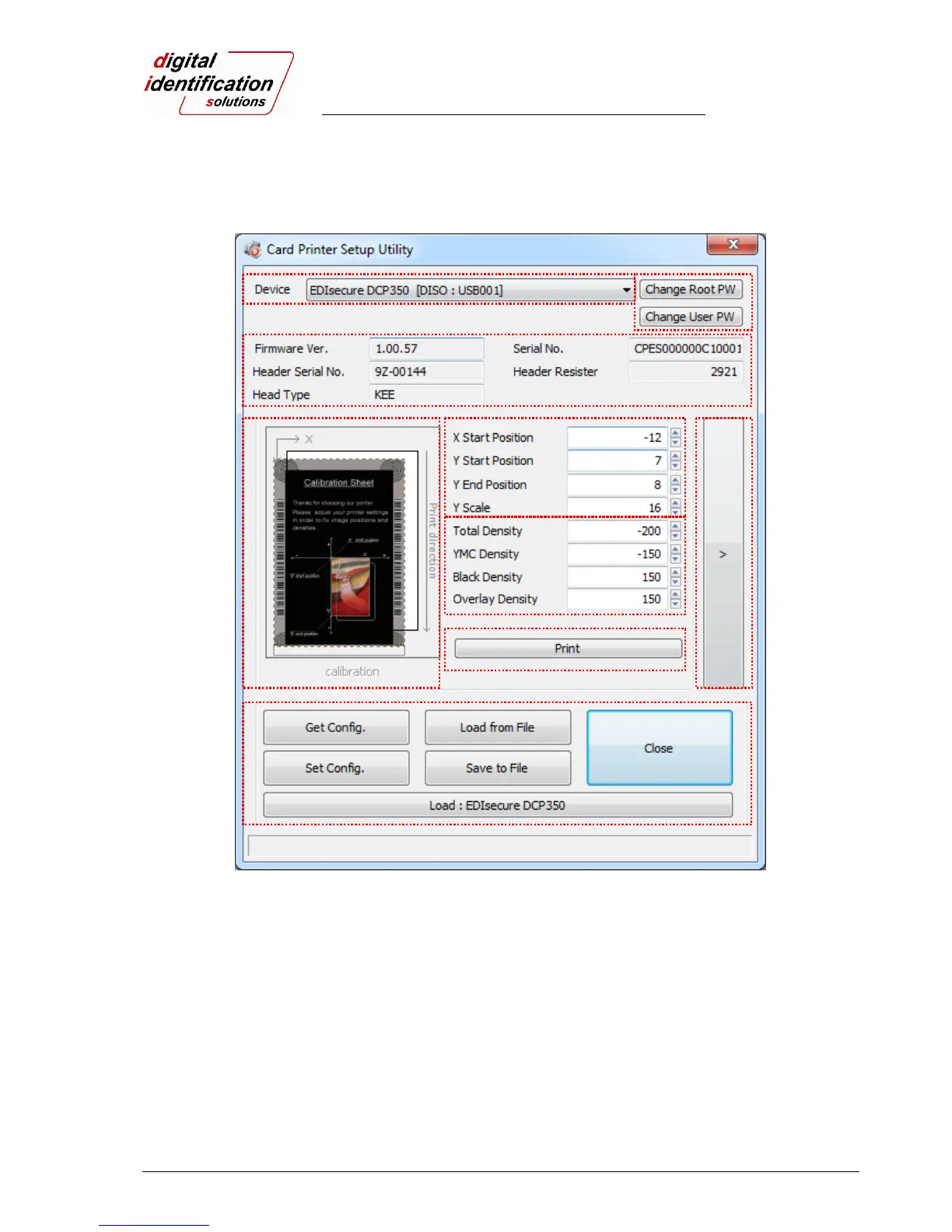
Basic setup for CardPrinterSetup is shown as followed.
Pic.76 Basic setup of CardPrinterSetup
① To show connected printers
Device: You can select a printer using pull-down menu. “EDIsecure
®
DCP 350 Card Printer” is
a name of printer. “DCP350228” is printer ID, “USB001” is connected port.
② To set administrator password and user password.
Change Root PW: To set administrator (root) password. This password is used to verify user
authority for CardPrinterSetup and User Authentication. Also it is required for User password
management. (Please set password for security use.)
Change User PW: To set user password for User Authentication.
③ To show firmware version, serial number of printer and serial number, resistor & type of print
head.
④ To show print area. It shows
exaggeratingly for user convenience.
① ②
③
④
⑤
⑥
⑦
⑧
⑨



 To Next Page