DCP 350
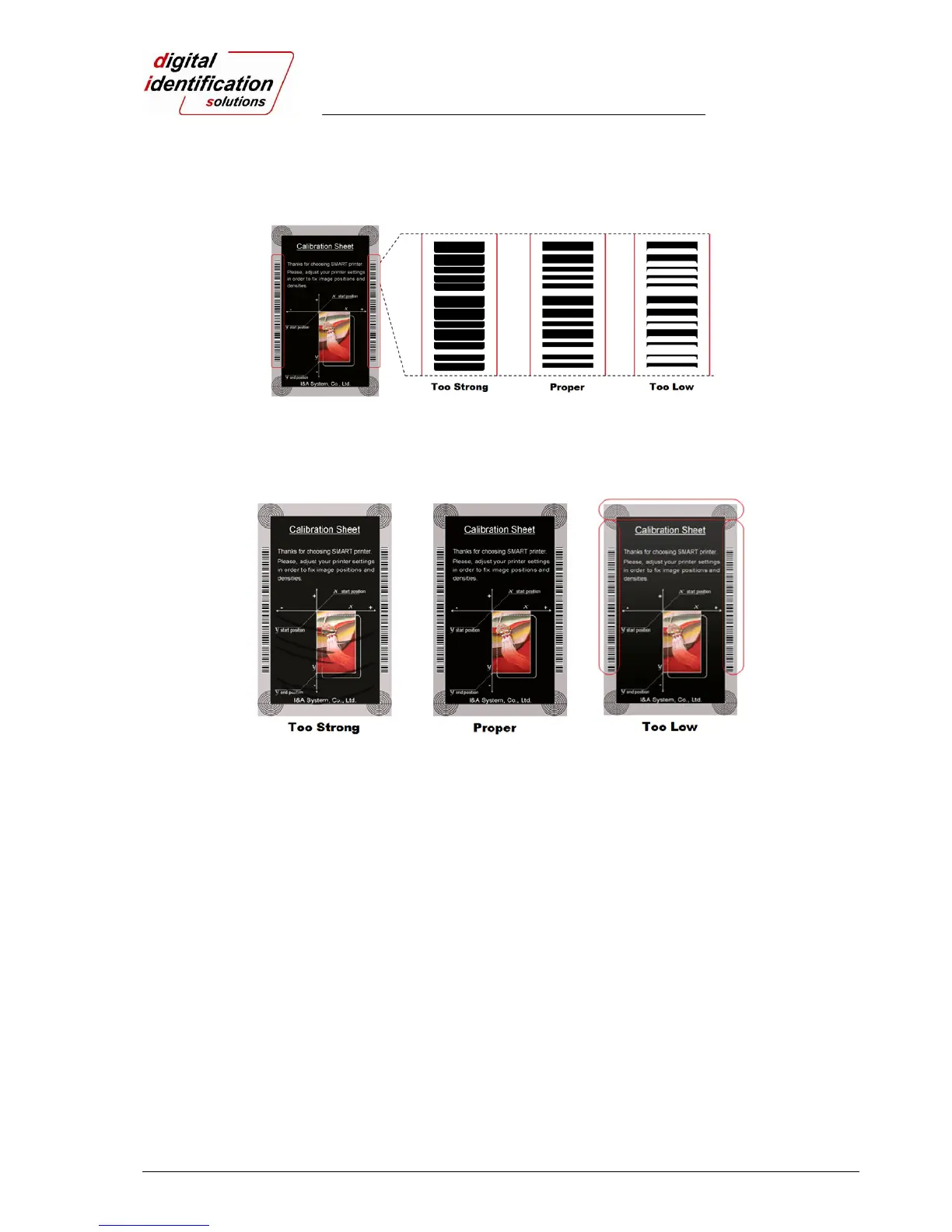
Black Density: To set resin black density. In Pic.104, barcode is printed to express density.
When density is too strong, barcode is printed too thick. When density is too weak, barcode is
too thin. Please adjust resin black density to express clear barcode. Please refer to the
following pictures.
Pic.78 Resin Black density
Overlay Density: To set overlay density. Please set it when overlay is printed on surface
regularly. If it is too strong, it is hazy and marks appear. If it is too weak, overlay panel is not
printed edge areas. You can check it with printed card under the light.
Pic.79 Overlay density
⑦ To print calibration card.
⑧ To show advanced Setup.
(It is recommended not to set advanced setup.)
⑨ To load or save values.
Get Config.: to get values from current printer
Set Config. : to set values to current printer
Load from File: to load values from file
Save to File : to save values to file
Load Default : to load default. Please adjust values again after load default.
Close : to close CardPrinterSetup



 To Next Page