EE Bright Box User Manual
12
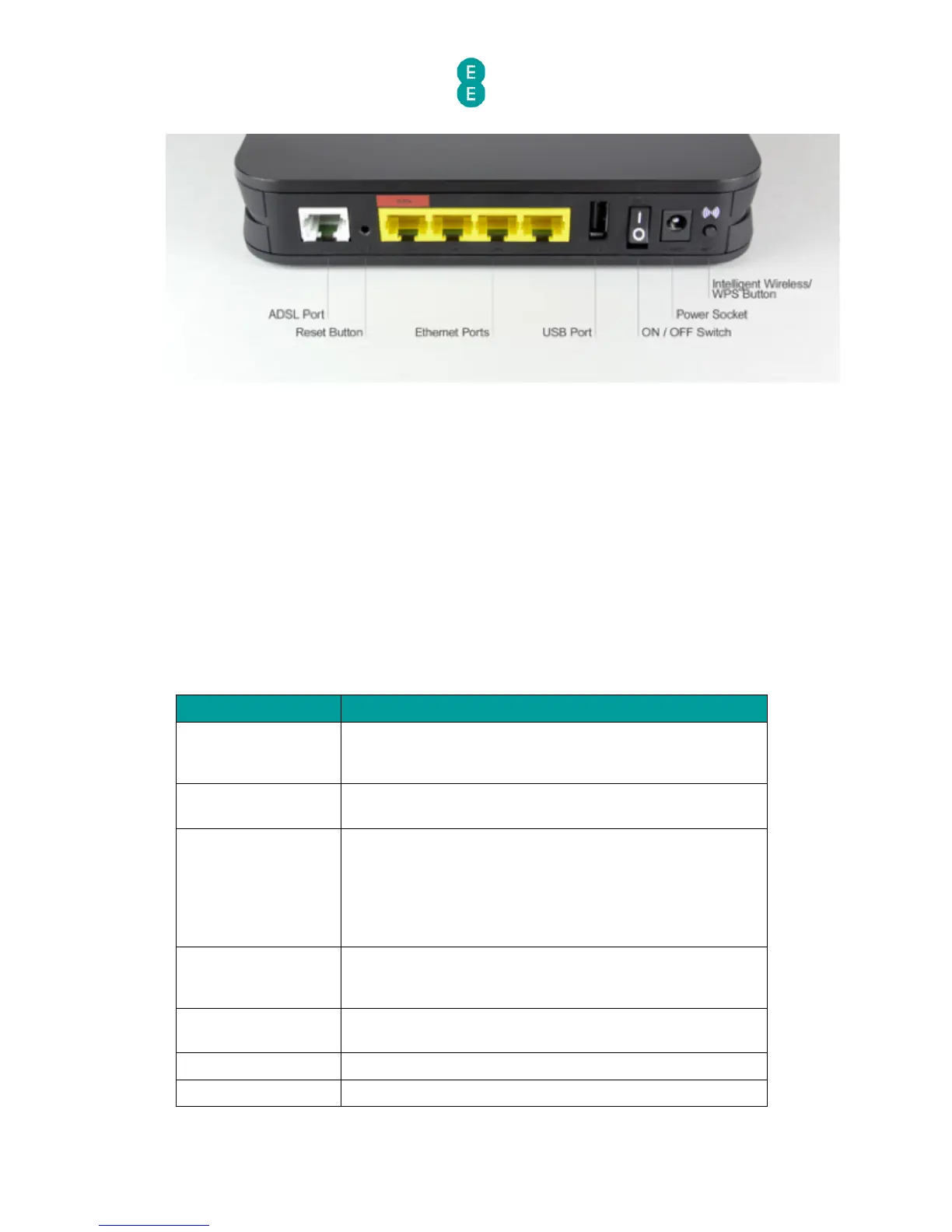
• DSL port
• Reset button
• Ethernet Ports
o WAN port for Fibre broadband services (also known as LAN 4)
o LAN ports (1-4)
• USB port
• ON/OFF power switch
• Power socket
• WPS button
The table below describes the ports, sockets and buttons on the back panel of the Bright Box
router:
For ADSL broadband, connect one end of a broadband
cable (RJ-11) to this port and the other end to a filter and
the telephone line.
Press briefly to restart the router, or press for 6 seconds to
return the router to factory default settings.
For ADSL broadband, connect one end of an Ethernet
cable (RJ-45) to this port to use as a normal LAN port (LAN
4).
For Fibre broadband, connect one end of an Ethernet
cable (RJ-45) to this port and the other end to the Fibre
modem.
Connect one end of an Ethernet cable (RJ-45) to this port,
and the other end to a computer (or other Ethernet
device) with a LAN card installed.
Connect a USB storage device such as a USB hard drive to
this port. See
USB File Sharing
on page 88
Use this switch to turn the router on/off.
Connect the supplied power adapter to this socket.



 To Next Page