EasyManua.ls Logo

EET PMC-D726M - DO Control; Meter Information

Default Icon
54 pages
Print Icon
To Next Page IconTo Next Page
To Previous Page IconTo Previous Page
Loading...
CET Electric Technology
48
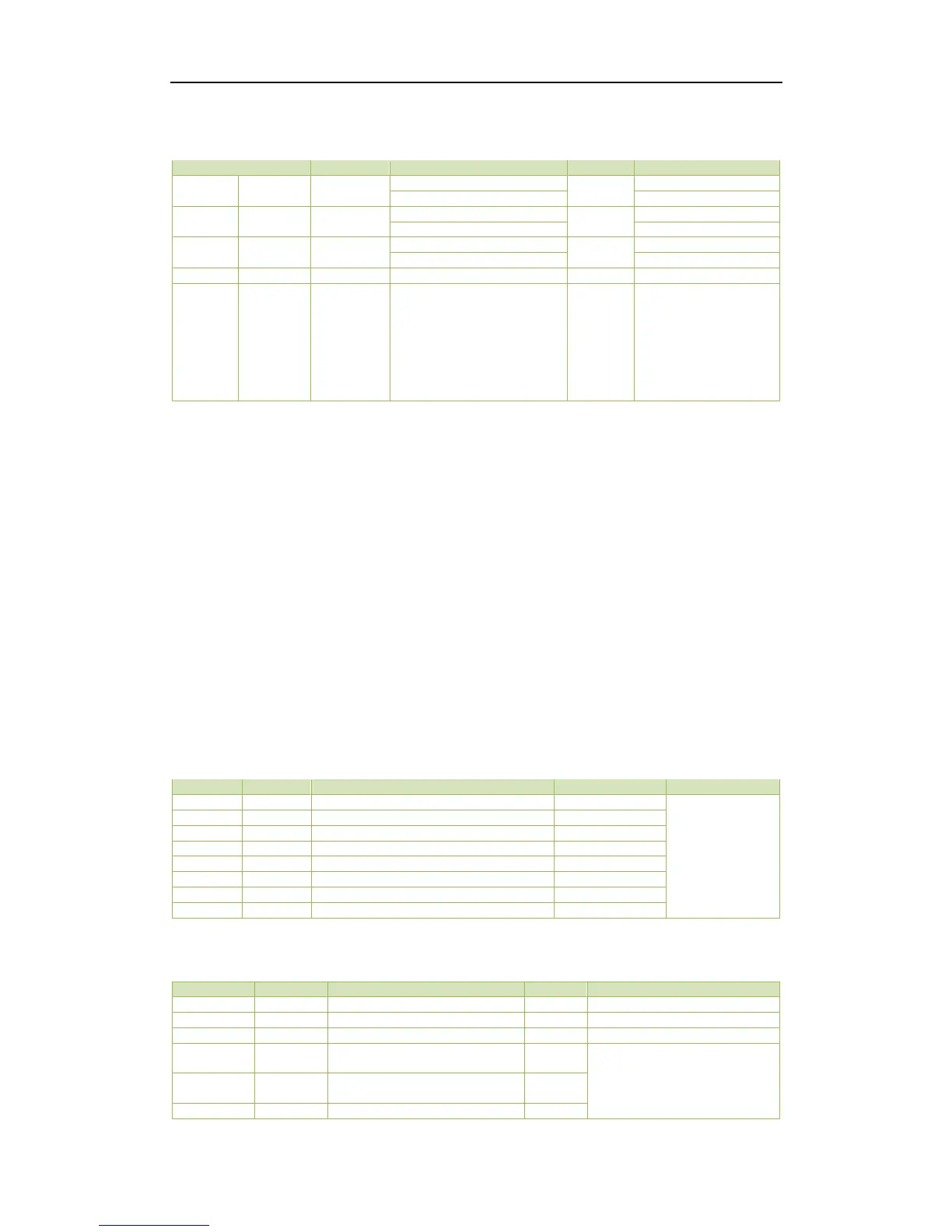
date or time values will be rejected by the meter. In addition, attempting to write a Time value less than
Jan 1, 2000 00:00:00 will be rejected.
Register
Property
Description
Format
Note
60000
9000
RW
High-order Byte: Year
UINT16
0-37 (Year-2000)
Low-order Byte: Month
1 to 12
60001
9001
RW
High-order Byte: Day
UINT16
1 to 31
Low-order Byte: Hour
0 to 23
60002
9002
RW
High-order Byte: Minute
UINT16
0 to 59
Low-order Byte: Second
0 to 59
60003
9003
RW
Millisecond
UINT16
0 to 999
60004
~
60005
9004
~
9005
RW
UNIX Time
UINT32
0x386D4380 to 0x
7FE8177F
The corresponding
time is 2000.01.01
00:00:00 to
2037.12.31 23:59:59
(GMT 0:00 Time
Zone)
Table 5-27 Time Registers
5.9 DO Control
The DO Control registers are implemented as both “Write-OnlyModbus Coil Registers (0XXXXX) and
Modbus Holding Registers (4XXXXX), which can be controlled with the Force Single Coil command
(Function Code 0x05) or the Preset Multiple Hold Registers (Function Code 0x10). The PMC-D726M does
not support the Read Coils command (Function Code 0x01) because DO Control registers are “Write-
Only. The DO Status register 0096 should be read instead to determine the current DO status.
The PMC-D726M adopts the ARM before EXECUTE operation for the remote control of its Digital
Outputs if this function is enabled through the Arm Before Execute Enable Setup register (6029), which
is Enabled by default. Before executing an OPEN or CLOSE command on a Digital Output, it must be
Armed” first. This is achieved by writing the value 0xFF00 to the appropriate register to Arm” a
particular DO operation. The DO will be “Disarmed” automatically if an “Execute” command is not
received within 15 seconds after it has been “Armed”. If an “Execute” command is received without first
having received an Arm” command, the meter ignores the “Execute” command and returns the 0x04
exception code.

Register
Property
Description
Format
Note
9100
WO
Arm DO1 Close
UINT16
Writing
“0xFF00” to the
register to
perform the
described
action.
9101
WO
Execute DO1 Close
UINT16
9102
WO
Arm DO1 Open
UINT16
9103
WO
Execute DO1 Open
UINT16
9104
WO
Arm DO2 Close
UINT16
9105
WO
Execute DO2 Close
UINT16
9106
WO
Arm DO2 Open
UINT16
9107
WO
Execute DO2 Open
UINT16
Table 5-28 DO Control Registers
5.10 Meter Information
Register
Property
Description
Format
Note
9800~9819
RO
Meter model
1
UINT16
See Note 1
9820
RO
Firmware Version
UINT16
e.g. 10111 means V1.01.11
9821
RO
Protocol Version
UINT16
e.g. 10 means V1.0
9822
RO
Firmware Update Date:
Year-2000
UINT16
e.g. 160709 means July 9,
2016
9823
RO
Firmware Update Date:
Month
UINT16
9824
RO
Firmware Update Date:
UINT16

Table of Contents

Related product manuals