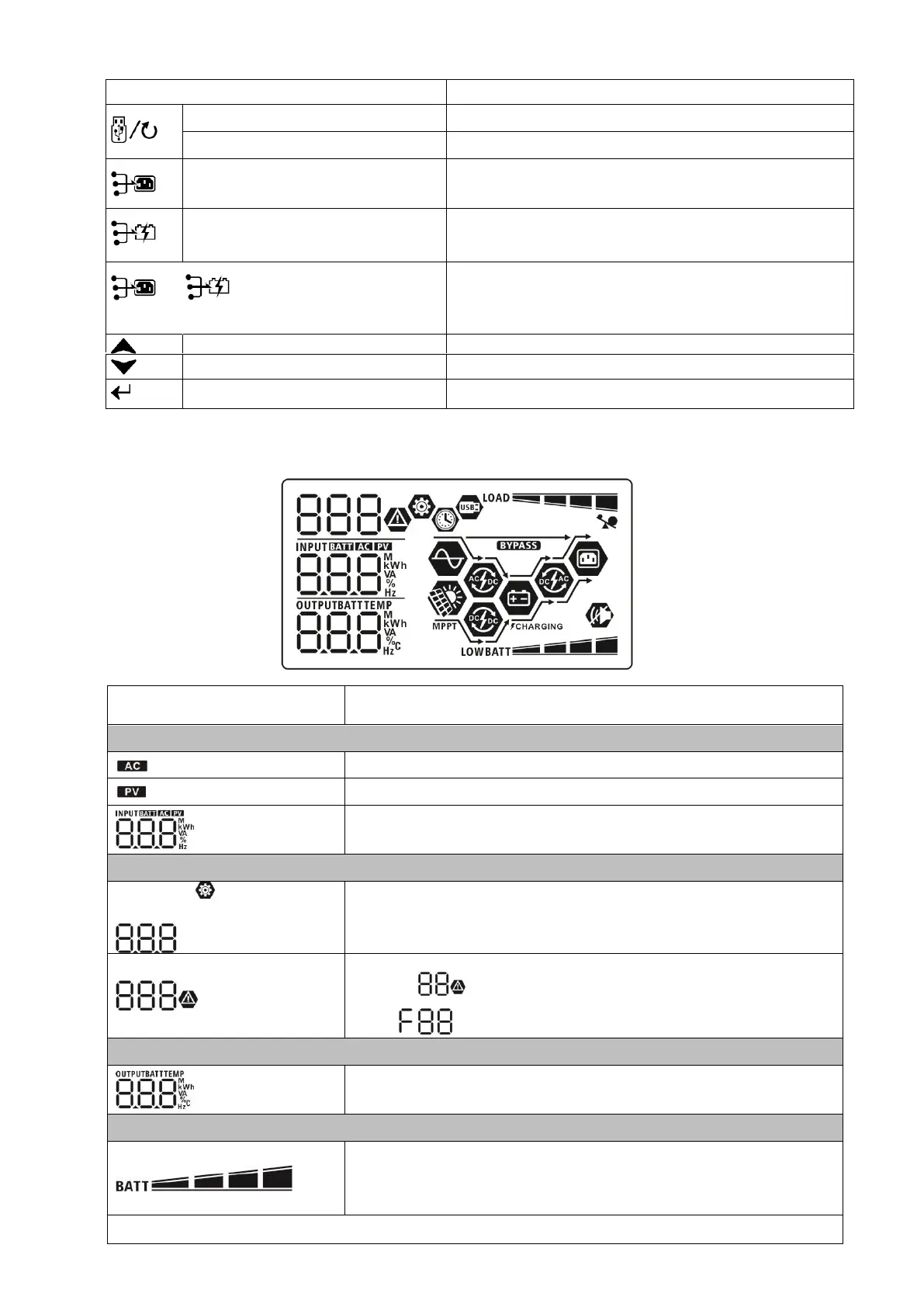
Function Keys
Timer setting for the Output source
priority
Setup the timer for prioritizing the output source
Timer setting for the Charger source
priority
Setup the timer for prioritizing the charger source
Press these two keys at the same time to switch RGB
LED bar between output source priority and battery
discharge/charge status.
Up
To last selection
Down To next selection
Enter To confirm/enter the selection in setting mode
Display Icons
Indicates input voltage, input frequency, PV voltage, charger current,
charger power, battery voltage. Use the up/down arrows to scroll.
Configuration Program and Fault Information
Indicates the setting programs.
Indicates the warning and fault codes.
flashing with warning code.
Fault:
lighting with fault code
Displays output voltage, frequency, load percent, load in VA, load in
watts, and discharging current. Use the up/down arrows to scroll.
Indicates battery level by 0-24%, 25-49%, 50-74% and 75-100% in
battery mode and charging status in line mode.
NOTE: When battery is
charging, it will
present battery charging
status.
Warning:



 To Next Page