Code Reference -
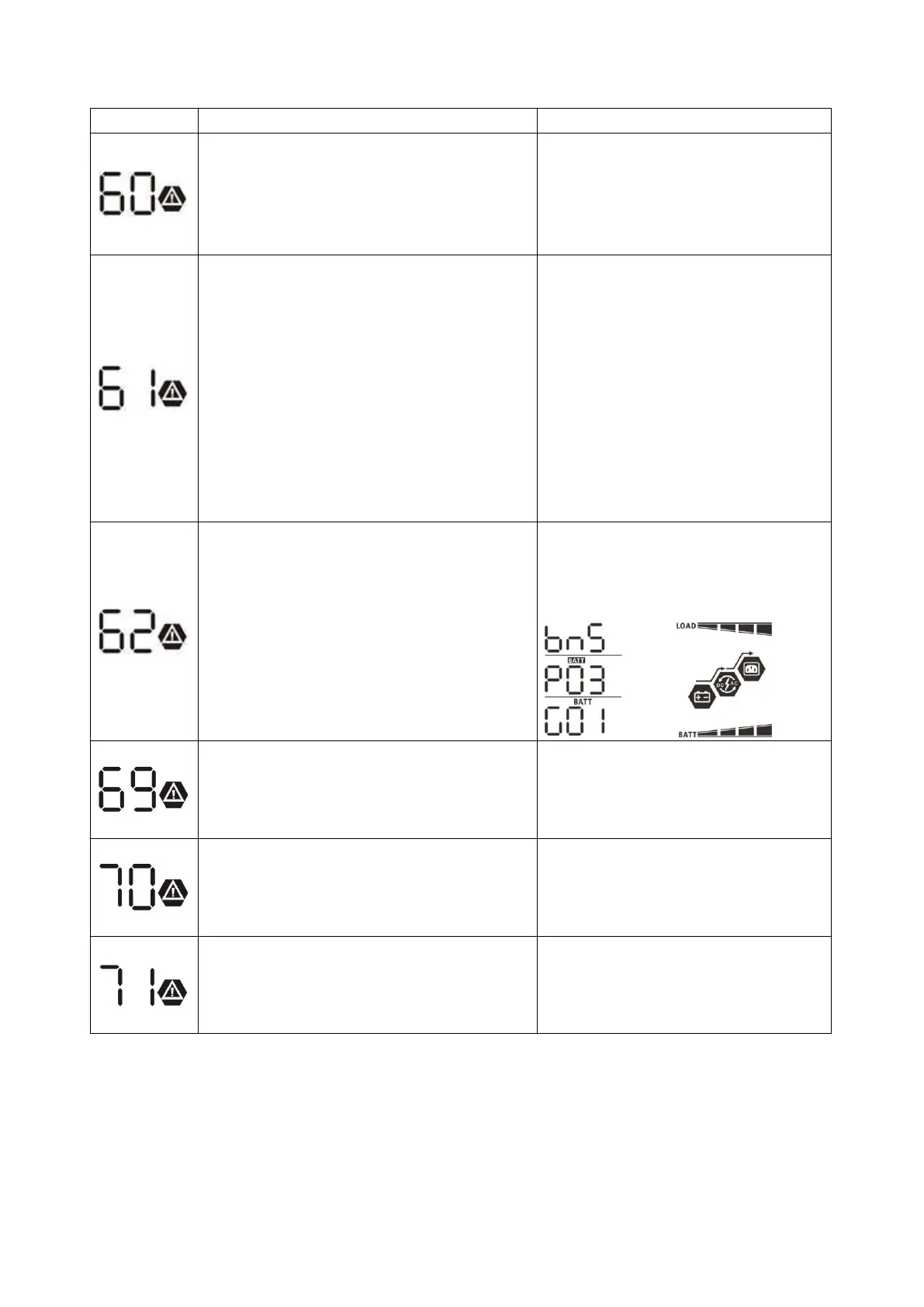
Related information code will be displayed on LCD screen. Please check inverter LCD screen for the operation.
Code Description Action
If battery status is not allowed to charge and
discharge after the communication between
the inverter and battery is successful, it will
show code 60 to stop charging and discharging
battery.
After battery is connected, communication
signal is not detected for 3 minutes,
buzzer will beep. After 10 minutes,
inverter will stop charging and discharging
to lithium battery. Communication lost
occurs after the inverter and battery is
connected successfully, buzzer beeps
immediately.
Battery number is changed. It probably is
because of communication lost between
battery packs.
Press “UP” or “DOWN” key to switch LCD
display until below screen shows. It will
have battery number re-checked and 62
warning code will be clear.
The battery is unable to charge even with
functional inverter to BMS communication.
Likely cause is a cell or pack being in an over-
voltage state.
Battery charge has dropped to critical and this
code indicates a failure to charge from the PV
source when set to solar only. System will
switch to AC source for charging.
If the battery is not able to discharge while
communication
is active/functioning, this code
will indicate the issue. Example issue is a cell or
pack voltage dropping below minimum.
Battery Connection Lost
Check the battery bank and each unit for
status. If one battery has failed, see
battery troubleshooting guide. Attempting
to reboot the system with
only the good
batteries may restore some functionality.
Check the PV array at the disconnect
after safely turning the strings off. Use a
properly rate multimeter and see
accredited PV string/array
troubleshooting guides.
Check the battery bank and each unit for
status.
If one battery has failed, see
battery troubleshooting guide. Attempting
to reboot the system with only the good
batteries may restore some functionality.
Check battery communication cables for
damage or improper connections.
Confirm the pin-out of the cables is
correct and there is no damage to the
cable or port pins.


 To Next Page